
The framework is built on LangGraph with a configurable workflow engine, supporting advanced features such as planning mode, sub-agent concurrency, and chain-of-thought reasoning. It is suitable for scenarios that require deep information gathering and structured analysis. Current integration targets DeerFlow 2.0
main branch. The DeerFlow official team has migrated the original Deep Research framework to the main-1.x branch for ongoing maintenance. Therefore, if you are using version 2.0, please refer to the official documentation and backend API of the main branch.
LangBot currently supports DeerFlow as an AI Capabilities runner, bringing deep research and agent orchestration capabilities to your conversation pipelines.
Deploying DeerFlow
Please follow the DeerFlow Official Documentation to install, configure, and start the service: After deployment, please confirm that DeerFlow has started normally and note its gateway address. By default, the DeerFlow gateway address ishttp://127.0.0.1:2026.
- The
API Base URLmust start withhttp://orhttps://. - If LangBot and DeerFlow are deployed on the same host and both use Docker deployment, you can refer to the article: Network Configuration Details. Please add the DeerFlow container to
langbot-networkwhen starting, and set theAPI Base URLin LangBot configuration to the container interconnection address, for examplehttp://deerflow-app:2026. - If deployed on different hosts or containers, please replace
127.0.0.1with the actual accessible intranet address, hostname, or domain of DeerFlow.
Configuring LangBot
Open the LangBot WebUI page, add a new pipeline or switch to theAI Capabilities configuration page in an existing pipeline.
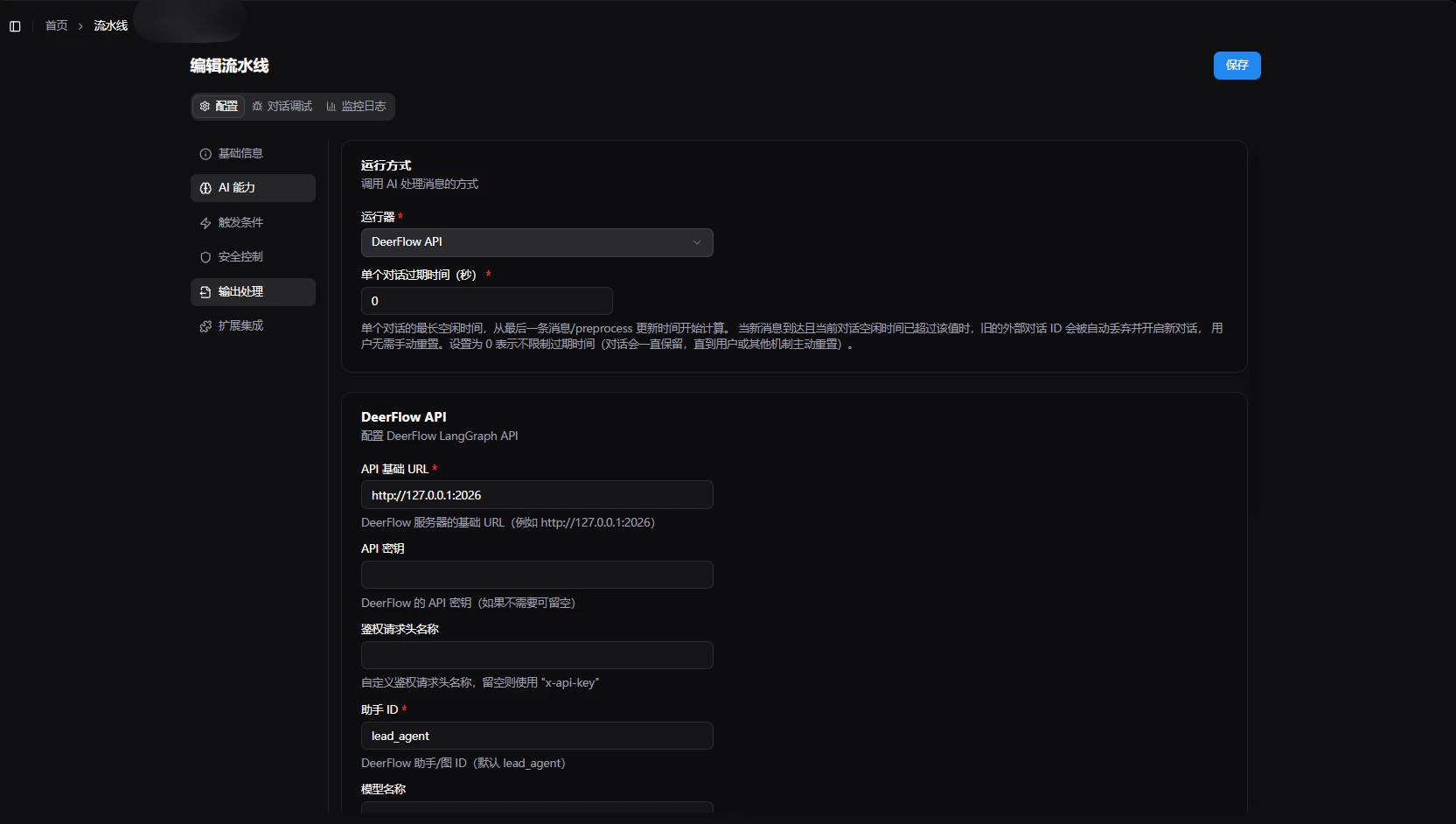
- Select
DeerFlow APIinRunner. - In the runner configuration items, fill in:
API Base URL: The API gateway address of the DeerFlow service, defaulthttp://127.0.0.1:2026.API Key: Optional. If your DeerFlow gateway uses Bearer Token authentication, you can enter the API Key here.Assistant ID: Corresponds to DeerFlow 2.0 LangGraph’sassistant_id, defaultlead_agent.Model Name Override: Optional. Used to override the default model configured on the DeerFlow side. If DeerFlow has a model configured, this can be left empty.Enable Thinking Mode: When enabled, DeerFlow will return chain-of-thought content, which can be used to display the reasoning process.Enable Planning Mode: Corresponds to DeerFlow 2.0 runtime parameterconfig.configurable.is_plan_mode. When enabled, the Agent will formulate a research plan before execution.Enable Sub-Agents: Corresponds to DeerFlow 2.0 runtime parameterconfig.configurable.subagent_enabled. When enabled, allows the Agent to dispatch sub-agents to complete tasks in parallel.Max Concurrent Sub-Agents: Corresponds to DeerFlow 2.0 runtime parameterconfig.configurable.max_concurrent_subagents, only effective when sub-agents are enabled, default3.Recursion Limit: Corresponds to LangGraph’srecursion_limit, controls the maximum recursion depth of the workflow, default1000.
- Click
Saveto complete the configuration.
- It is only recommended to enable
Planning ModeorSub-Agentrelated options if the corresponding capabilities have been enabled on the DeerFlow side, otherwise the expected effects may not be achieved. - LangBot will send both the
config.configurableruntime parameters recommended by DeerFlow 2.0 and retain backward-compatible legacy fields for easier integration with upstream recent versions.
Frequently Asked Questions
- Save failed or invocation error: Please verify that the
API KeyandAPI Base URLare correct, and ensure the DeerFlow service has started normally. - No expected content returned: Please verify that the
Assistant IDmatches the actual available assistant in DeerFlow. - Cannot select
DeerFlow API: Please verify that your current LangBot version supports this runner; if not supported, please upgrade to a version that includes the DeerFlow runner. - Meaning of DeerFlow configuration items: Please refer to the DeerFlow official documentation regarding runtime parameters and capabilities, or consult the DeerFlow community for recommended configurations.