跳转到主要内容
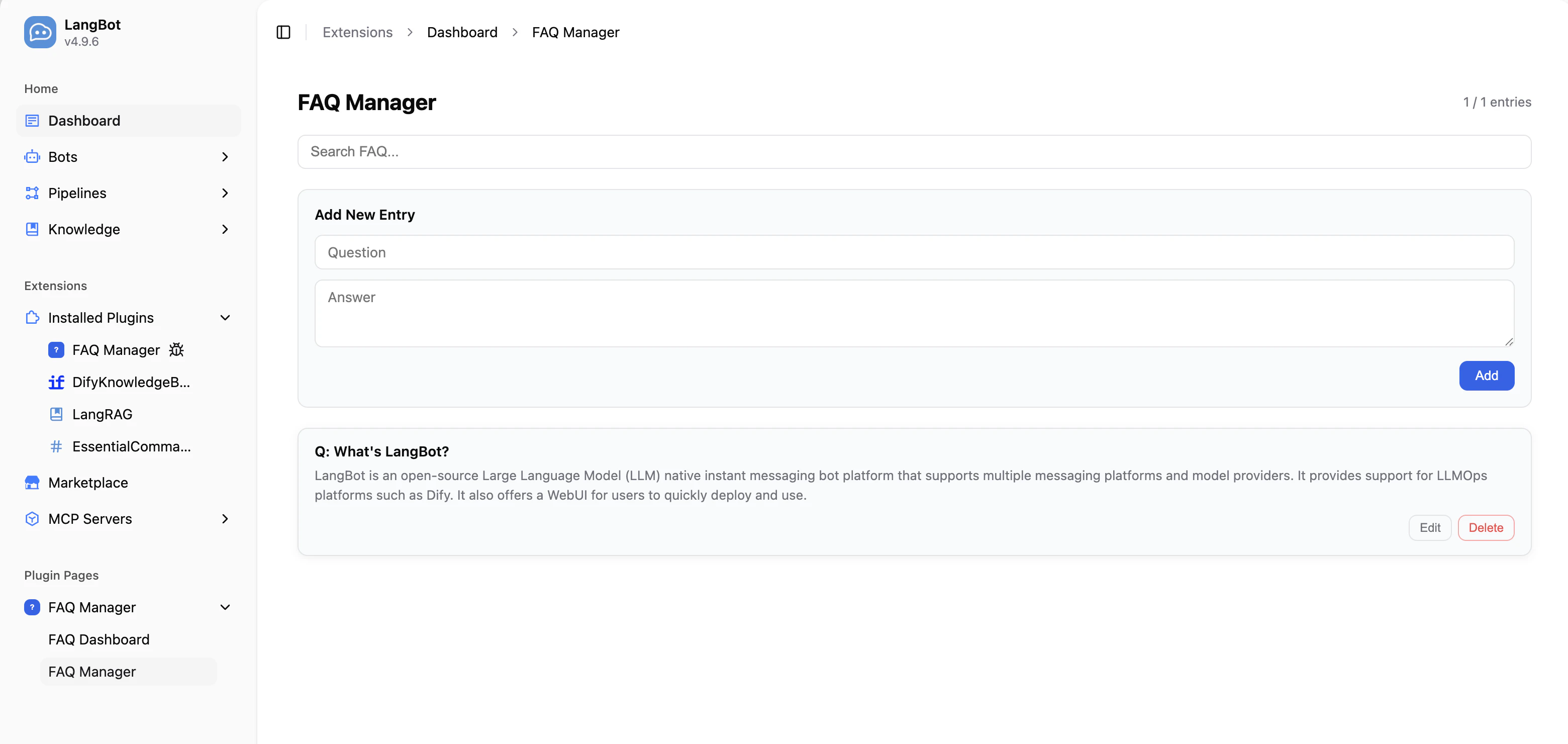
Page 组件允许插件在 LangBot 的 WebUI 侧边栏中注册自定义的可视化页面。页面运行在 iframe 沙箱中,通过 Page SDK 与宿主通信,并可调用插件后端 API。

适用场景

  • 管理面板:为插件提供可视化的配置和数据管理界面(如 FAQ 管理、数据统计仪表盘)
  • 数据展示:展示插件运行时的统计数据、日志、图表等
  • 交互式工具:提供表单、编辑器等交互式界面

添加页面组件

在插件目录执行命令:
lbp comp Page
根据提示输入页面名称后,会在 components/pages/ 目录下生成页面文件:
├── components
   └── pages
       └── dashboard
           ├── dashboard.yaml   # 页面清单
           ├── dashboard.py     # 页面后端处理程序
           ├── index.html       # 页面入口
           └── i18n             # 翻译文件(可选)
               ├── en_US.json
               └── zh_Hans.json
同时,manifest.yaml 中会添加组件发现配置:
spec:
  components:
    Page:
      fromDirs:
      - path: components/pages/
        maxDepth: 2

清单文件:页面

apiVersion: v1  # 请勿修改
kind: Page  # 请勿修改
metadata:
  name: dashboard  # 页面唯一 ID,同一插件内不可重复
  label:
    en_US: Dashboard  # 页面显示名称,显示在 WebUI 侧边栏,支持多语言
    zh_Hans: 仪表盘
spec:
  path: index.html  # HTML 入口文件,相对于该 YAML 所在目录的路径
execution:
  python:
    path: dashboard.py  # 页面后端处理程序
    attr: DashboardPage  # 处理程序类名

后端处理

Page 组件的后端处理程序继承 Page 基类,实现 handle_api 方法来处理来自前端页面的 API 请求。
from langbot_plugin.api.definition.components.page import Page, PageRequest, PageResponse


class DashboardPage(Page):

    async def handle_api(self, request: PageRequest) -> PageResponse:
        # request.endpoint: API 端点路径,如 '/stats'
        # request.method:   HTTP 方法(GET、POST、PUT、DELETE)
        # request.body:     请求体(已解析的 JSON,或 None)

        if request.endpoint == '/stats' and request.method == 'GET':
            # 通过 self.plugin 访问插件实例的共享状态
            return PageResponse.ok({
                'total': len(self.plugin.entries),
            })

        return PageResponse.fail(f'Unknown endpoint: {request.endpoint}')

PageRequest 字段

字段类型说明
endpointstrAPI 端点路径(如 '/entries'
methodstrHTTP 方法(GETPOSTPUTDELETE
bodyAny请求体(已解析的 JSON,或 None

PageResponse 构造

方法说明
PageResponse.ok(data)成功响应,data 为任意可 JSON 序列化的数据
PageResponse.fail(error)失败响应,error 为错误信息字符串

前端页面开发

在 HTML 文件中引入 Page SDK,即可与插件后端通信:
<!DOCTYPE html>
<html>
<head>
  <meta charset="UTF-8">
  <style>
    body {
      background: var(--langbot-bg, #ffffff);
      color: var(--langbot-text, #0a0a0a);
      font-family: -apple-system, BlinkMacSystemFont, 'Segoe UI', Roboto, sans-serif;
      padding: 24px;
    }
  </style>
</head>
<body>
  <h1 data-i18n="title">Dashboard</h1>
  <p id="stats"></p>

  <script src="/api/v1/plugins/_sdk/page-sdk.js"></script>
  <script>
    langbot.onReady(async function(ctx) {
      // 调用后端 API
      var data = await langbot.api('/stats', null, 'GET');
      document.getElementById('stats').textContent = 'Total: ' + data.total;
    });
  </script>
</body>
</html>

Page SDK API

方法说明
langbot.onReady(callback)SDK 就绪后触发回调,callback 接收 ctx 参数(包含 themelanguage
langbot.api(endpoint, body?, method?)调用插件后端 handle_api,返回 Promise
langbot.t(key, fallback?)获取翻译字符串
langbot.onThemeChange(callback)主题变更回调
langbot.onLanguageChange(callback)语言变更回调
langbot.applyI18n()手动重新应用 data-i18n 翻译

暗色模式

SDK 会自动在页面上设置 CSS 自定义属性,直接使用即可:
CSS 变量用途
--langbot-bg页面背景色
--langbot-bg-card卡片背景色
--langbot-text主文字色
--langbot-text-muted次要文字色
--langbot-border边框色
--langbot-accent强调色

页面 i18n

在页面目录下创建 i18n/ 目录,放入 JSON 翻译文件:
pages/dashboard/
├── index.html
└── i18n/
    ├── en_US.json
    └── zh_Hans.json
翻译文件格式为扁平 JSON 键值对:
{
  "title": "仪表盘",
  "totalEntries": "条目总数"
}
在 HTML 元素上添加 data-i18n 属性,SDK 会自动替换文本:
<h1 data-i18n="title">Dashboard</h1>

完整示例:FAQ 管理器

以下是一个完整的 Page 组件示例,实现了 FAQ 条目的增删改查。 后端处理程序components/pages/manager/manager.py):
from langbot_plugin.api.definition.components.page import Page, PageRequest, PageResponse


class ManagerPage(Page):

    async def handle_api(self, request: PageRequest) -> PageResponse:
        plugin = self.plugin

        if request.endpoint == '/entries' and request.method == 'GET':
            return PageResponse.ok({'entries': plugin.entries})

        if request.endpoint == '/entries' and request.method == 'POST':
            question = (request.body or {}).get('question', '').strip()
            answer = (request.body or {}).get('answer', '').strip()
            if not question or not answer:
                return PageResponse.fail('question and answer are required')
            entry = plugin.add_entry(question, answer)
            await plugin.persist()
            return PageResponse.ok({'entry': entry})

        if request.endpoint == '/entries' and request.method == 'DELETE':
            entry_id = (request.body or {}).get('id', '')
            if plugin.delete_entry(entry_id):
                await plugin.persist()
                return PageResponse.ok({'deleted': entry_id})
            return PageResponse.fail('entry not found')

        return PageResponse.fail(f'Unknown: {request.method} {request.endpoint}')
前端页面components/pages/manager/index.html)中通过 langbot.api() 调用后端:
// 加载条目
var data = await langbot.api('/entries', null, 'GET');

// 添加条目
await langbot.api('/entries', { question: '...', answer: '...' }, 'POST');

// 删除条目
await langbot.api('/entries', { id: '...' }, 'DELETE');
完整示例代码请参考 FAQManager 插件

注意事项

  • 页面运行在 sandbox="allow-scripts allow-forms" 的 iframe 中,不能弹窗或导航父页面
  • 通过 self.plugin 访问插件实例的共享状态,Page 和 Tool 组件可以共享数据
  • 使用 PageResponse.ok()PageResponse.fail() 构造响应,确保格式一致
  • Page SDK 的 <script> 标签必须放在使用 langbot 对象的代码之前