
The Page component allows plugins to register custom visual pages in the LangBot WebUI sidebar. Pages run inside an iframe sandbox, communicate with the host via the Page SDK, and can call the plugin’s backend API.

Use Cases

  • Admin panels: Provide visual configuration and data management interfaces (e.g., FAQ management, analytics dashboards)
  • Data displays: Show runtime statistics, logs, charts, etc.
  • Interactive tools: Provide forms, editors, and other interactive interfaces
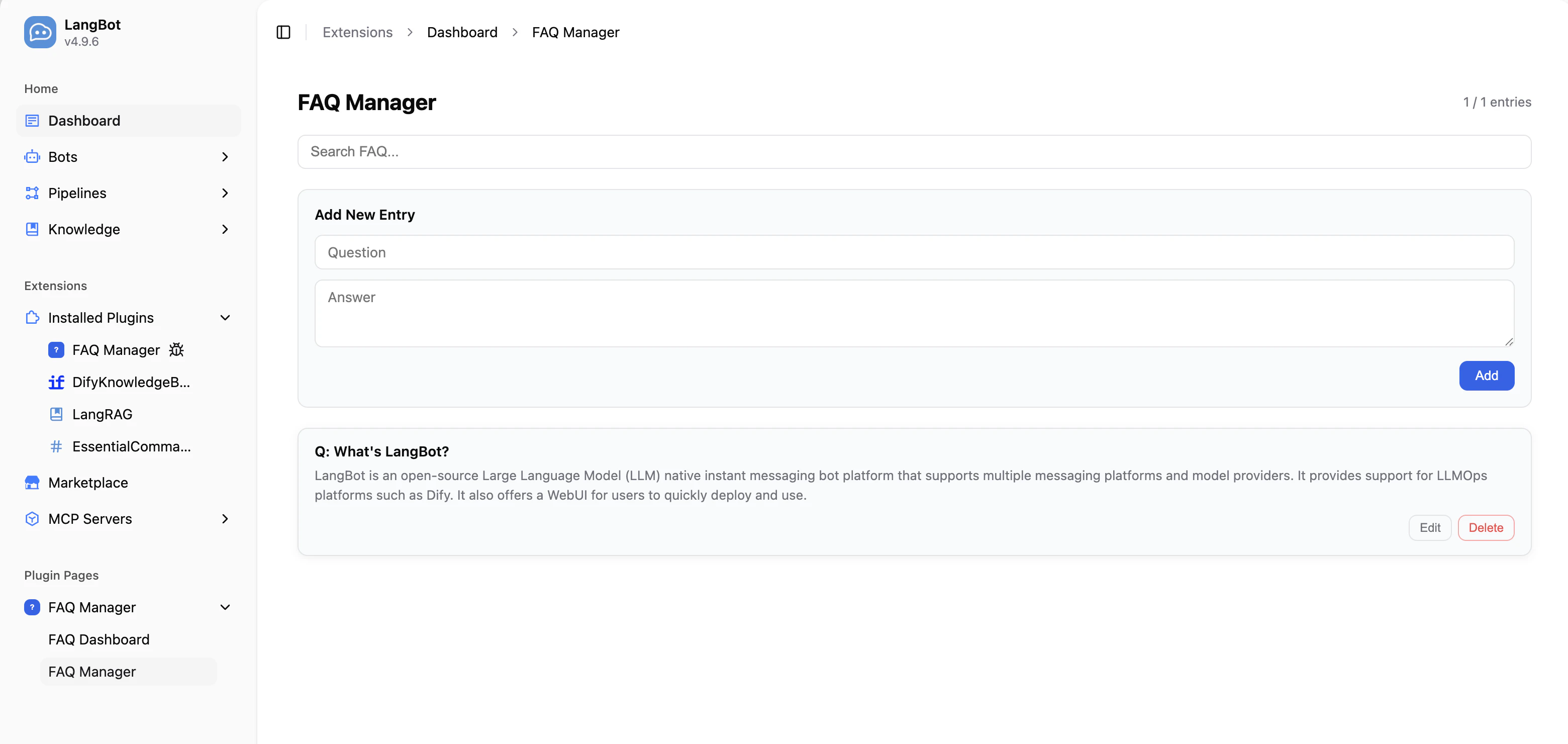
Adding a Page Component

Run the following command in the plugin directory:
lbp comp Page
After entering the page name, the CLI will generate page files under components/pages/:
├── components
   └── pages
       └── dashboard
           ├── dashboard.yaml   # Page manifest
           ├── dashboard.py     # Backend handler
           ├── index.html       # Page entry point
           └── i18n             # Translation files (optional)
               ├── en_US.json
               └── zh_Hans.json
The plugin’s manifest.yaml will also be updated with the component discovery config:
spec:
  components:
    Page:
      fromDirs:
      - path: components/pages/
        maxDepth: 2

Manifest File: Page

apiVersion: v1  # Do not modify
kind: Page  # Do not modify
metadata:
  name: dashboard  # Unique page ID within the plugin
  label:
    en_US: Dashboard  # Display name shown in the WebUI sidebar, supports i18n
    zh_Hans: 仪表盘
spec:
  path: index.html  # HTML entry file, relative to this YAML file's directory
execution:
  python:
    path: dashboard.py  # Backend handler file
    attr: DashboardPage  # Handler class name

Backend Handler

The Page component’s backend handler extends the Page base class and implements handle_api to process API requests from the frontend page.
from langbot_plugin.api.definition.components.page import Page, PageRequest, PageResponse


class DashboardPage(Page):

    async def handle_api(self, request: PageRequest) -> PageResponse:
        # request.endpoint: API endpoint path, e.g. '/stats'
        # request.method:   HTTP method (GET, POST, PUT, DELETE)
        # request.body:     Request body (parsed JSON, or None)

        if request.endpoint == '/stats' and request.method == 'GET':
            # Access shared plugin state via self.plugin
            return PageResponse.ok({
                'total': len(self.plugin.entries),
            })

        return PageResponse.fail(f'Unknown endpoint: {request.endpoint}')

PageRequest Fields

FieldTypeDescription
endpointstrAPI endpoint path (e.g. '/entries')
methodstrHTTP method (GET, POST, PUT, DELETE)
bodyAnyRequest body (parsed JSON, or None)

PageResponse Construction

MethodDescription
PageResponse.ok(data)Success response. data can be any JSON-serializable value
PageResponse.fail(error)Error response. error is a human-readable error string

Frontend Page Development

Include the Page SDK in your HTML file to communicate with the plugin backend:
<!DOCTYPE html>
<html>
<head>
  <meta charset="UTF-8">
  <style>
    body {
      background: var(--langbot-bg, #ffffff);
      color: var(--langbot-text, #0a0a0a);
      font-family: -apple-system, BlinkMacSystemFont, 'Segoe UI', Roboto, sans-serif;
      padding: 24px;
    }
  </style>
</head>
<body>
  <h1 data-i18n="title">Dashboard</h1>
  <p id="stats"></p>

  <script src="/api/v1/plugins/_sdk/page-sdk.js"></script>
  <script>
    langbot.onReady(async function(ctx) {
      // Call the backend API
      var data = await langbot.api('/stats', null, 'GET');
      document.getElementById('stats').textContent = 'Total: ' + data.total;
    });
  </script>
</body>
</html>

Page SDK API

MethodDescription
langbot.onReady(callback)Fires when SDK is ready. callback receives ctx with theme and language
langbot.api(endpoint, body?, method?)Calls the plugin’s handle_api. Returns a Promise
langbot.t(key, fallback?)Gets a translated string
langbot.onThemeChange(callback)Fires when the theme changes
langbot.onLanguageChange(callback)Fires when the language changes
langbot.applyI18n()Manually re-apply data-i18n translations

Dark Mode

The SDK automatically sets CSS custom properties on the page. Use them directly:
CSS VariablePurpose
--langbot-bgPage background
--langbot-bg-cardCard background
--langbot-textPrimary text color
--langbot-text-mutedSecondary text color
--langbot-borderBorder color
--langbot-accentAccent color

Page i18n

Create an i18n/ directory inside your page directory with JSON translation files:
pages/dashboard/
├── index.html
└── i18n/
    ├── en_US.json
    └── zh_Hans.json
Translation files are flat JSON key-value pairs:
{
  "title": "Dashboard",
  "totalEntries": "Total Entries"
}
Add the data-i18n attribute to HTML elements for automatic translation:
<h1 data-i18n="title">Dashboard</h1>

Full Example: FAQ Manager

Here is a complete Page component example that implements CRUD operations for FAQ entries. Backend handler (components/pages/manager/manager.py):
from langbot_plugin.api.definition.components.page import Page, PageRequest, PageResponse


class ManagerPage(Page):

    async def handle_api(self, request: PageRequest) -> PageResponse:
        plugin = self.plugin

        if request.endpoint == '/entries' and request.method == 'GET':
            return PageResponse.ok({'entries': plugin.entries})

        if request.endpoint == '/entries' and request.method == 'POST':
            question = (request.body or {}).get('question', '').strip()
            answer = (request.body or {}).get('answer', '').strip()
            if not question or not answer:
                return PageResponse.fail('question and answer are required')
            entry = plugin.add_entry(question, answer)
            await plugin.persist()
            return PageResponse.ok({'entry': entry})

        if request.endpoint == '/entries' and request.method == 'DELETE':
            entry_id = (request.body or {}).get('id', '')
            if plugin.delete_entry(entry_id):
                await plugin.persist()
                return PageResponse.ok({'deleted': entry_id})
            return PageResponse.fail('entry not found')

        return PageResponse.fail(f'Unknown: {request.method} {request.endpoint}')
Frontend page (components/pages/manager/index.html) calls the backend via langbot.api():
// Load entries
var data = await langbot.api('/entries', null, 'GET');

// Add entry
await langbot.api('/entries', { question: '...', answer: '...' }, 'POST');

// Delete entry
await langbot.api('/entries', { id: '...' }, 'DELETE');
Full example code is available at FAQManager plugin.

Notes

  • Pages run inside a sandbox="allow-scripts allow-forms" iframe and cannot open popups or navigate the parent page
  • Access shared plugin state via self.plugin — Page and Tool components can share data
  • Use PageResponse.ok() and PageResponse.fail() to construct responses for consistent formatting
  • The Page SDK <script> tag must be placed before any code that uses the langbot object