
Overall Architecture: A Three-Layer Process Model
LangBot’s plugin system consists of three cooperating process layers: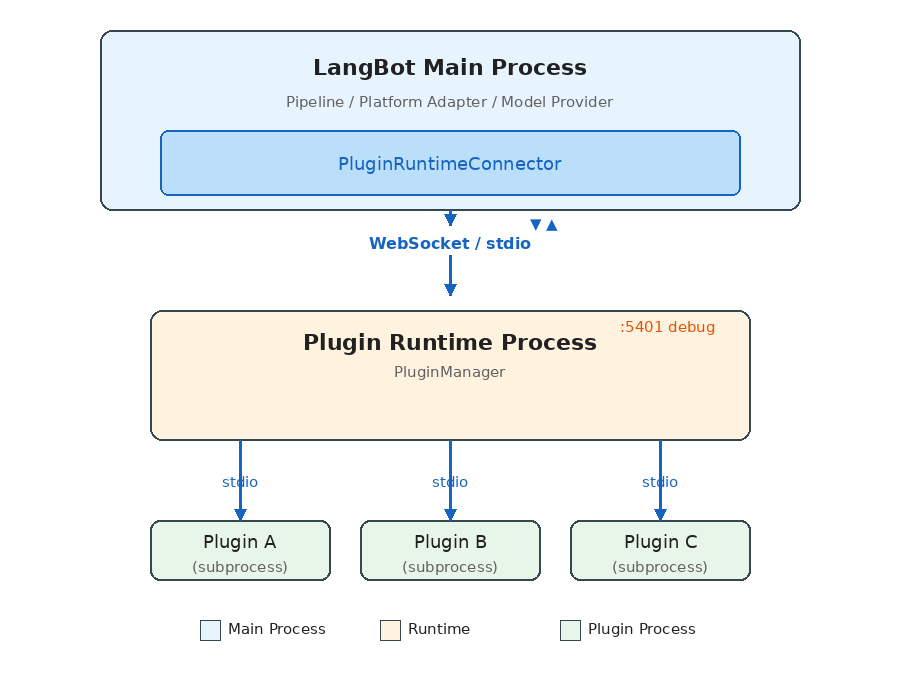
- LangBot Main Process: Runs business logic (message pipelines, platform adapters, model invocations), connects to Runtime via
PluginRuntimeConnector. - Plugin Runtime: The orchestration layer — discovers, launches, and manages all plugin subprocesses, routes requests from the main process to the appropriate plugin.
- Plugin Subprocesses: Each plugin runs in its own Python process, communicating with Runtime via stdio pipes.
Why Three Layers Instead of Two?
The intuitive design would have the main process manage plugin processes directly. LangBot adds the Runtime layer for deployment flexibility:- Local development: Main process spawns Runtime as a child via stdio (zero config)
- Docker production: Runtime runs as a separate container, connected via WebSocket
- Windows compatibility: Since Windows asyncio has incomplete stdio subprocess support, it automatically falls back to WebSocket
Communication Protocol: JSON-RPC-Style Request/Response
All cross-process communication runs on a unified protocol layer. The core data structures are minimal:Handler class is the system’s core abstraction, acting as both RPC client and server:
seq_id-based request/response matching enables full-duplex concurrent calls- Streaming responses via
chunk_statusfor long-running operations like command execution - Large messages auto-chunk (stdio: 16KB / WebSocket: 64KB per chunk)
- File transfer uses a separate base64 chunking mechanism
Action Enums: Clear API Contracts
The system defines all cross-process calls through four enum groups:Plugin Lifecycle
A plugin goes through these stages from installation to execution:1. Discovery
On startup, Runtime scans thedata/plugins/ directory:
{author}__{name} convention, each containing a manifest.yaml and plugin code.
2. Launch
Runtime spawns an independent subprocess for each plugin:3. Registration
After starting, the plugin process actively registers itself with Runtime:4. Running
Once inINITIALIZED state, the plugin can receive events, tool calls, and command executions.
5. Shutdown
Component System: Four Extension Types
A LangBot plugin isn’t a single hook function — it’s a component container. A single plugin can provide multiple component types simultaneously:EventListener
The most fundamental extension — listen for events in the message pipeline:
Event propagation supports two interruption modes:
prevent_default(): Skip default behavior (e.g., skip the LLM call)prevent_postorder(): Stop subsequent plugins from running
Tool
Tools for LLM Function Calling:Command
User-triggered commands via!command, with subcommand support:
AsyncGenerator, providing natural streaming output.
KnowledgeRetriever
A multi-instance component for connecting external knowledge bases:SDK API: What Plugins Can Do
Plugins gain rich capabilities through theLangBotAPIProxy inherited by BasePlugin:
plugin_storage (plugin-private) and workspace_storage (globally shared), storing data as bytes (base64-serialized in transit). Simple but flexible enough.
Event Dispatch Mechanism
The complete path from main process to plugin: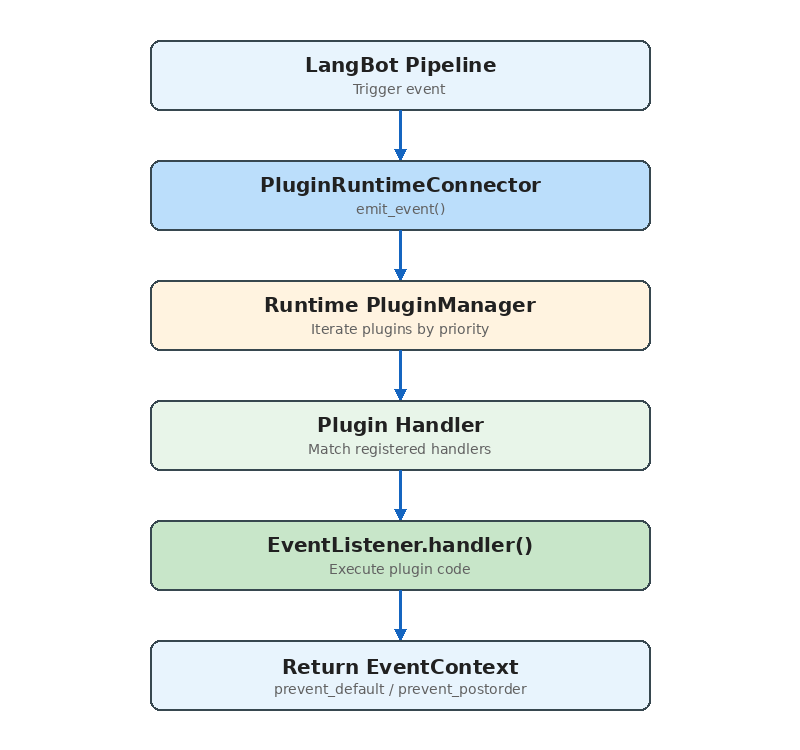
include_plugins parameter enables pipeline-level plugin binding — different message processing pipelines can use different subsets of plugins.
Installation & Distribution
Plugins support three installation sources:- Local upload:
.lbpkgfiles (actually zip archives containing manifest.yaml and code) - Marketplace: Install from LangBot Space online
- GitHub Release: Download from a GitHub repository’s Release assets
AsyncGenerator, enabling real-time installation status in the frontend.
Developer Experience
The SDK provides a complete developer toolchain:Comparisons with Other Systems
vs Dify Plugins
Dify’s plugin system (dify-plugin-daemon) shares the process isolation philosophy with LangBot, but the focus differs:
- Dify: Plugins extend workflow node types (Tool, Model, Extension) — designed for AI application orchestration
- LangBot: Plugins extend the message processing pipeline (Event, Tool, Command, KnowledgeRetriever) — designed for instant messaging scenarios
EventListener component provides a capability Dify lacks — injecting logic at any stage of message processing.
vs MCP (Model Context Protocol)
MCP is a standardized protocol for AI tool invocation. LangBot’s Tool component and MCP services overlap functionally, but serve different purposes:- MCP: A universal “AI calls external capabilities” protocol, usable by any LLM application
- LangBot Tool: Deeply integrated with message processing context, with access to session info, user identity, etc.
Design Decisions Explained
Why process isolation instead of threads/coroutines?- Plugin code quality is unpredictable; a segfault shouldn’t crash the entire service
- Dependency isolation: different plugins may depend on different versions of the same library
- Resource control: you can set per-plugin process resource limits
- Debug-friendly: developers can directly read communication logs
- Natively supported in Python, no extra dependencies
- The performance bottleneck isn’t serialization (plugin call frequency is far below database queries)
- stdio requires no network stack — lower latency
- Simpler process lifecycle management (child processes auto-cleanup when parent exits)
- WebSocket is only used where stdio isn’t supported (Docker, Windows)
Conclusion
LangBot’s plugin system is a production-grade, process-isolated, event-driven component framework for extensibility. Its core design principles:- Safety first: Process isolation ensures plugins can’t destabilize the main service
- Deployment flexibility: Dual stdio/WebSocket modes adapt to all environments
- Developer-friendly: Complete SDK, CLI, and debug support
- Component-based: Four component types cover the major extension needs