
コンポーネント: Tool
LangBotの組み込みLocal Agentは、実行中にツールを呼び出して外部世界と対話します。現在、プラグインとMCPの両方を通じてツールを追加することがサポートされています。
Toolコンポーネントの追加
1つのプラグインには任意の数のツールを含めることができます。プラグインディレクトリでコマンドlbp comp Toolを実行し、プロンプトに従ってツール設定を入力します。
➜  HelloPlugin > lbp comp Tool
Generating component Tool...
Tool name: get_weather_alerts
Tool description: Get weather alerts for a US state.
Component Tool generated successfully.
組件 Tool 生成成功。これにより、components/tools/ディレクトリにget_weather_alerts.yamlとget_weather_alerts.pyファイルが生成されます。.yamlファイルはツールの基本情報を定義し、.pyファイルはツールハンドラです:
➜  HelloPlugin > tree
...
├── components
│   ├── __init__.py
│   └── tools
│       ├── __init__.py
│       ├── get_weather_alerts.py
│       └── get_weather_alerts.yaml
...
マニフェストファイル: Tool
apiVersion: v1  # 変更しないでください
kind: Tool  # 変更しないでください
metadata:
  name: get_weather_alerts  # ツール名、LLM認識用
  label:
    en_US: GetWeatherAlerts  # ツール表示名、LangBot UIに表示、多言語対応
    zh_Hans: GetWeatherAlerts
  description:
    en_US: 'Get weather alerts for a US state.'  # ツール説明、LangBot UIに表示、多言語対応。オプション
    zh_Hans: '獲取美国某个州的天気預警'
spec:
  parameters: []  # ツールパラメータ、会話コンテキストに基づいてLLMが生成する値
  llm_prompt: 'Get weather alerts for a US state.'  # ツールプロンプト、LLMがこのツールを呼び出すかどうかを判断するため
execution:
  python:
    path: get_weather_alerts.py  # ツールハンドラ、変更しないでください
    attr: GetWeatherAlerts  # ツールハンドラクラス名、get_weather_alerts.pyのクラス名と一致
プラグイン処理
以下のコードがデフォルトで生成されます(components/tools/<tool_name>.py)。GetWeatherAlertsクラスのcallメソッドでこのツールの呼び出しと戻り値のロジックを実装する必要があります。
# Auto generated by LangBot Plugin SDK.
# Please refer to https://docs.langbot.app/en/plugin/dev/tutor.html for more details.
from __future__ import annotations

from typing import Any

from langbot_plugin.api.definition.components.tool.tool import Tool
from langbot_plugin.api.entities.builtin.provider import session as provider_session


class GetWeatherAlerts(Tool):

    async def call(self, params: dict[str, Any], session: provider_session.Session, query_id: int) -> str:
        """Fill your tool code here"""
return {}callメソッドでこのツールを実装します:
INFO
天気検索ツールの例は、MCPのサーバー作成例から来ています。
from __future__ import annotations

from typing import Any

from langbot_plugin.api.definition.components.tool.tool import Tool
from langbot_plugin.api.entities.builtin.provider import session as provider_session
import httpx

# 定数
NWS_API_BASE = "https://api.weather.gov"
USER_AGENT = "weather-app/1.0"


async def make_nws_request(url: str) -> dict[str, Any] | None:
    """適切なエラー処理を使用してNWS APIにリクエストを行う。"""
    headers = {
        "User-Agent": USER_AGENT,
        "Accept": "application/geo+json"
    }
    async with httpx.AsyncClient() as client:
        try:
            response = await client.get(url, headers=headers, timeout=30.0)
            response.raise_for_status()
            return response.json()
        except Exception:
            return None

def format_alert(feature: dict) -> str:
    """アラート機能を読みやすい文字列にフォーマットする。"""
    props = feature["properties"]
    return f"""
Event: {props.get('event', 'Unknown')}
Area: {props.get('areaDesc', 'Unknown')}
Severity: {props.get('severity', 'Unknown')}
Description: {props.get('description', 'No description available')}
Instructions: {props.get('instruction', 'No specific instructions provided')}
"""

class GetWeatherAlerts(Tool):

    async def call(self, params: dict[str, Any], session: provider_session.Session, query_id: int) -> str:
        """Fill your tool code here"""
        state = params.get("state", "CA")

        url = f"{NWS_API_BASE}/alerts/active/area/{state}"
        data = await make_nws_request(url)

        if not data or "features" not in data:
            return "Unable to fetch alerts or no alerts found."

        if not data["features"]:
            return "No active alerts for this state."

        alerts = [format_alert(feature) for feature in data["features"]]
return "\n---\n".join(alerts)このツールでは、paramsからstateパラメータを取得し、NWS APIを呼び出してその州の天気アラートを取得する必要があるため、マニフェストファイルのparametersでstateパラメータを定義する必要があります。
parametersフォーマットはJSON Schemaに従い、OpenAI Function Calling機能でサポートされており、そのルートタイプはtype: objectに固定されています。propertiesにパラメータを追加し、requiredに必須パラメータの説明を追加してください。
...
spec:
  parameters:
    type: object  # 変更しないでください
    properties:  # 変更しないでください、ここにパラメータを追加
      state:
        type: string
        description: 'Two-letter US state code (e.g. CA, NY)'
    required:  # ここに必須パラメータの説明を追加
      - state
...このツールはhttpxライブラリも使用しているため、プラグインディレクトリのrequirements.txtにhttpx依存関係を追加する必要があります。
# HelloPlugin/requirements.txt
langbot-plugin  # デフォルトで既に存在
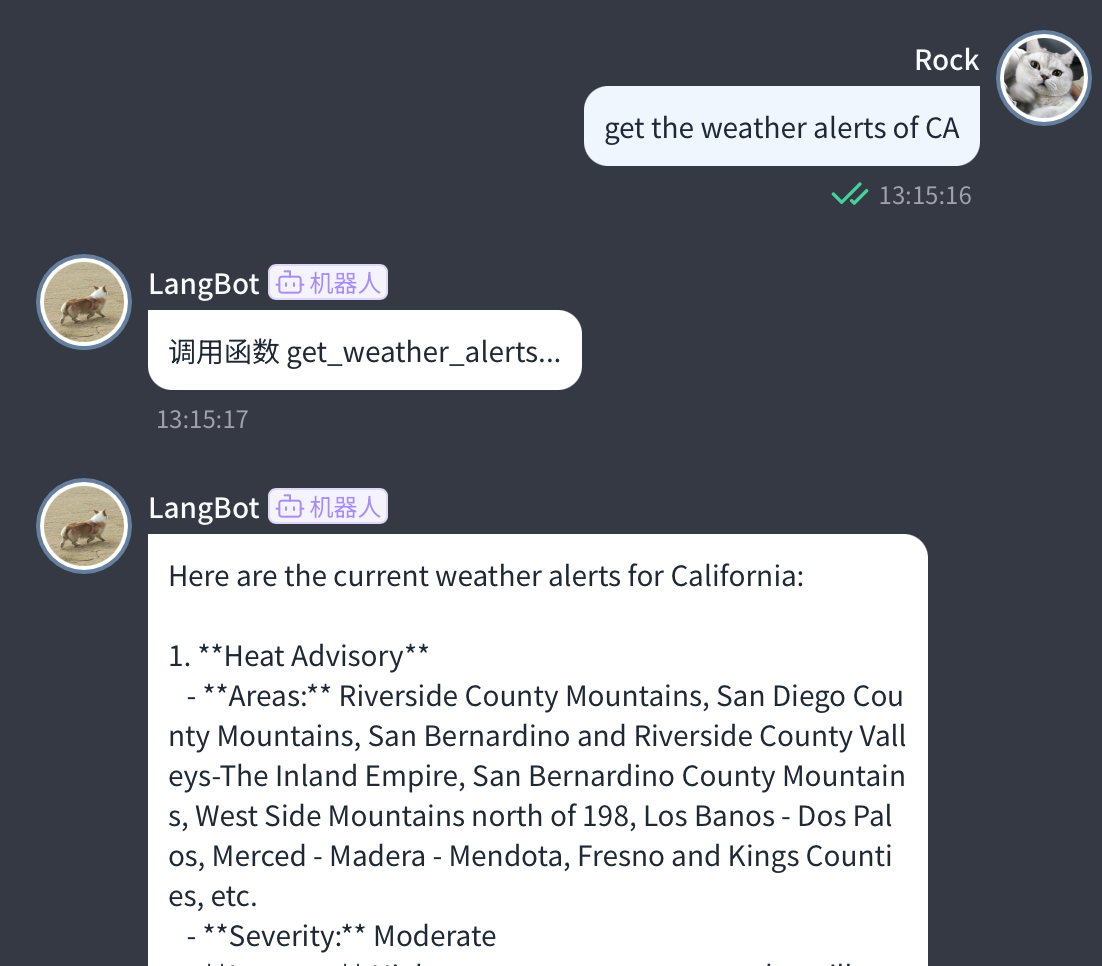
httpx次に、プラグインディレクトリでコマンドlbp runを実行してデバッグを開始します。LangBotでツール呼び出しをサポートするモデルを設定し、対応するパイプラインでそのモデルの使用を選択してこのツールを使用します。
次のステップ
ツールの基本的な使い方を学びました。次は:
- プラグイン共通APIを確認してください