> ## Documentation Index
> Fetch the complete documentation index at: https://docs.langbot.app/llms.txt
> Use this file to discover all available pages before exploring further.
# Lucky Lilla Desktop
> 通过 Satori 协议(LLOneBot)接入 LangBot,在受支持的消息客户端上运行 AI 机器人。
通过 Satori 协议接入,需选择使用`Satori`作为适配器。
# LuckyLillia
* [LuckyLillia](https://github.com/LLOneBot/LuckyLilliaBot) 安装客户端以使用Satori协议
安装LuckyLillia的教程:[https://luckylillia.com/guide/choice\_install](https://luckylillia.com/guide/choice_install)
 确保地址中 IP地址 是 LangBot 运行的主机的地址(若在同一网络内运行则为 `127.0.0.1`) 默认端口 `5600` 可以根据需要更改 推荐设置令牌
>
确保地址中 IP地址 是 LangBot 运行的主机的地址(若在同一网络内运行则为 `127.0.0.1`) 默认端口 `5600` 可以根据需要更改 推荐设置令牌
>  >
> 该图为公网配置确保地址中 IP地址 是 LangBot 运行的主机的地址 此时配置需要暴露langbot的该端口
## LangBot 对接
接下来打开 LangBot 配置页面
点击机器人,点击添加
`平台/适配器选择`为`Satori`
>
> 该图为公网配置确保地址中 IP地址 是 LangBot 运行的主机的地址 此时配置需要暴露langbot的该端口
## LangBot 对接
接下来打开 LangBot 配置页面
点击机器人,点击添加
`平台/适配器选择`为`Satori`
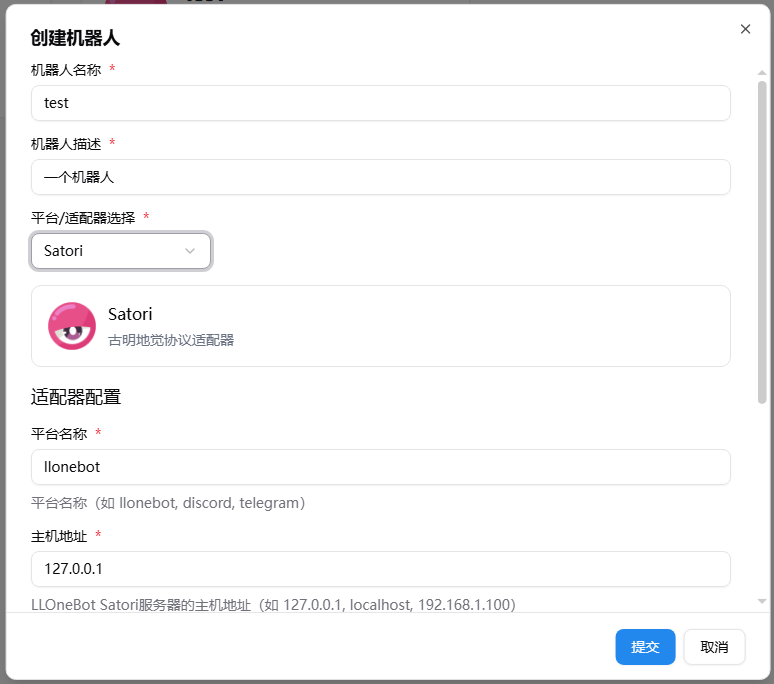 > 如果你使用默认配置(内网)你甚至不用修改任何参数
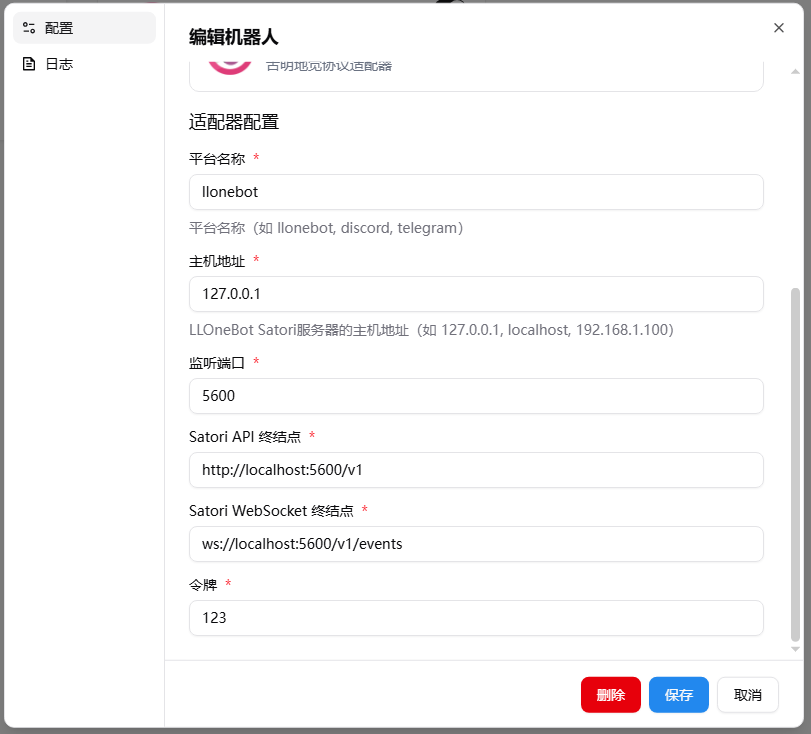
创建好后你仍然可以调整参数
> 如果你使用默认配置(内网)你甚至不用修改任何参数
创建好后你仍然可以调整参数
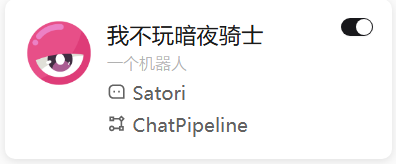
 确保你启用了本适配器
 注意,如果涉及多个 docker 容器的网络连接问题,请参考 [网络配置详解](/zh/workshop/network-details)