> ## Documentation Index
> Fetch the complete documentation index at: https://docs.langbot.app/llms.txt
> Use this file to discover all available pages before exploring further.

# LINE

> 用 LangBot 搭建 LINE AI 机器人，将大模型接入 LINE 聊天与官方账号。

本文介绍如何将 LangBot 与 LINE 平台进行对接，实现 LINE 机器人功能。

## 创建LINE机器人

### 注册LINE开发者账号

1. 访问 [LINE Developers 官网](https://developers.line.biz/)，使用 LINE 账号登录
2. 登录后，进入开发者控制台

### 创建 Provider 和 Channel

> [开发者控制台](https://developers.line.biz/console)

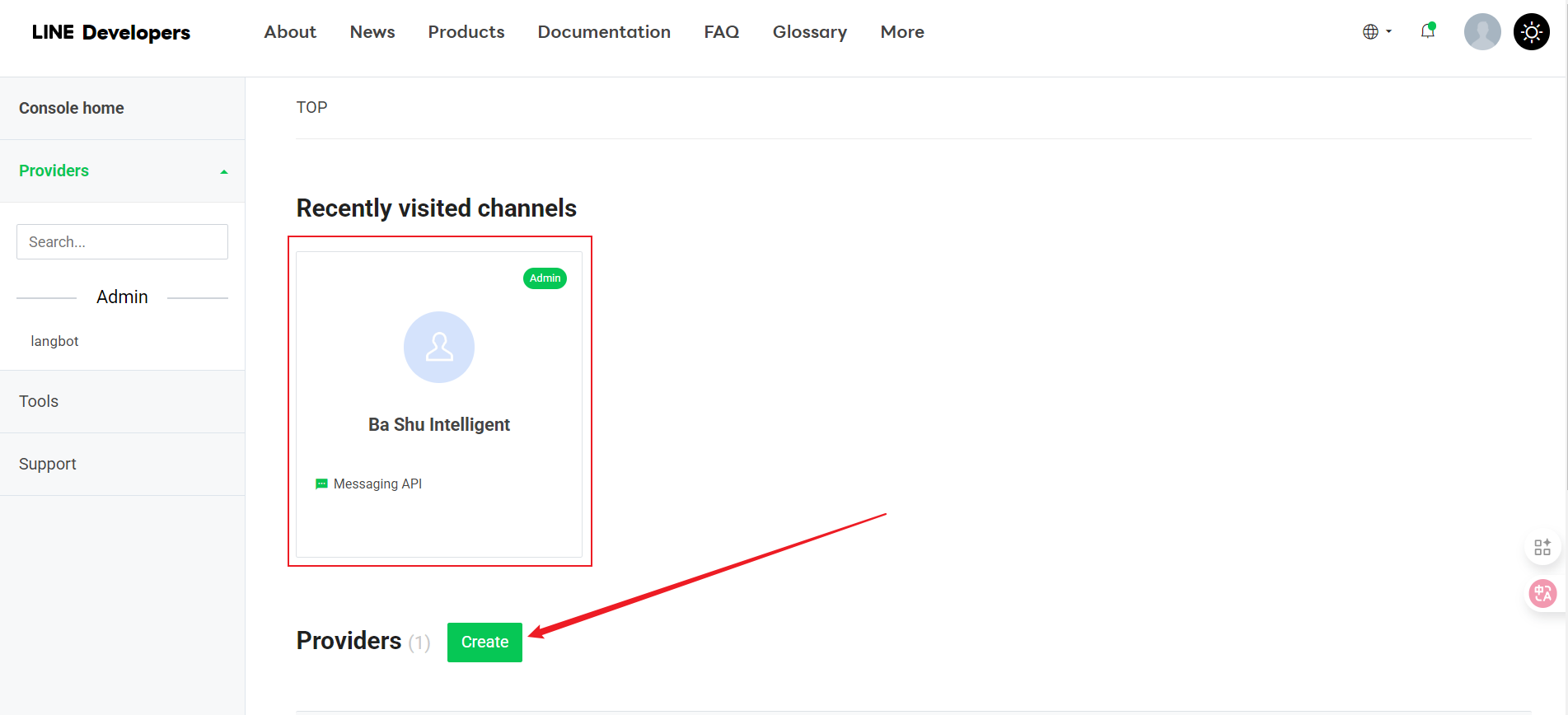
1. 在开发者控制台中，创建一个新的 Provider（如果没有的话）

<img src="https://mintcdn.com/langbot/7LP8IdEMby3DrX2X/images/zh/deploy/bots/line/line01.png?fit=max&auto=format&n=7LP8IdEMby3DrX2X&q=85&s=a13b8620a00caa05fccbc30af46677c2" alt="alt text" width="1903" height="868" data-path="images/zh/deploy/bots/line/line01.png" />

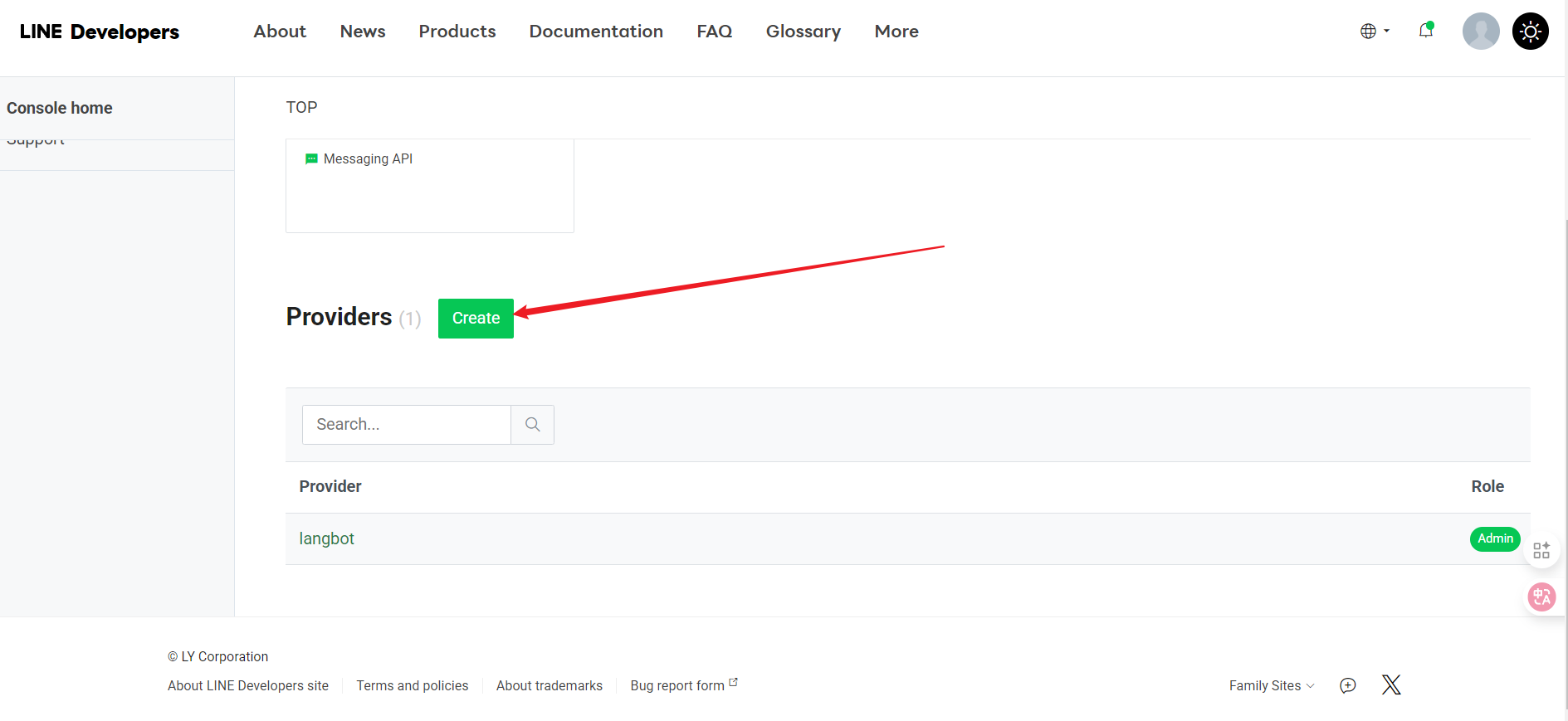
2. 在 Provider 下，点击 "Create"

<img src="https://mintcdn.com/langbot/7LP8IdEMby3DrX2X/images/zh/deploy/bots/line/line02.png?fit=max&auto=format&n=7LP8IdEMby3DrX2X&q=85&s=b7f5bd9332592c4603b2bf214f418d94" alt="alt text" width="1889" height="869" data-path="images/zh/deploy/bots/line/line02.png" />

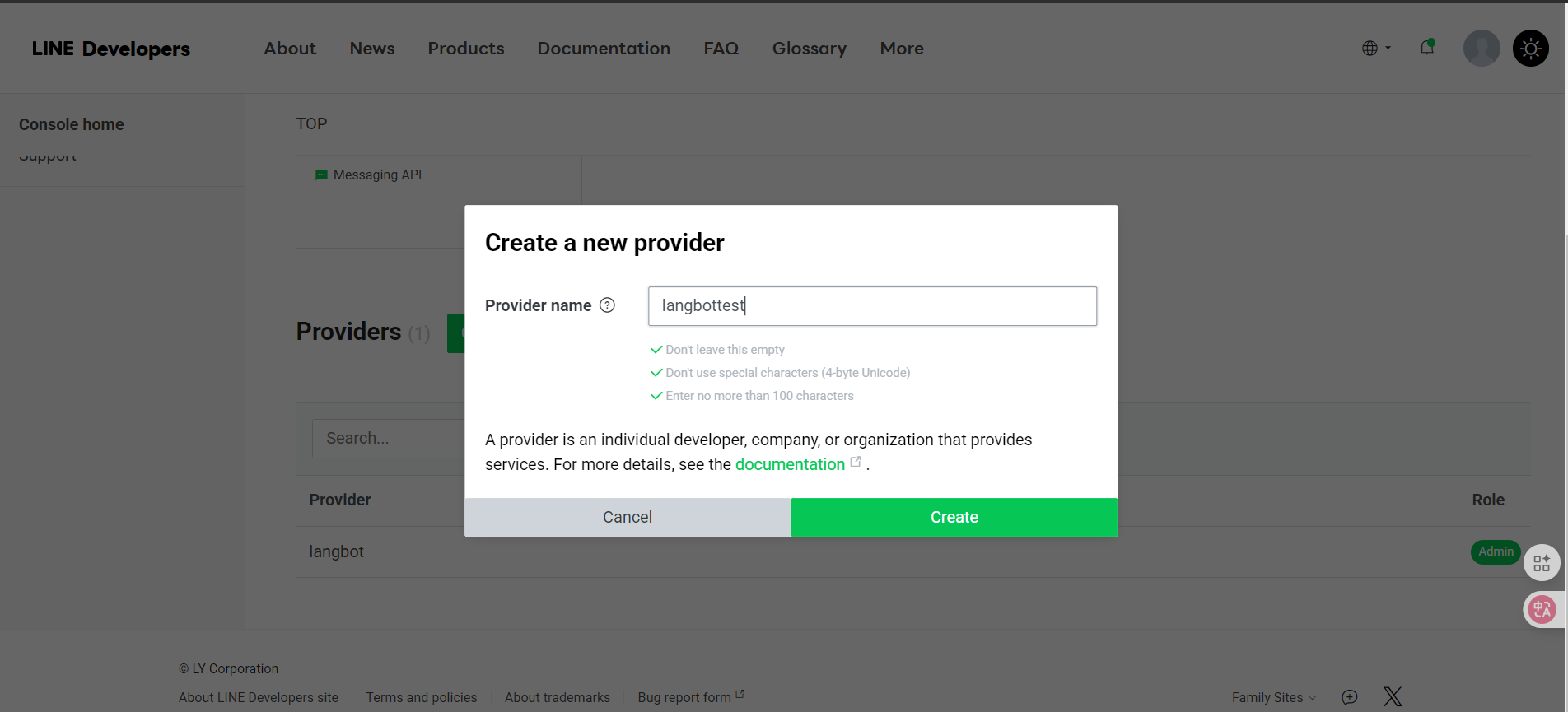
3. 填入名称，并点击 Create

<img src="https://mintcdn.com/langbot/7LP8IdEMby3DrX2X/images/zh/deploy/bots/line/line03.png?fit=max&auto=format&n=7LP8IdEMby3DrX2X&q=85&s=af69cbd6e8cd056553a6a4e94c435e1c" alt="alt text" width="1904" height="865" data-path="images/zh/deploy/bots/line/line03.png" />

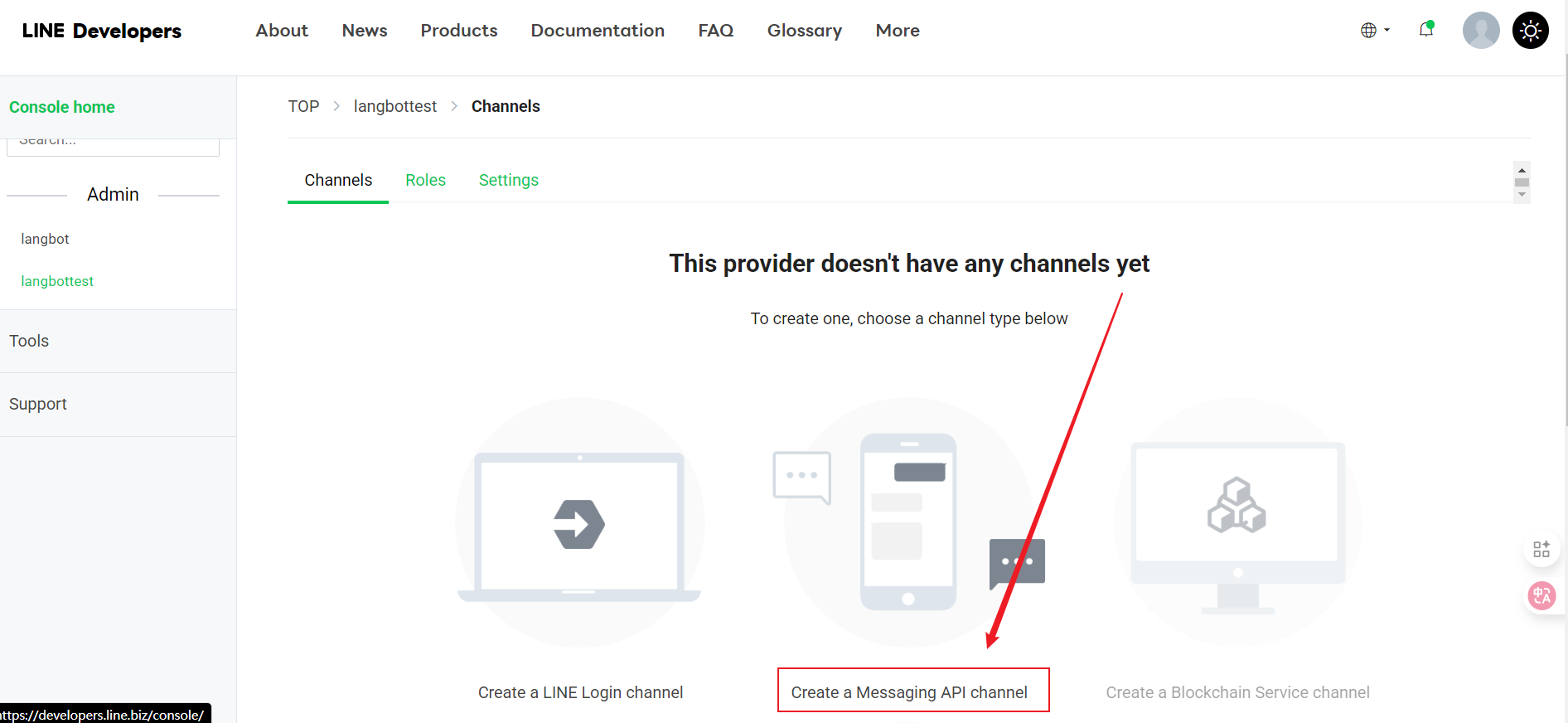
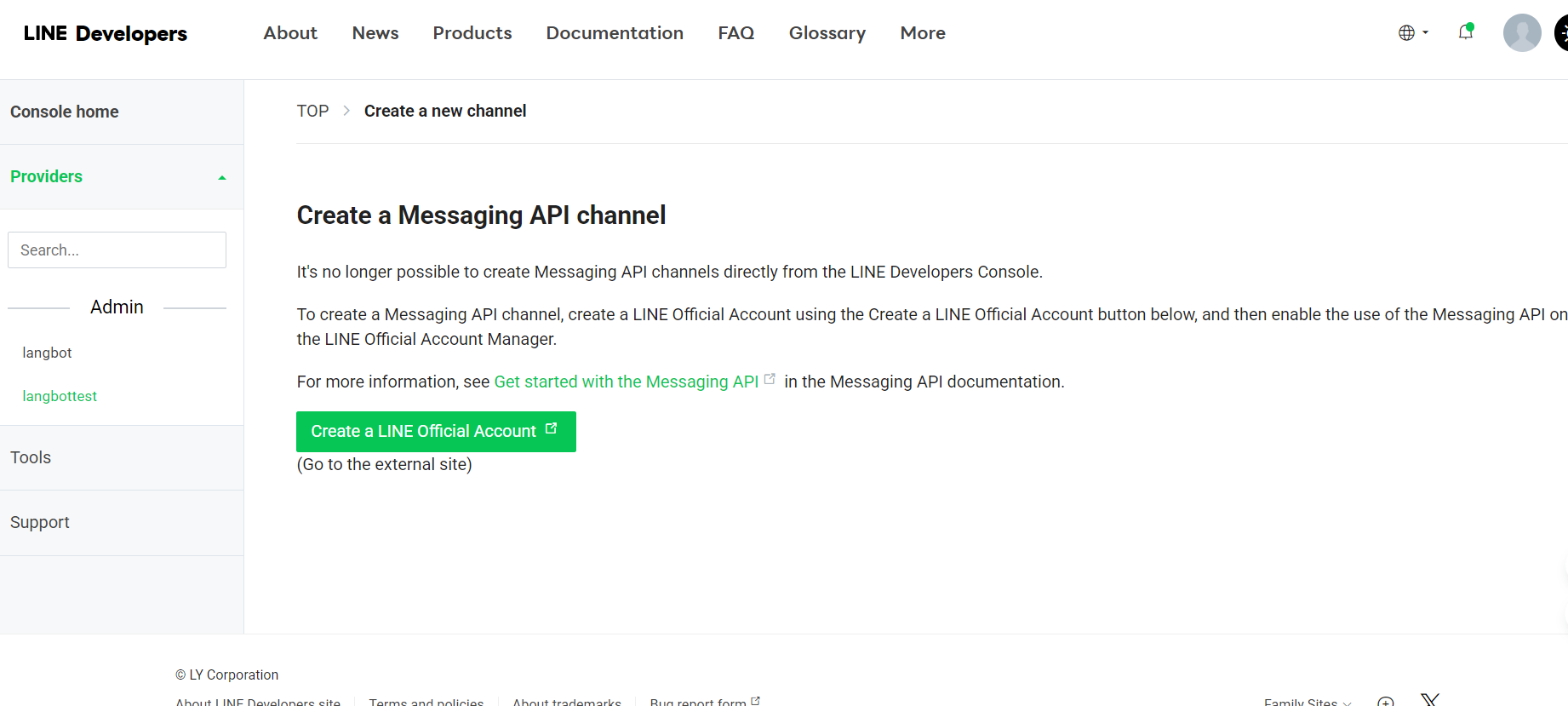
4. 跳转页面后选择 Create a Message API
   <img src="https://mintcdn.com/langbot/7LP8IdEMby3DrX2X/images/zh/deploy/bots/line/line04.png?fit=max&auto=format&n=7LP8IdEMby3DrX2X&q=85&s=7415f81d8a56491b7dd8ed810c7ed5aa" alt="alt text" width="1892" height="872" data-path="images/zh/deploy/bots/line/line04.png" />

* 继续点击 Create a Message API
  <img src="https://mintcdn.com/langbot/7LP8IdEMby3DrX2X/images/zh/deploy/bots/line/line05.png?fit=max&auto=format&n=7LP8IdEMby3DrX2X&q=85&s=1eab450322616bc97ad2441080b483d9" alt="alt text" width="1842" height="829" data-path="images/zh/deploy/bots/line/line05.png" />
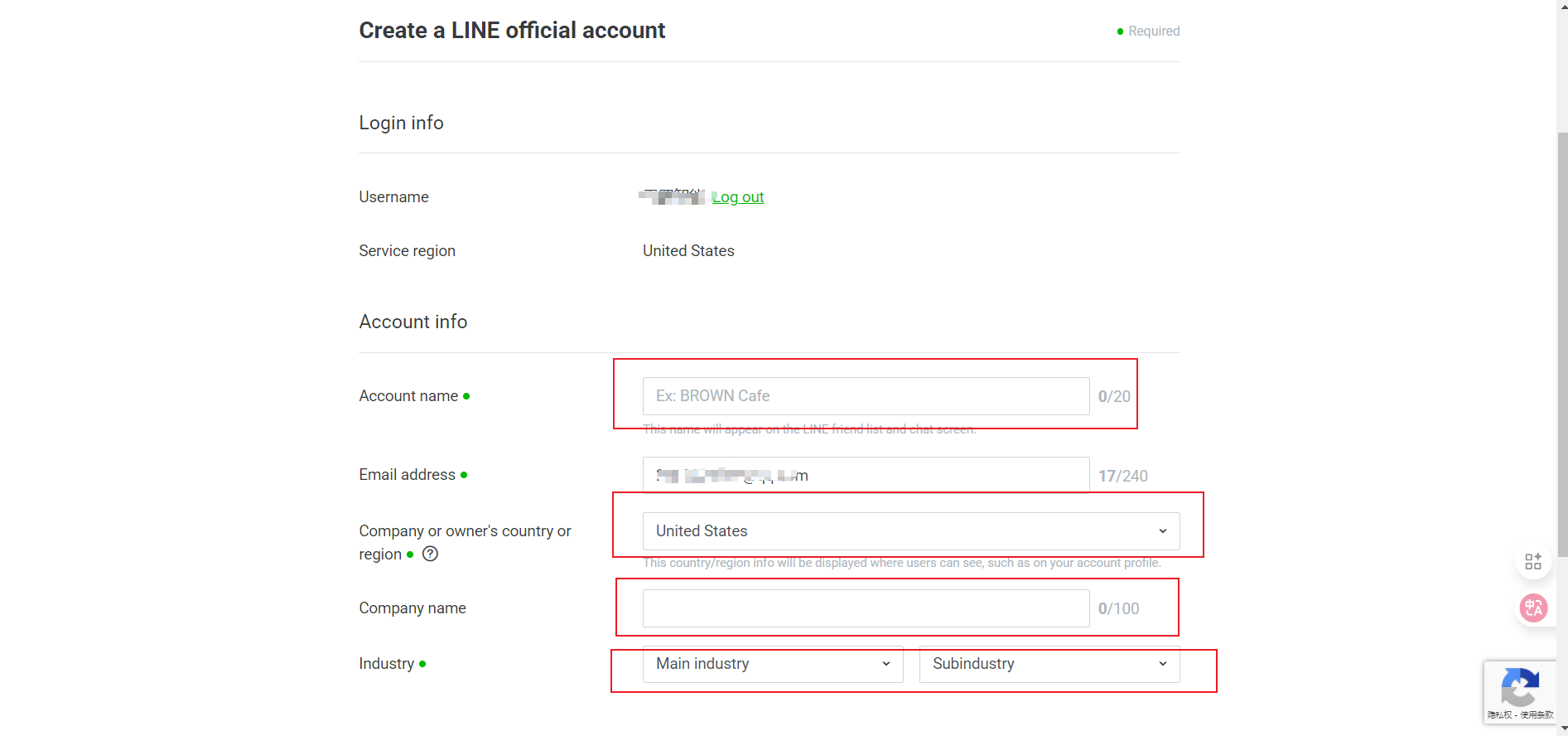
* 跳转页面后填入基本信息
  <img src="https://mintcdn.com/langbot/7LP8IdEMby3DrX2X/images/zh/deploy/bots/line/line06.png?fit=max&auto=format&n=7LP8IdEMby3DrX2X&q=85&s=f7e363f62e0eb8c73bcda0809f88ba7e" alt="alt text" width="1893" height="888" data-path="images/zh/deploy/bots/line/line06.png" />
  * Channel Name（频道名称）
  * Channel Description（频道描述）
  * Category（类别）
  * Subcategory（子类别）
  * Email Address（邮箱地址）

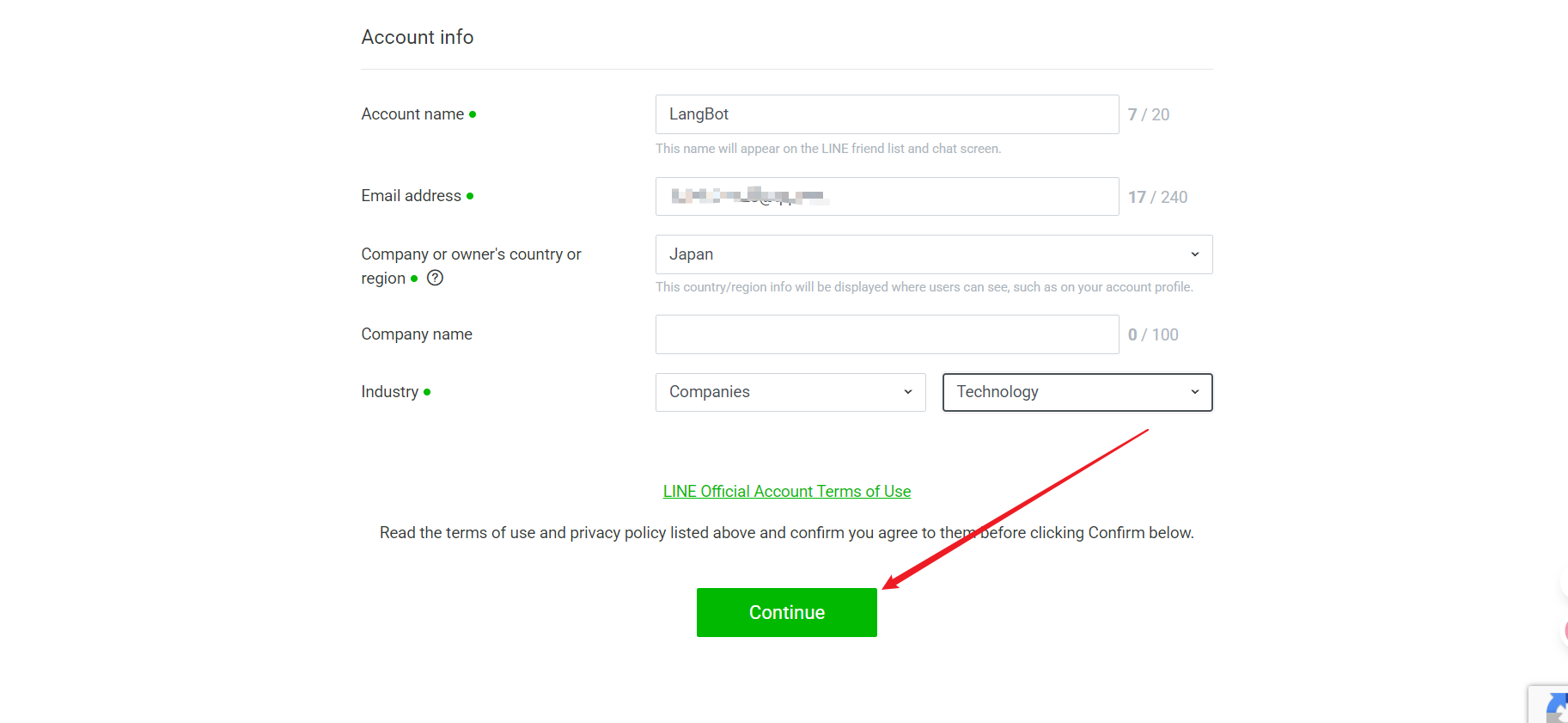
5. 全部填好之后点击 "Continue" 创建
   <img src="https://mintcdn.com/langbot/7LP8IdEMby3DrX2X/images/zh/deploy/bots/line/line07.png?fit=max&auto=format&n=7LP8IdEMby3DrX2X&q=85&s=daaa875ff01affce4d567b207f5013b1" alt="alt text" width="1825" height="841" data-path="images/zh/deploy/bots/line/line07.png" />
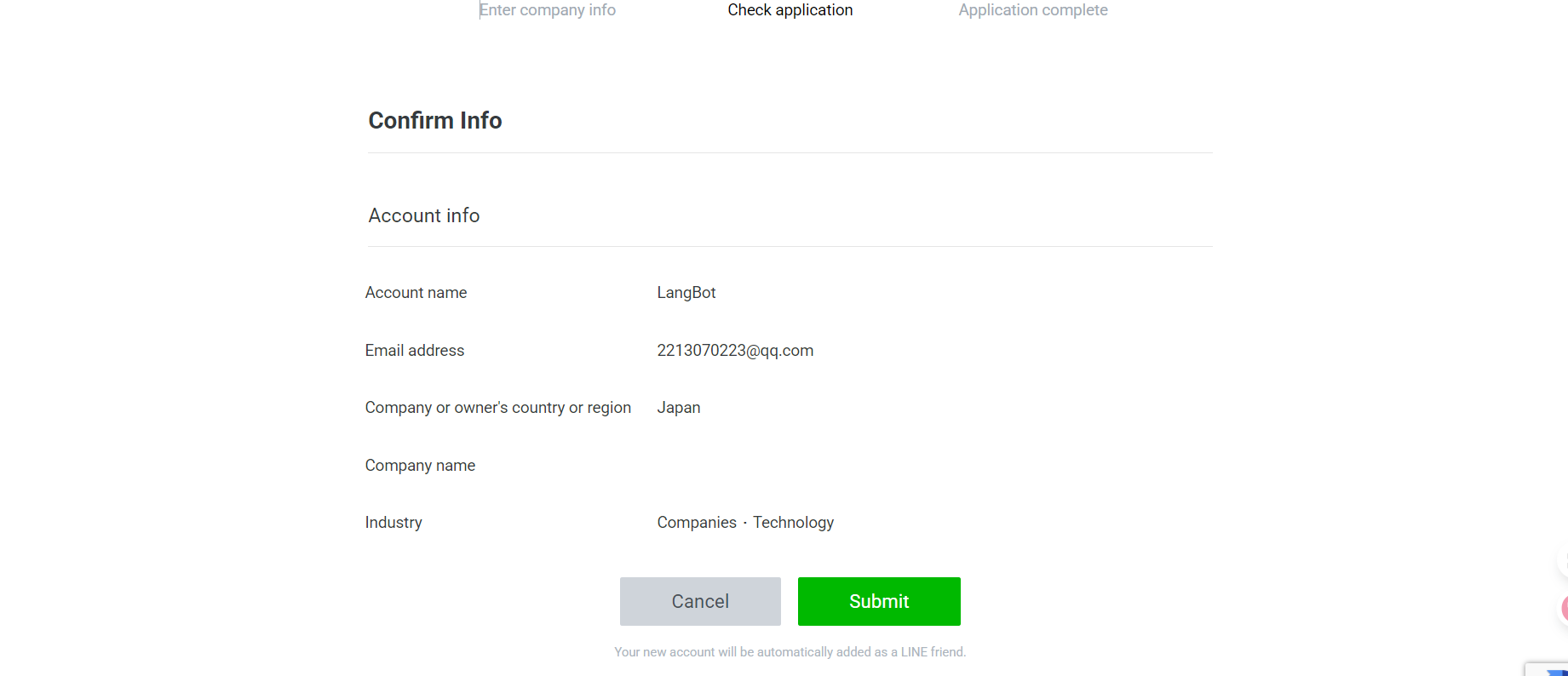
6. 检查填入的信息，无问题点击 Submit 即可
   <img src="https://mintcdn.com/langbot/7LP8IdEMby3DrX2X/images/zh/deploy/bots/line/line08.png?fit=max&auto=format&n=7LP8IdEMby3DrX2X&q=85&s=e2e93e568c9c5d1c616329dc3b0a56a1" alt="alt text" width="1841" height="794" data-path="images/zh/deploy/bots/line/line08.png" />
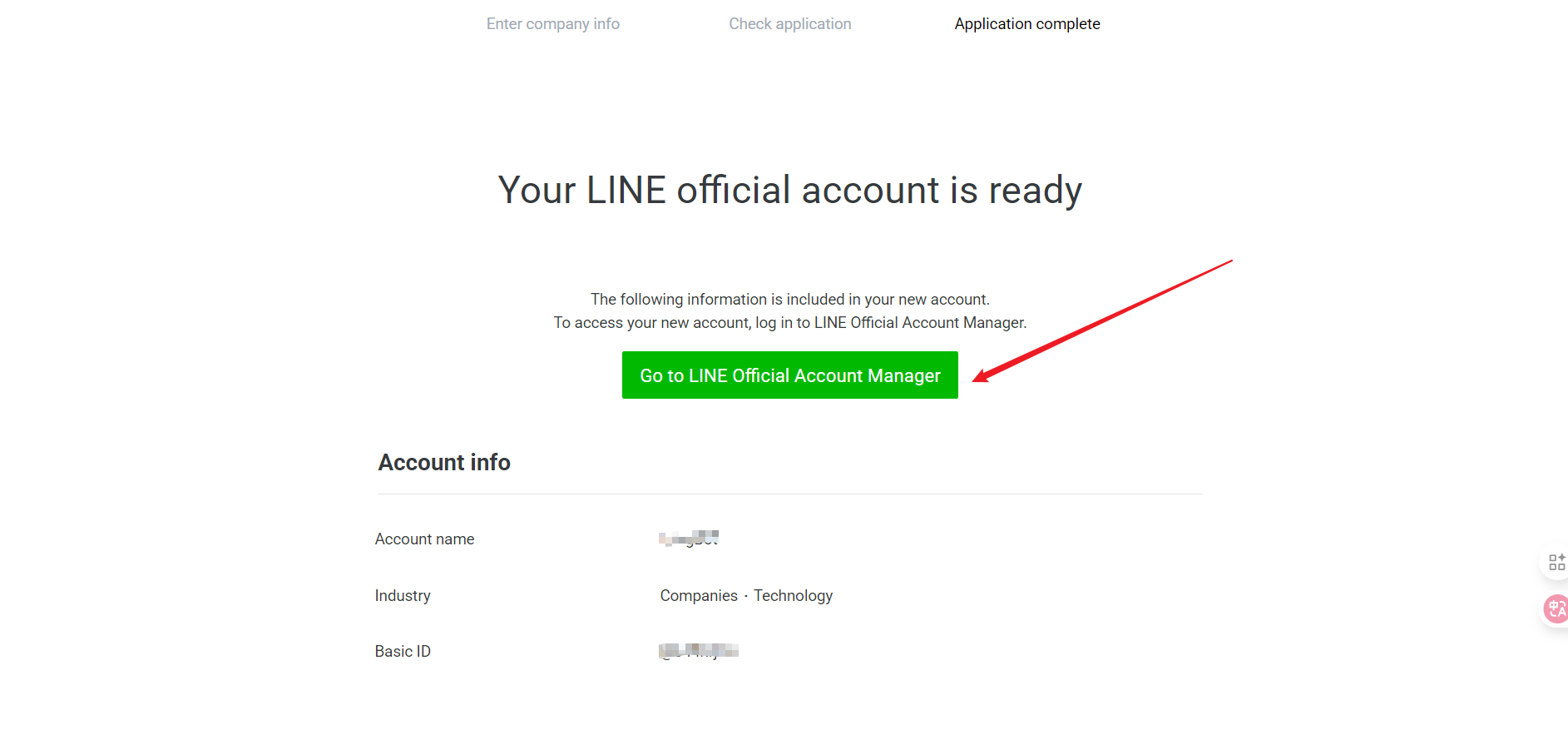
7. 创建成功去使用
   <img src="https://mintcdn.com/langbot/7LP8IdEMby3DrX2X/images/zh/deploy/bots/line/line09.png?fit=max&auto=format&n=7LP8IdEMby3DrX2X&q=85&s=2a676d5901bacc1bcfe7dd3e0273f51c" alt="alt text" width="1885" height="877" data-path="images/zh/deploy/bots/line/line09.png" />

### 获取配置信息

创建完成后，您将获得以下重要信息，请记录下来：

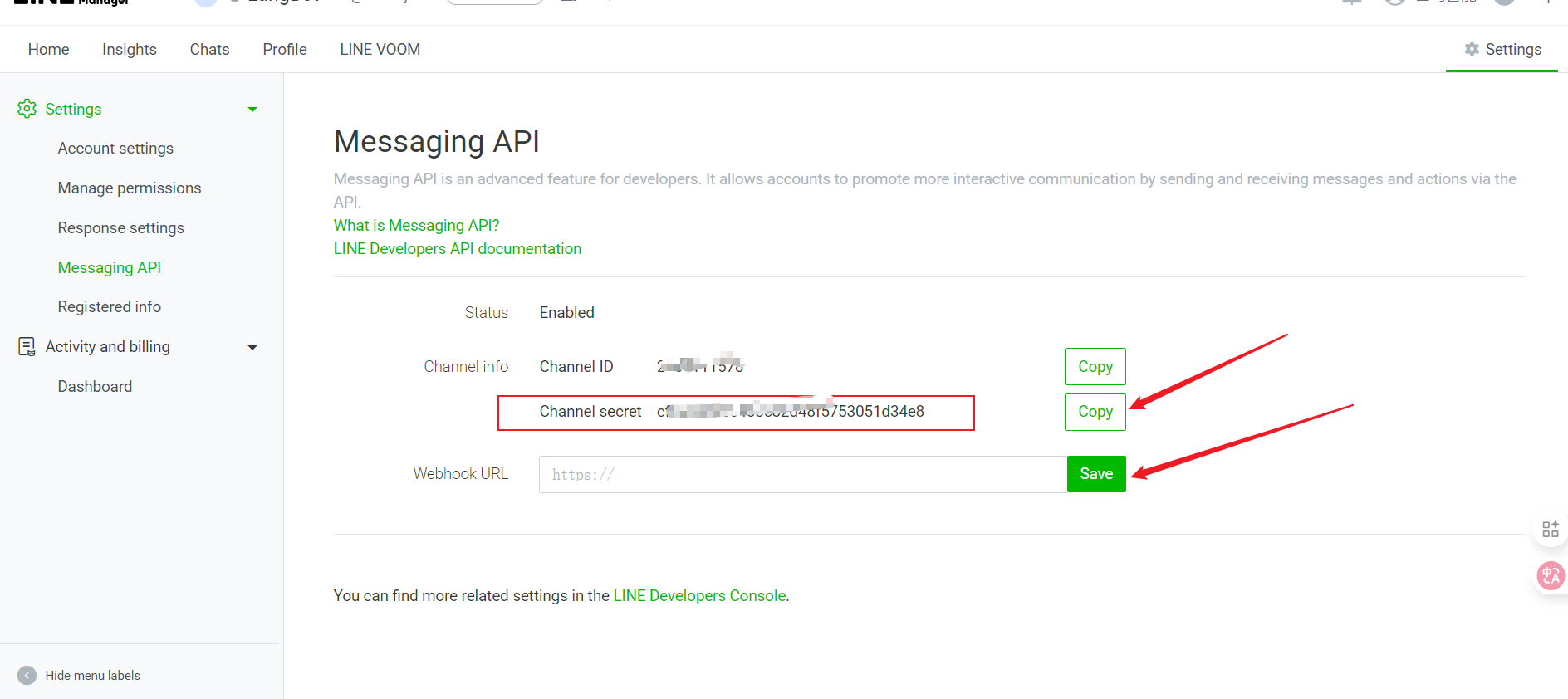
1. Channel Secret

> [刚刚点击使用跳转页面](https://manager.line.biz/account)

* 选择 Settings
  <img src="https://mintcdn.com/langbot/7LP8IdEMby3DrX2X/images/zh/deploy/bots/line/line09.png?fit=max&auto=format&n=7LP8IdEMby3DrX2X&q=85&s=2a676d5901bacc1bcfe7dd3e0273f51c" alt="alt text" width="1885" height="877" data-path="images/zh/deploy/bots/line/line09.png" />
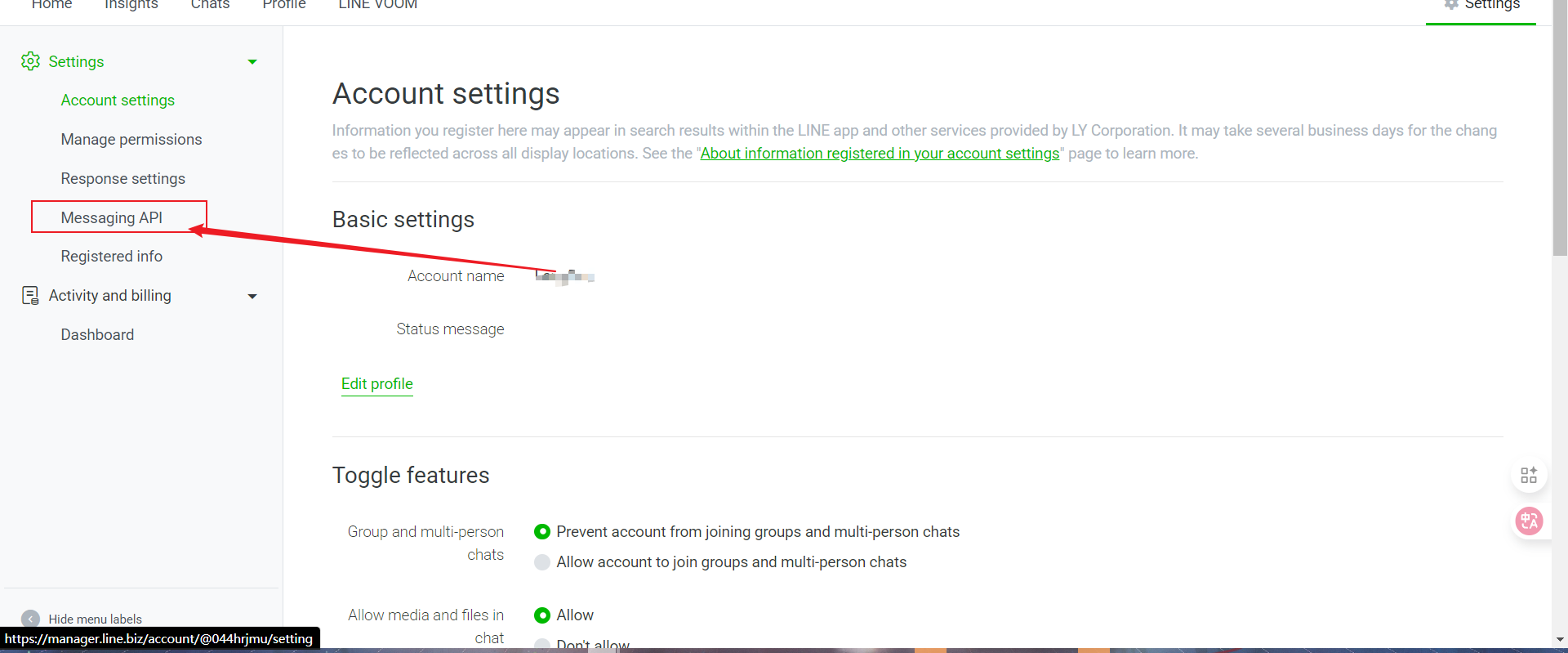
* 点击 Message API
  <img src="https://mintcdn.com/langbot/7LP8IdEMby3DrX2X/images/zh/deploy/bots/line/line11.png?fit=max&auto=format&n=7LP8IdEMby3DrX2X&q=85&s=75e2fcf21b5a10f00cf37c37ff866f86" alt="alt text" width="1920" height="799" data-path="images/zh/deploy/bots/line/line11.png" />
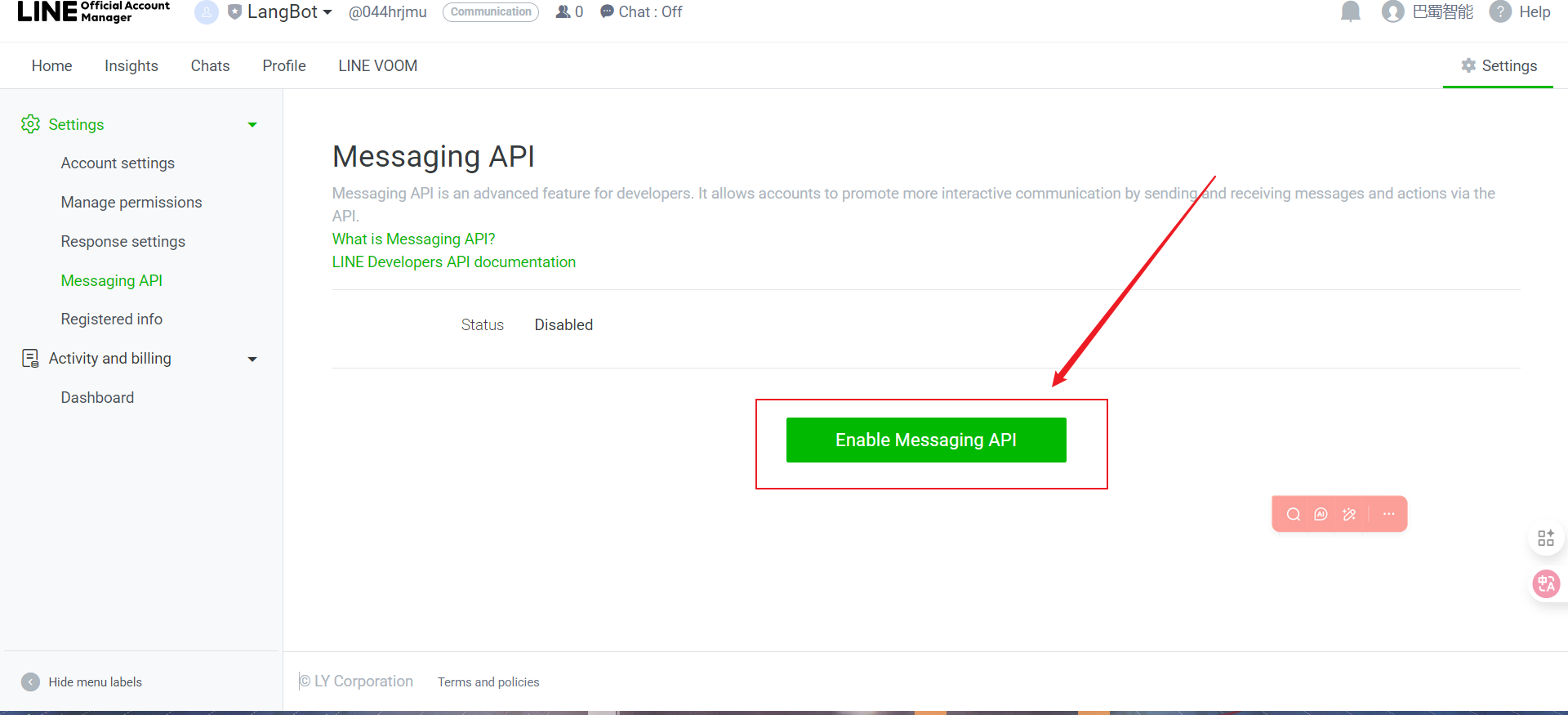
* 开启 Message API
  <img src="https://mintcdn.com/langbot/7LP8IdEMby3DrX2X/images/zh/deploy/bots/line/line12.png?fit=max&auto=format&n=7LP8IdEMby3DrX2X&q=85&s=e39e31b86a7266d4026f479c2e15ba6d" alt="alt text" width="1920" height="875" data-path="images/zh/deploy/bots/line/line12.png" />
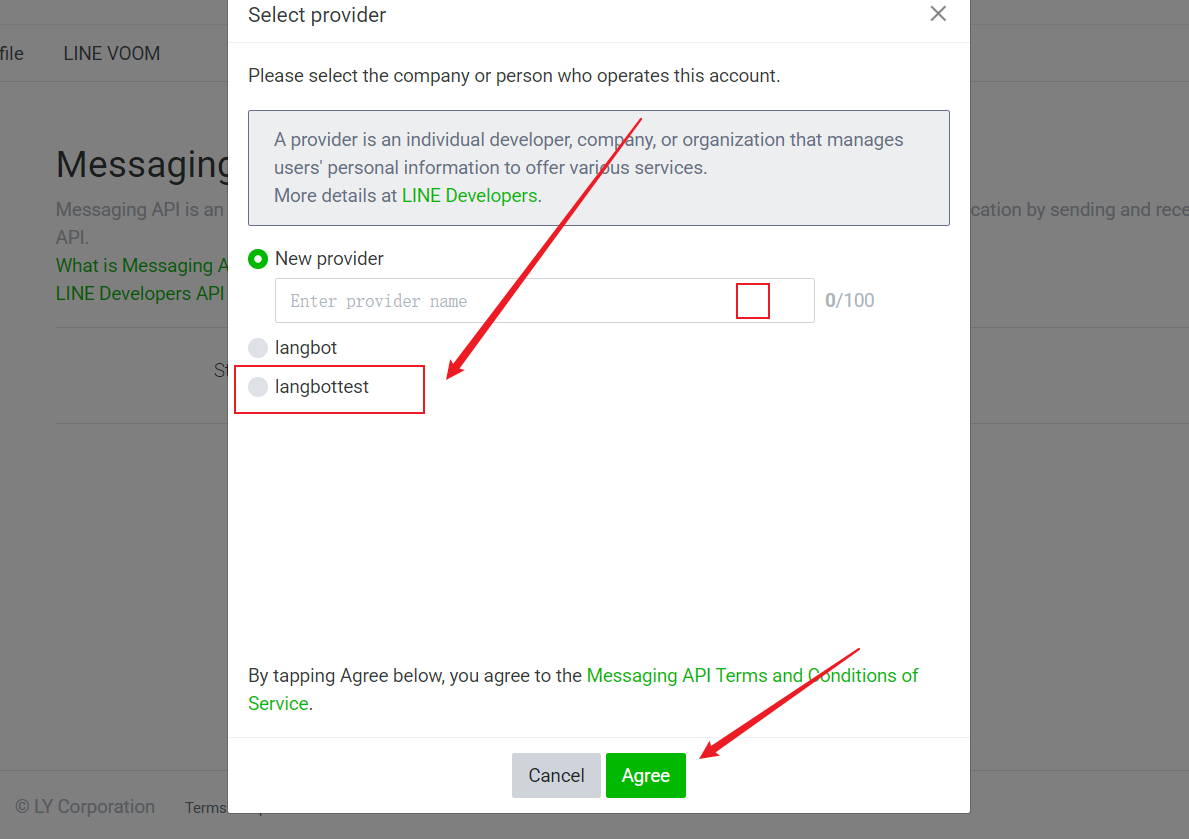
* 选择刚刚新建的 Provider 并点击 Agree
  <img src="https://mintcdn.com/langbot/7LP8IdEMby3DrX2X/images/zh/deploy/bots/line/line13.png?fit=max&auto=format&n=7LP8IdEMby3DrX2X&q=85&s=b3613a5a9ef8e22267b2c0b9c9759ea2" alt="alt text" width="1189" height="839" data-path="images/zh/deploy/bots/line/line13.png" />
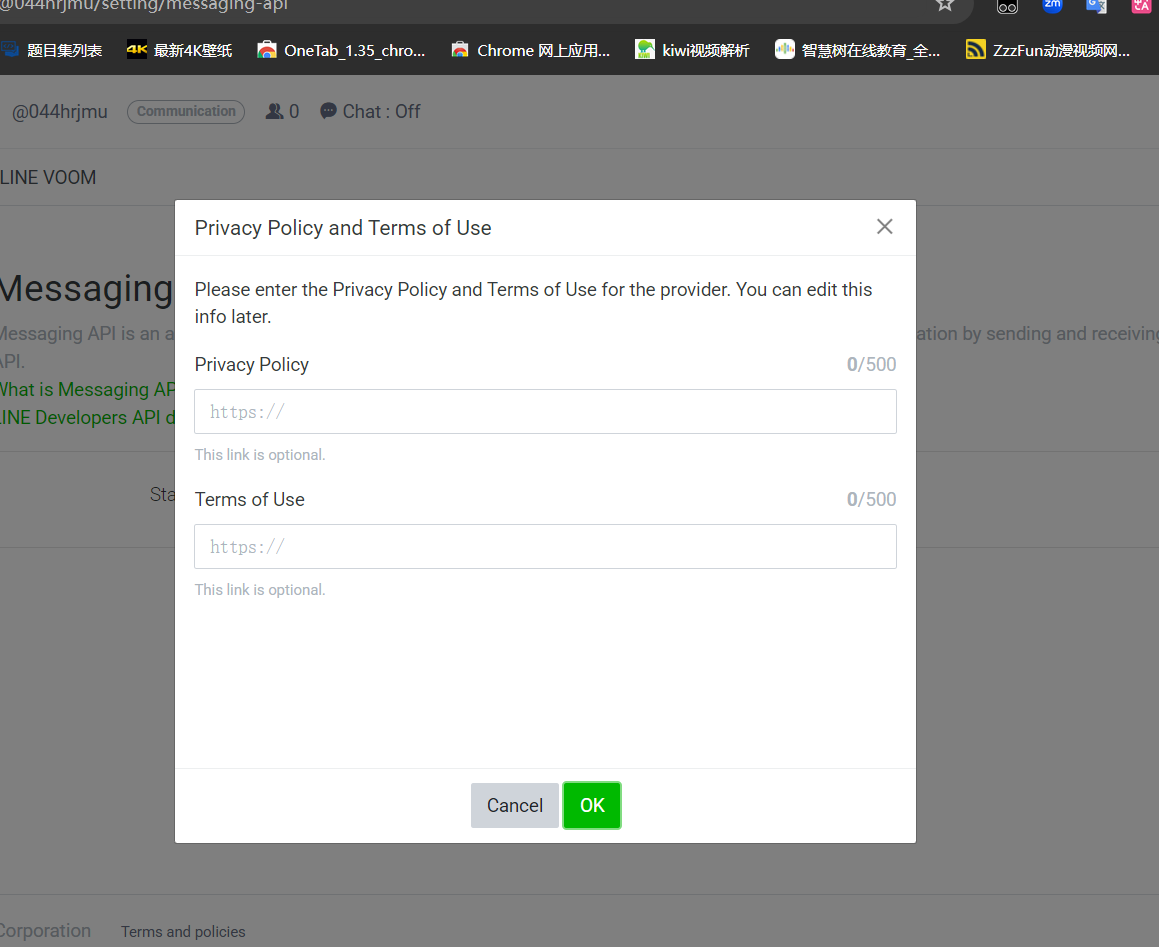
* 隐私条款直接点击 OK
  <img src="https://mintcdn.com/langbot/7LP8IdEMby3DrX2X/images/zh/deploy/bots/line/line14.png?fit=max&auto=format&n=7LP8IdEMby3DrX2X&q=85&s=b458e9e3db14b3fc6693085e24a7b899" alt="alt text" width="1159" height="947" data-path="images/zh/deploy/bots/line/line14.png" />
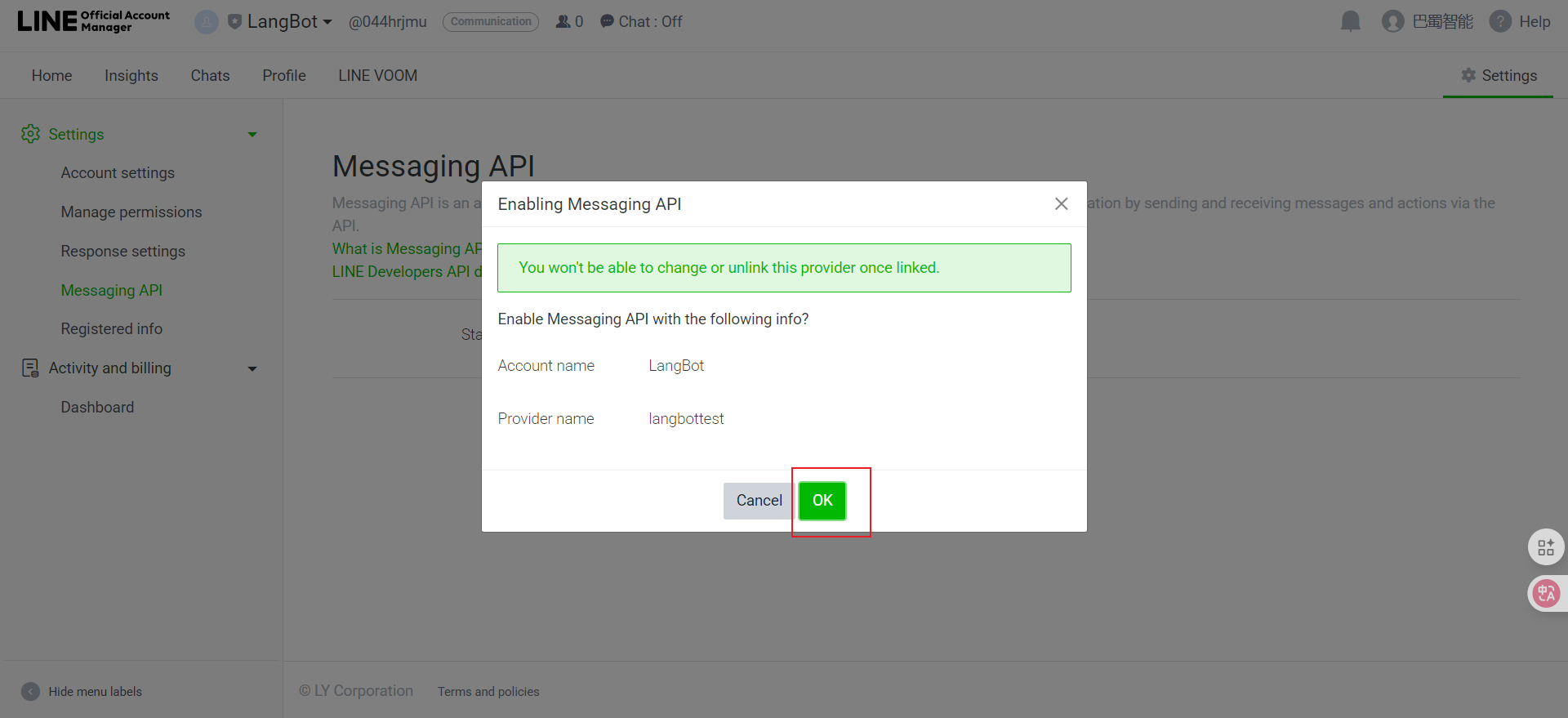
* 点击 OK 创建成功
  <img src="https://mintcdn.com/langbot/7LP8IdEMby3DrX2X/images/zh/deploy/bots/line/line15.png?fit=max&auto=format&n=7LP8IdEMby3DrX2X&q=85&s=7c91b666d54d183ee0a86dd16eda9cf5" alt="alt text" width="1920" height="879" data-path="images/zh/deploy/bots/line/line15.png" />
* Copy 即可
  <img src="https://mintcdn.com/langbot/7LP8IdEMby3DrX2X/images/zh/deploy/bots/line/line16.png?fit=max&auto=format&n=7LP8IdEMby3DrX2X&q=85&s=bc3457b23d78b4a08de6b856cf40e5f4" alt="alt text" width="1888" height="842" data-path="images/zh/deploy/bots/line/line16.png" />

2. Channel Access Token（需要点击 "Issue" 按钮生成）

* 点击控制台或者直接访问 [控制台](https://developers.line.biz/console/)
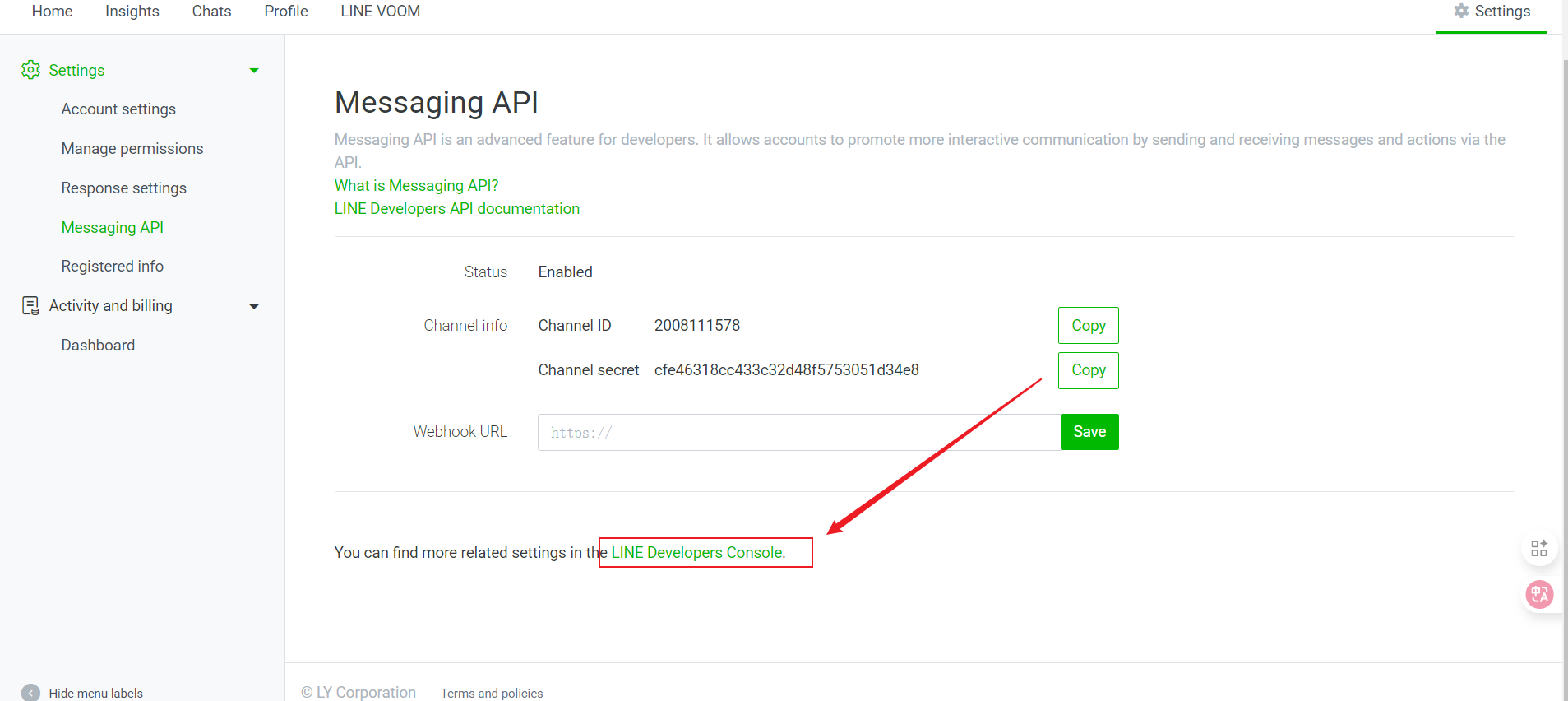
  <img src="https://mintcdn.com/langbot/7LP8IdEMby3DrX2X/images/zh/deploy/bots/line/line17.png?fit=max&auto=format&n=7LP8IdEMby3DrX2X&q=85&s=e60c4f29ea6d83e3e4d560bb951b3869" alt="alt text" width="1907" height="852" data-path="images/zh/deploy/bots/line/line17.png" />
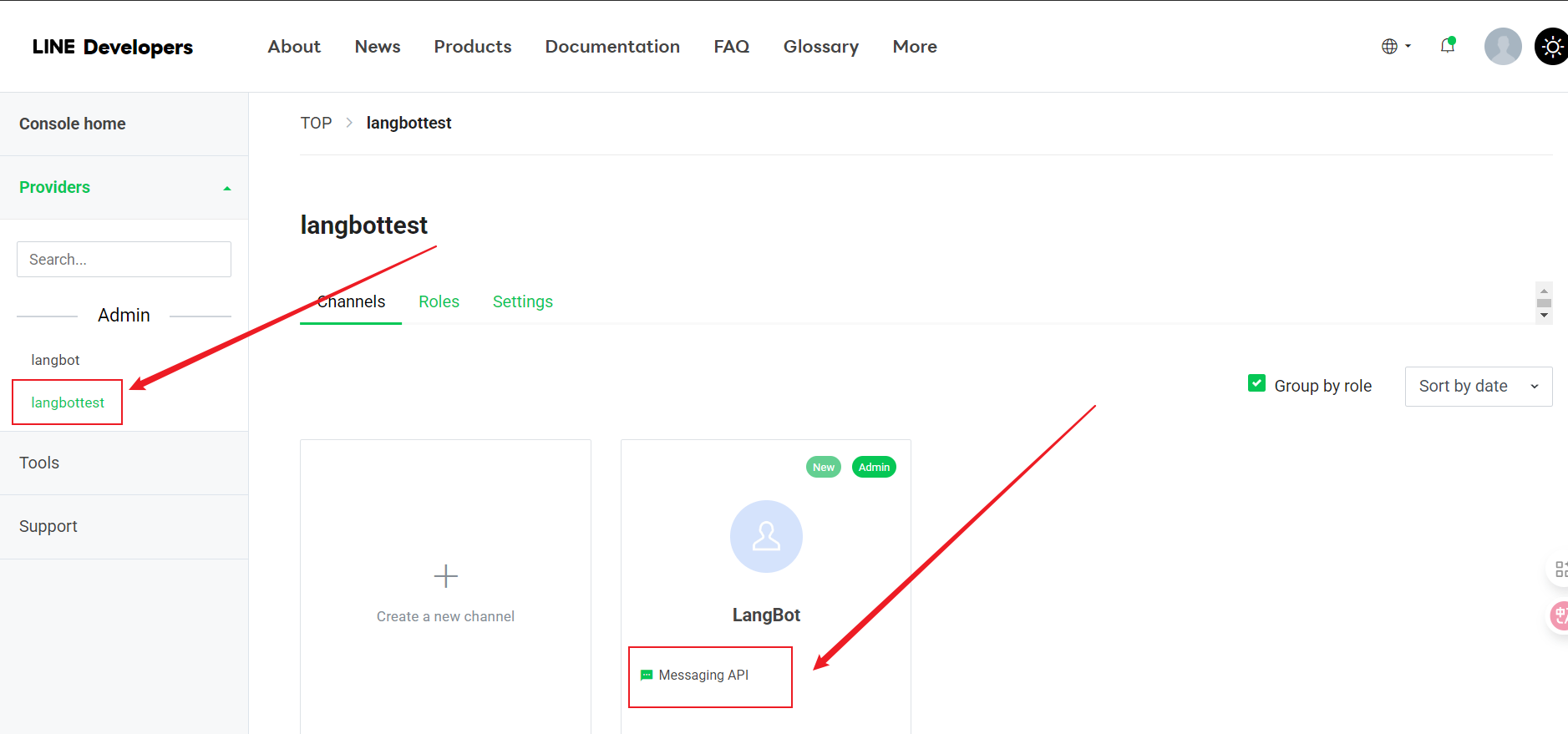
* 选择你创建的 Provider 并点击 Message API
  <img src="https://mintcdn.com/langbot/7LP8IdEMby3DrX2X/images/zh/deploy/bots/line/line18.png?fit=max&auto=format&n=7LP8IdEMby3DrX2X&q=85&s=a5d7e5d239240f2b75a4bc2a6288332c" alt="alt text" width="1877" height="879" data-path="images/zh/deploy/bots/line/line18.png" />
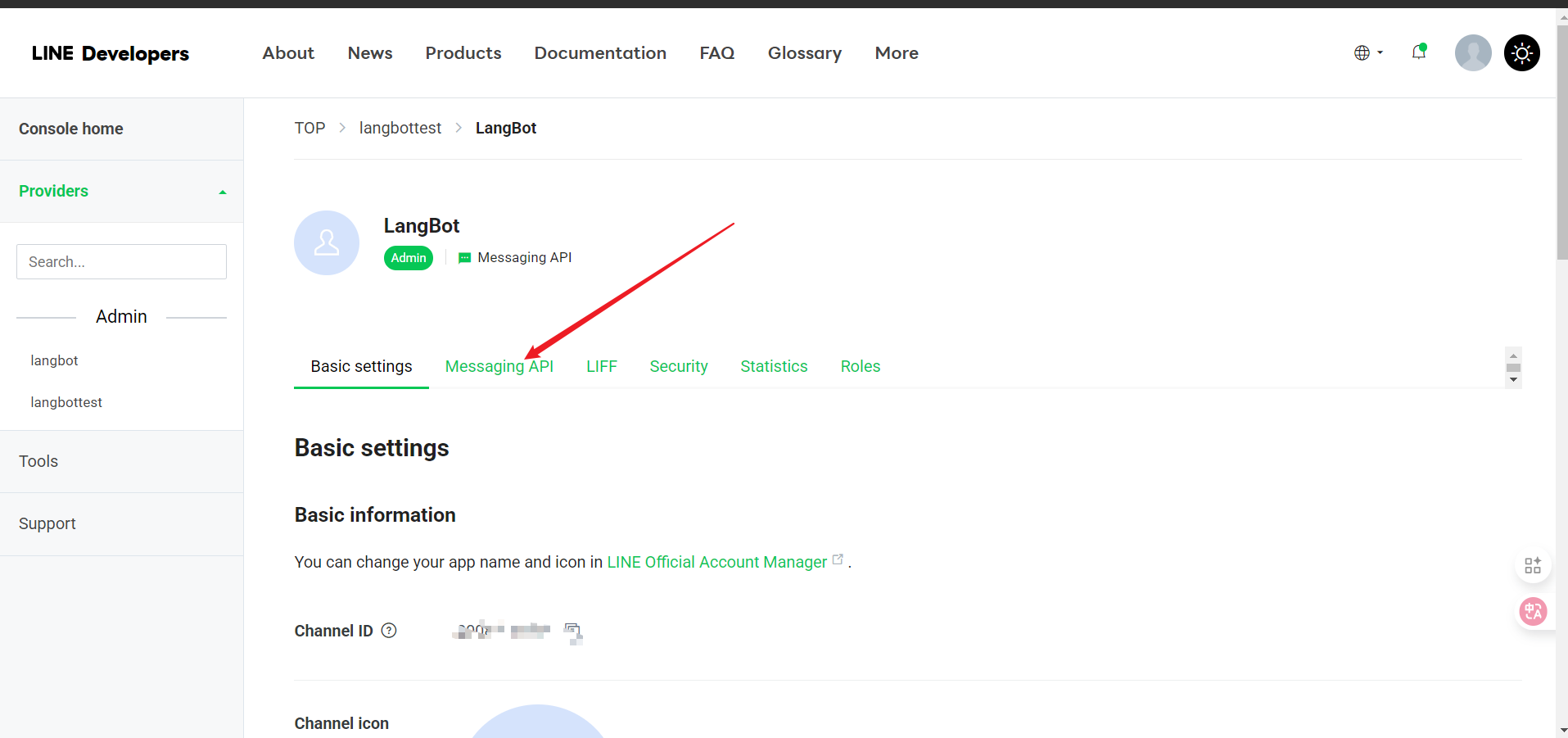
* 点击 Message API
  <img src="https://mintcdn.com/langbot/7LP8IdEMby3DrX2X/images/zh/deploy/bots/line/line19.png?fit=max&auto=format&n=7LP8IdEMby3DrX2X&q=85&s=614d84c02e8fb34a92a97e8ae64dcaa1" alt="alt text" width="1915" height="901" data-path="images/zh/deploy/bots/line/line19.png" />
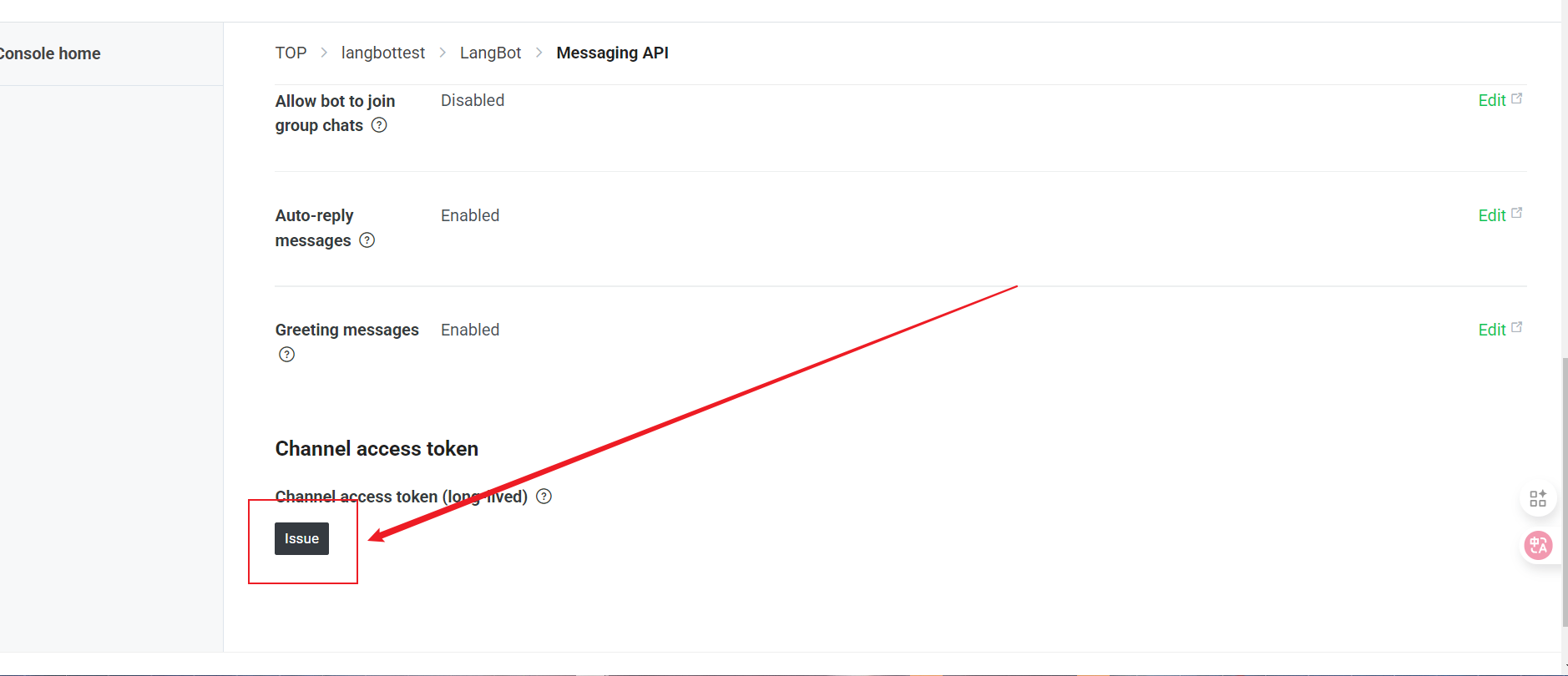
* 下滑到最下面，点击 Issue
  <img src="https://mintcdn.com/langbot/7LP8IdEMby3DrX2X/images/zh/deploy/bots/line/line20.png?fit=max&auto=format&n=7LP8IdEMby3DrX2X&q=85&s=e35012762bee2c9bcbdf48a83ee42639" alt="alt text" width="1878" height="810" data-path="images/zh/deploy/bots/line/line20.png" />
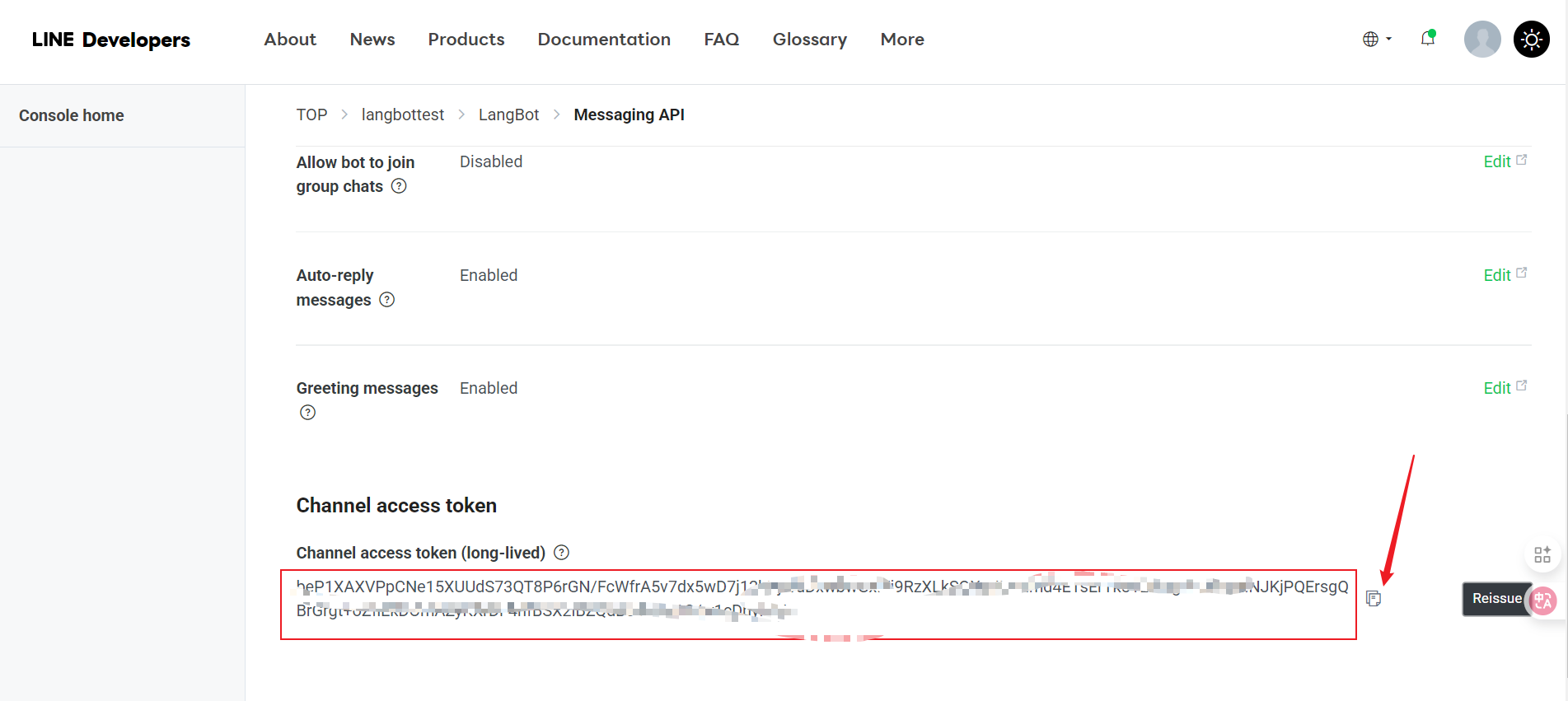
* 点击图标复制
  <img src="https://mintcdn.com/langbot/7LP8IdEMby3DrX2X/images/zh/deploy/bots/line/line21.png?fit=max&auto=format&n=7LP8IdEMby3DrX2X&q=85&s=566ff66cac84a039e8ec4b87495f86cb" alt="alt text" width="1903" height="851" data-path="images/zh/deploy/bots/line/line21.png" />

## 对接 LangBot

接下来打开 LangBot 配置页面：

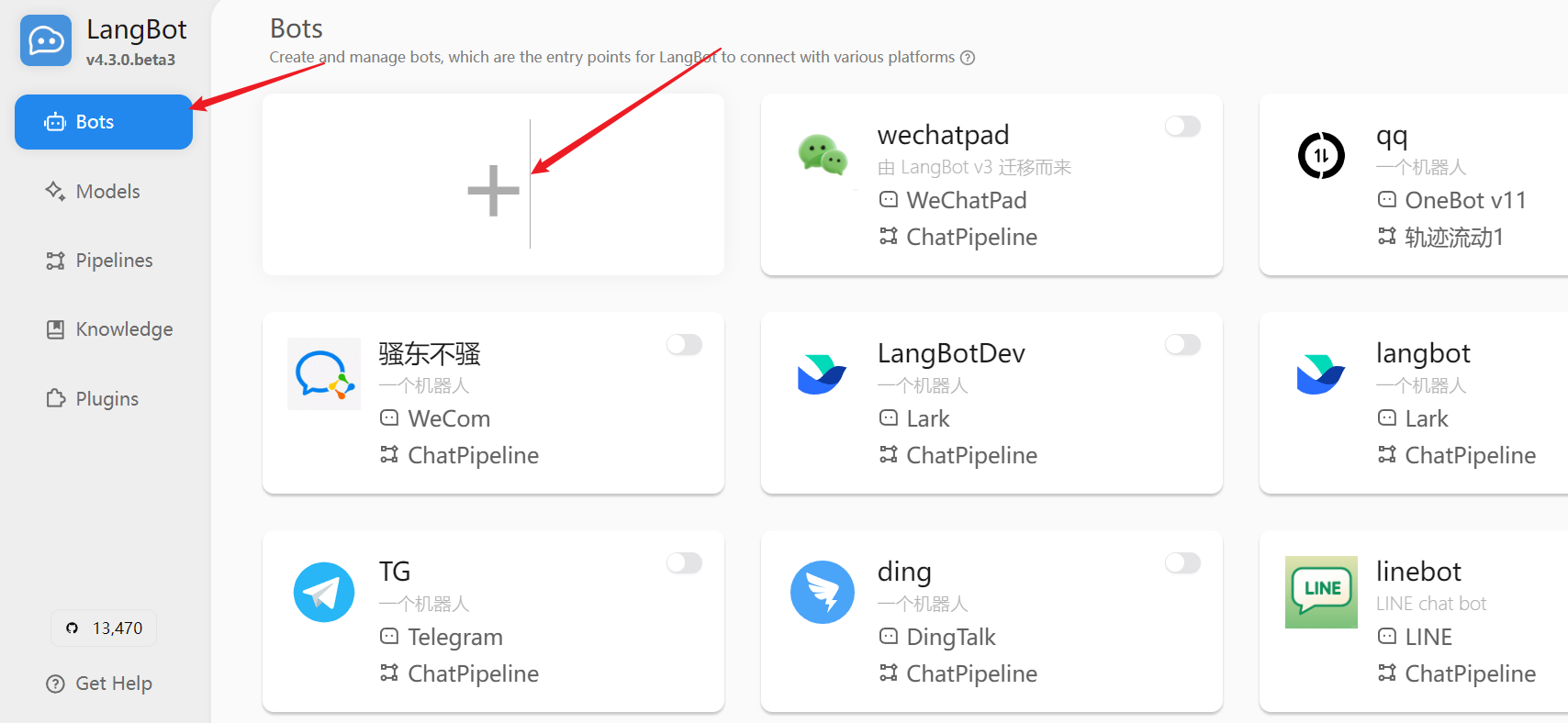
1. 点击 "机器人"，然后点击 "添加"
   <img src="https://mintcdn.com/langbot/7LP8IdEMby3DrX2X/images/zh/deploy/bots/line/line26.png?fit=max&auto=format&n=7LP8IdEMby3DrX2X&q=85&s=f0cc67db904c7cbdfc8fd9454edc44dc" alt="alt text" width="1708" height="788" data-path="images/zh/deploy/bots/line/line26.png" />

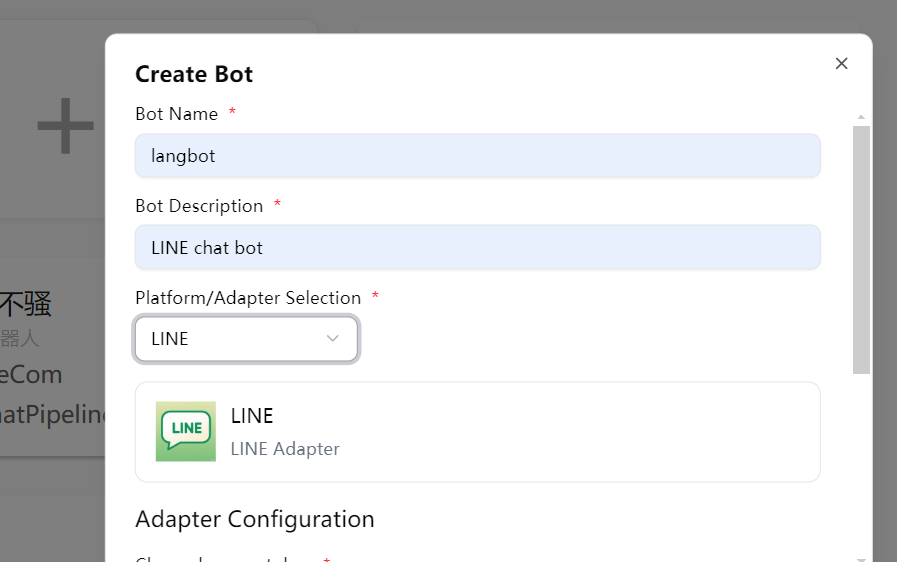
2. 在 "平台/适配器选择" 中选择 "LINE"
   <img src="https://mintcdn.com/langbot/7LP8IdEMby3DrX2X/images/zh/deploy/bots/line/line27.png?fit=max&auto=format&n=7LP8IdEMby3DrX2X&q=85&s=743d78febb3a87f7fe6736e1a277765a" alt="alt text" width="897" height="562" data-path="images/zh/deploy/bots/line/line27.png" />

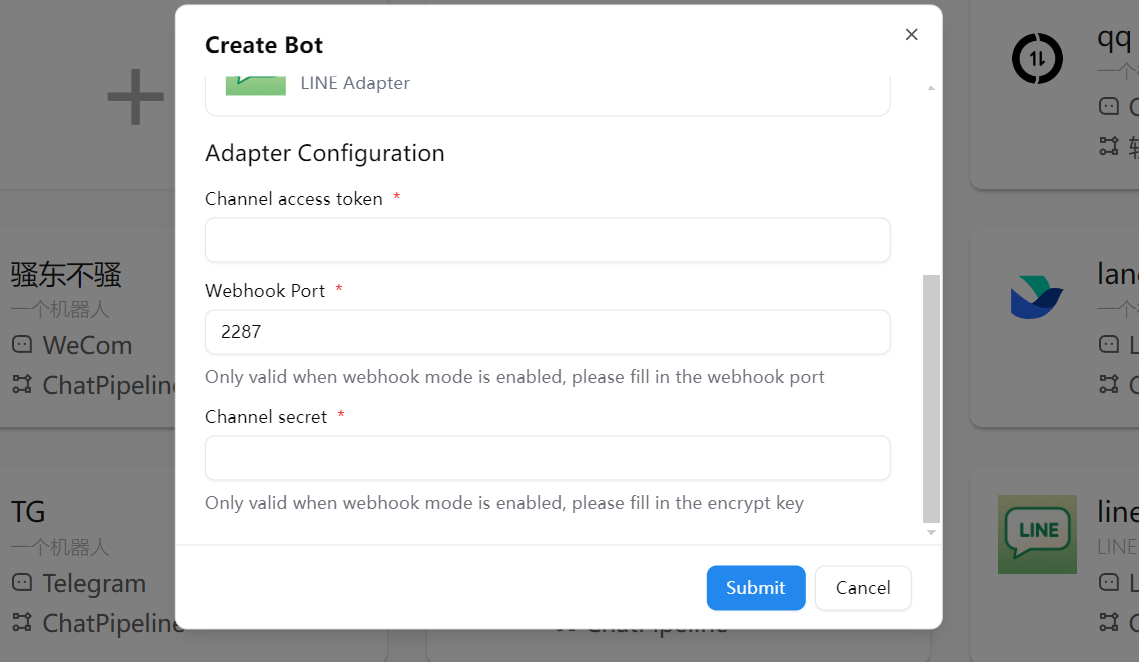
3. 填写配置信息：
   * Channel Secret：您之前获取的 Channel Secret
   * Channel Access Token：您之前获取的 Channel Access Token
     <img src="https://mintcdn.com/langbot/7LP8IdEMby3DrX2X/images/zh/deploy/bots/line/line28.png?fit=max&auto=format&n=7LP8IdEMby3DrX2X&q=85&s=62abe5cdc3df626137ad766fc234f51b" alt="alt text" width="1139" height="662" data-path="images/zh/deploy/bots/line/line28.png" />

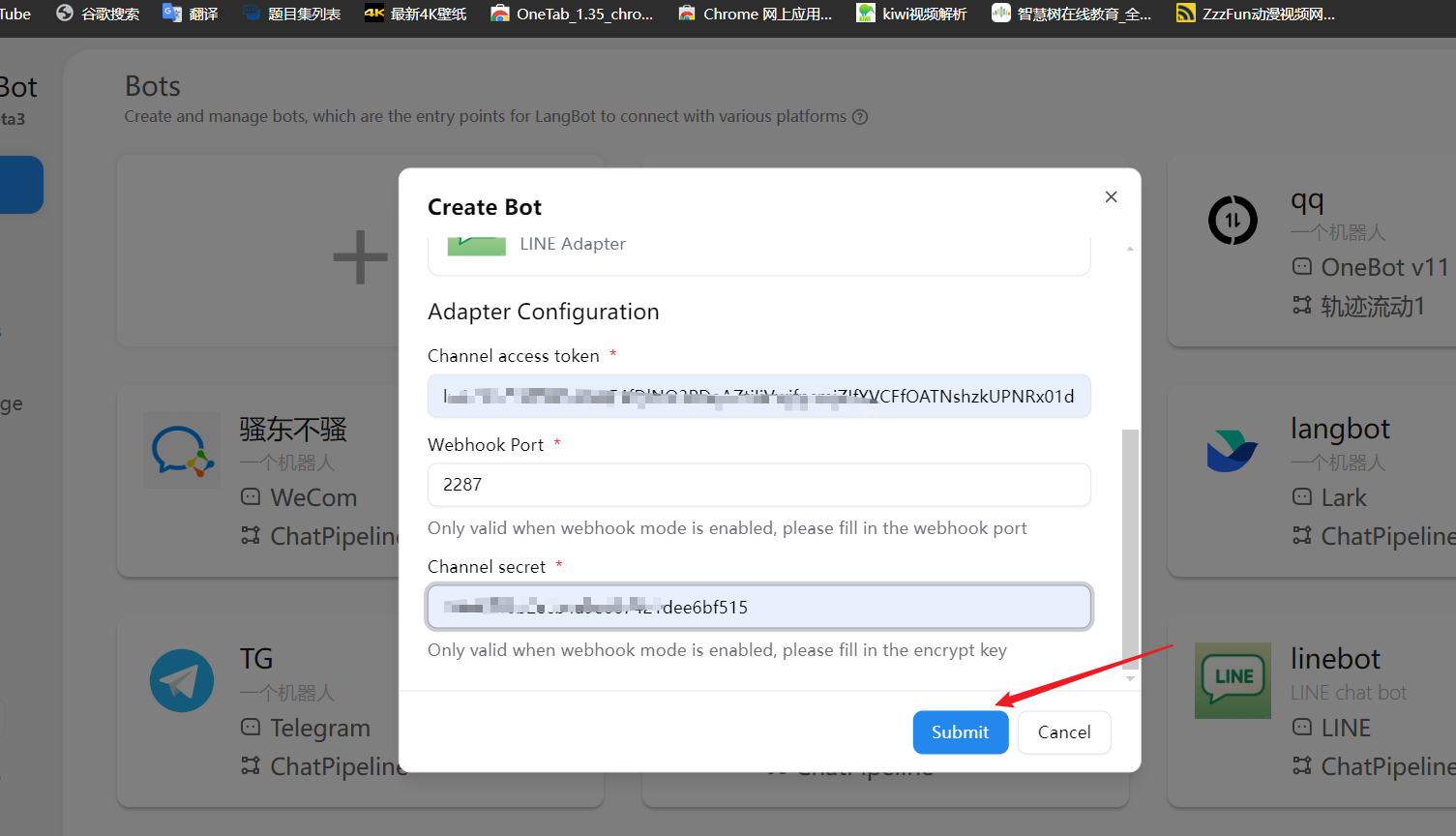
4. 点击 "保存" 完成配置
   <img src="https://mintcdn.com/langbot/7LP8IdEMby3DrX2X/images/zh/deploy/bots/line/line29.png?fit=max&auto=format&n=7LP8IdEMby3DrX2X&q=85&s=66ff6ac8ecd301964eb542fa91a3c4c6" alt="alt text" width="1505" height="864" data-path="images/zh/deploy/bots/line/line29.png" />

## 配置Webhook

<Info>
  推荐您先参照[配置 HTTP 反向代理](/zh/workshop/production/proxy-and-ssl)来配置 LangBot 回调地址。
</Info>

<Tip>
  **不想配置公网和域名？** [LangBot Cloud](https://space.langbot.app/cloud) 自带域名和 HTTPS，开箱即用。
</Tip>

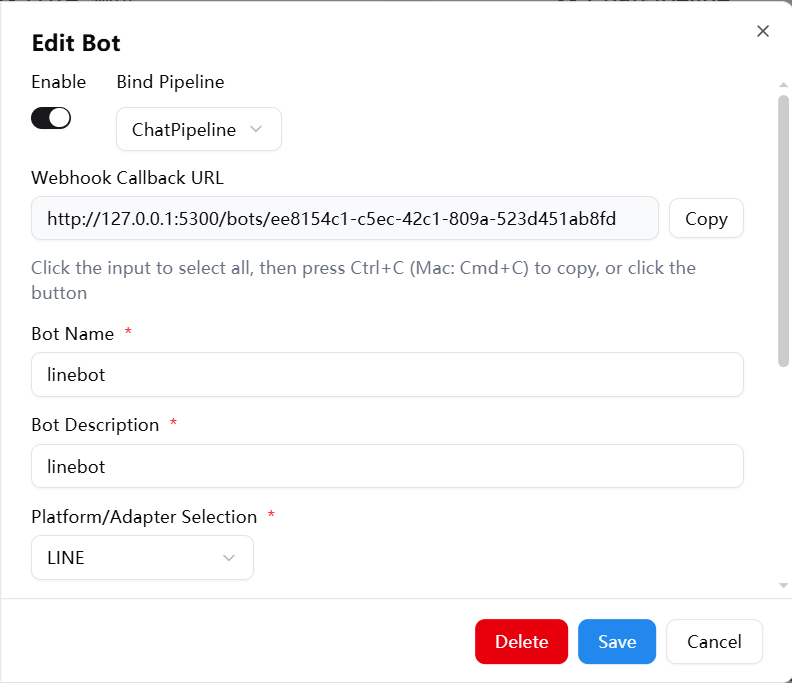
* 从 LangBot 配置页面获取 Webhook 回调地址
  <img src="https://mintcdn.com/langbot/7LP8IdEMby3DrX2X/images/zh/deploy/bots/line/line30.png?fit=max&auto=format&n=7LP8IdEMby3DrX2X&q=85&s=88649dd82d77e3e7b39a28bdeab847b5" alt="alt text" width="792" height="683" data-path="images/zh/deploy/bots/line/line30.png" />

* 点击控制台或者直接访问 [控制台](https://developers.line.biz/console/)
  <img src="https://mintcdn.com/langbot/7LP8IdEMby3DrX2X/images/zh/deploy/bots/line/line17.png?fit=max&auto=format&n=7LP8IdEMby3DrX2X&q=85&s=e60c4f29ea6d83e3e4d560bb951b3869" alt="alt text" width="1907" height="852" data-path="images/zh/deploy/bots/line/line17.png" />

* 选择你创建的 Provider 并点击 Message API
  <img src="https://mintcdn.com/langbot/7LP8IdEMby3DrX2X/images/zh/deploy/bots/line/line18.png?fit=max&auto=format&n=7LP8IdEMby3DrX2X&q=85&s=a5d7e5d239240f2b75a4bc2a6288332c" alt="alt text" width="1877" height="879" data-path="images/zh/deploy/bots/line/line18.png" />

* 点击 Message API
  <img src="https://mintcdn.com/langbot/7LP8IdEMby3DrX2X/images/zh/deploy/bots/line/line19.png?fit=max&auto=format&n=7LP8IdEMby3DrX2X&q=85&s=614d84c02e8fb34a92a97e8ae64dcaa1" alt="alt text" width="1915" height="901" data-path="images/zh/deploy/bots/line/line19.png" />

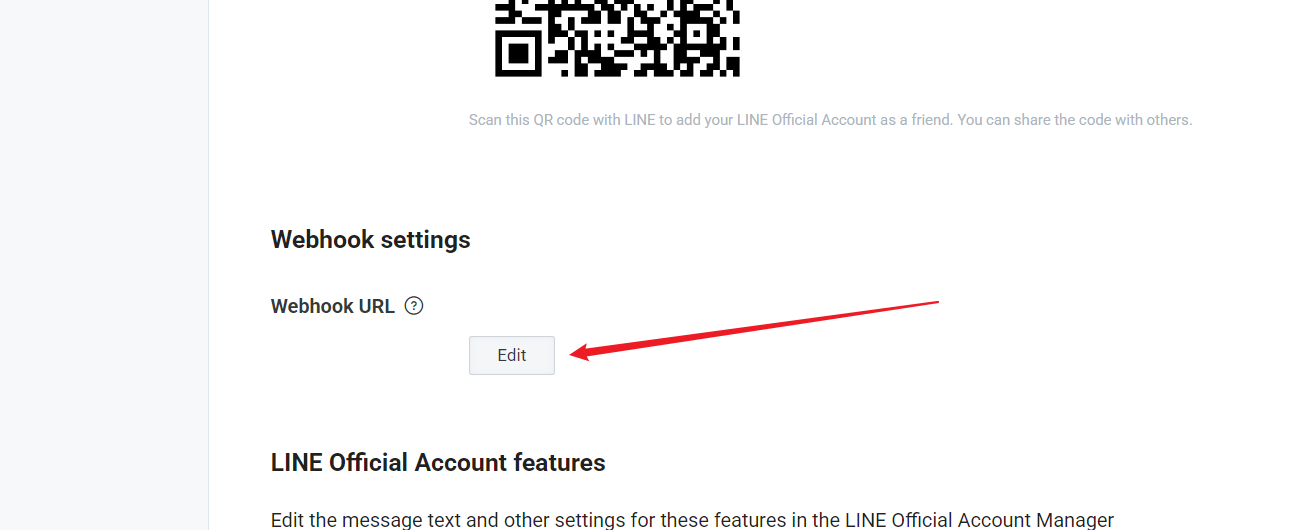
* 点击 Edit 填写连接
  <img src="https://mintcdn.com/langbot/7LP8IdEMby3DrX2X/images/zh/deploy/bots/line/line22.png?fit=max&auto=format&n=7LP8IdEMby3DrX2X&q=85&s=592b1d1c314e431058921db1b323ddaf" alt="alt text" width="1315" height="530" data-path="images/zh/deploy/bots/line/line22.png" />

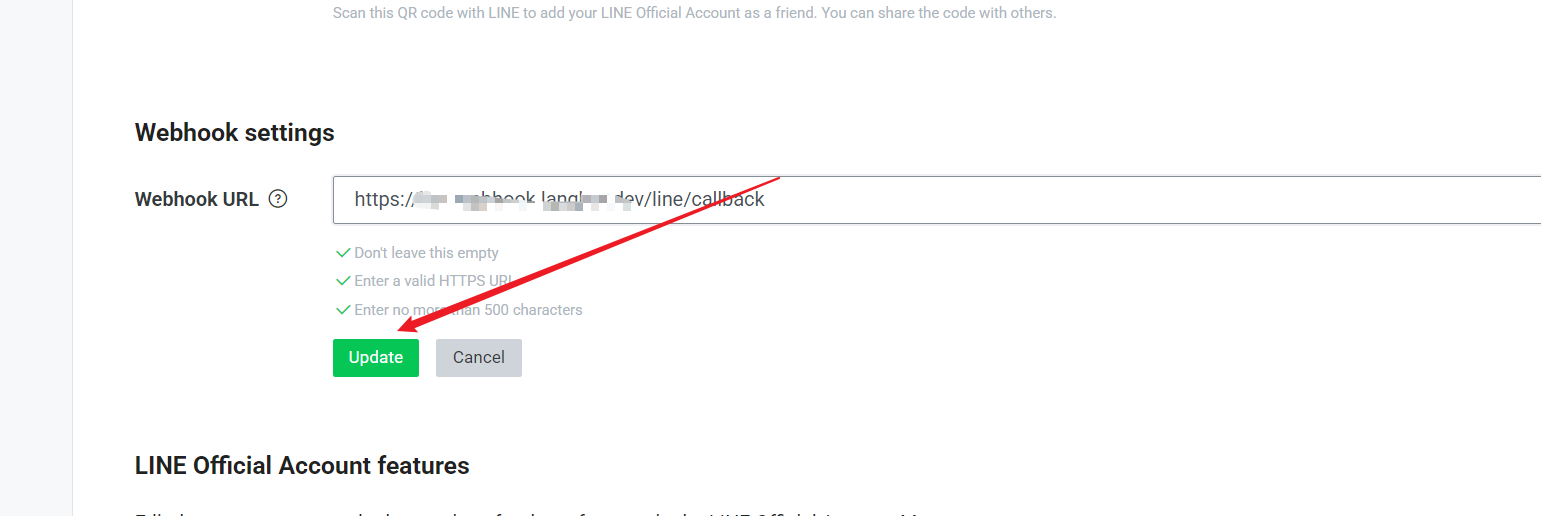
* 填入连接（必须要 HTTPS 的连接，也就是要 SSL 证书），点击 Update
  <img src="https://mintcdn.com/langbot/7LP8IdEMby3DrX2X/images/zh/deploy/bots/line/line23.png?fit=max&auto=format&n=7LP8IdEMby3DrX2X&q=85&s=659b9924ca2c21a9882df5e2b0acd3d6" alt="alt text" width="1541" height="516" data-path="images/zh/deploy/bots/line/line23.png" />

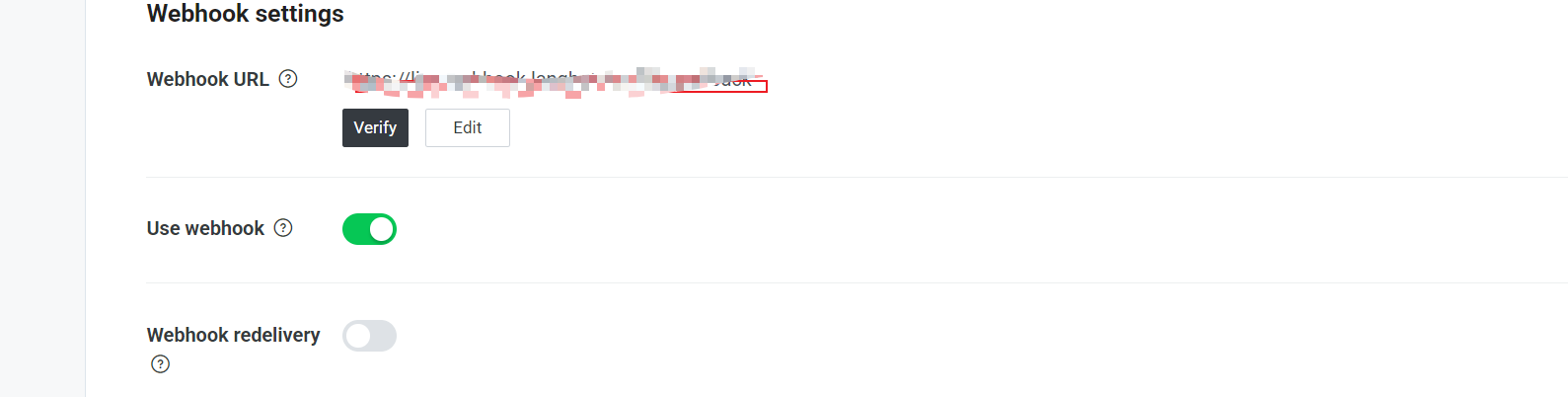
* 选择 Use Webhook
  <img src="https://mintcdn.com/langbot/7LP8IdEMby3DrX2X/images/zh/deploy/bots/line/line24.png?fit=max&auto=format&n=7LP8IdEMby3DrX2X&q=85&s=99bf16e4f595ecc9d0ec23cc6c83dd10" alt="alt text" width="1589" height="402" data-path="images/zh/deploy/bots/line/line24.png" />

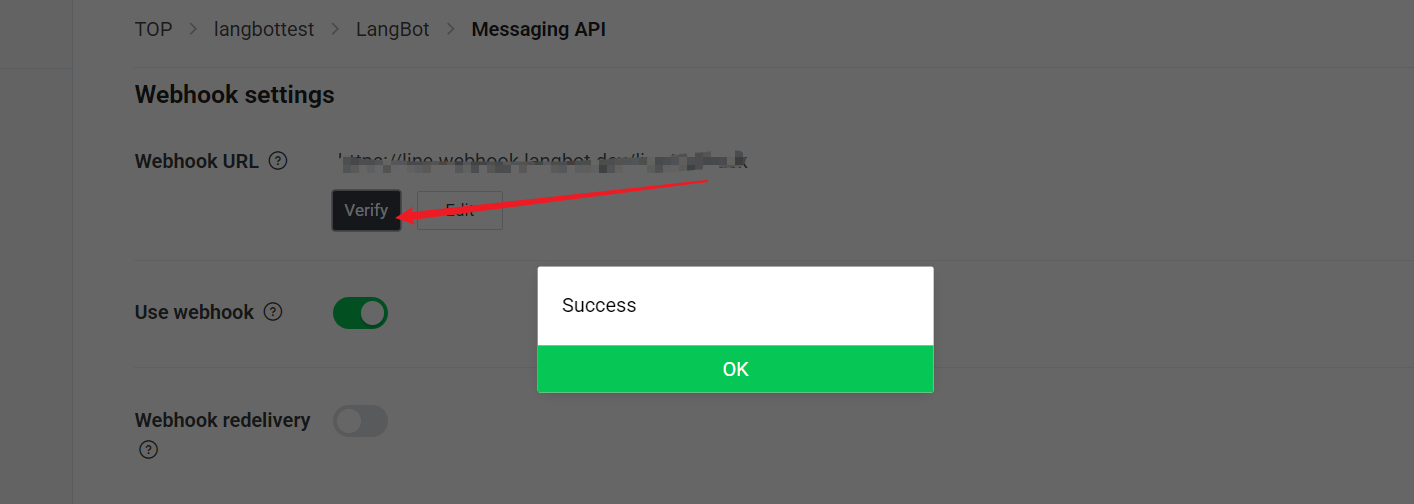
5. 点击 "Verify" 按钮测试连接是否成功
   <img src="https://mintcdn.com/langbot/7LP8IdEMby3DrX2X/images/zh/deploy/bots/line/line25.png?fit=max&auto=format&n=7LP8IdEMby3DrX2X&q=85&s=6fd5d9d9a0a68b0e068e251726c92b49" alt="alt text" width="1414" height="504" data-path="images/zh/deploy/bots/line/line25.png" />

## 功能配置

在 LINE 开发者控制台中，您可以进一步配置机器人的功能：

1. 在 "Messaging API" 选项卡中，找到 "LINE Official Account Features" 部分
2. 根据需要开启或关闭以下功能：
   * 自动回复消息
   * 加好友欢迎消息
   * 群组和多人聊天
   * 机器人加入群组时的问候语

## 使用

配置完成后，用户可以通过以下方式与您的 LINE 机器人互动：

1. 扫描 LINE 开发者控制台中提供的 QR 码添加机器人为好友
2. 在聊天中发送消息，机器人将通过 LangBot 处理并回复

## 常见问题

### Webhook 验证失败

* 确保您的服务器可以通过 HTTPS 访问
* 检查 Webhook URL 是否正确
* 确认 LangBot 服务是否正常运行

### 消息无法接收

* 检查 Channel Access Token 是否有效
* 确认 "Use Webhook" 选项已开启
* 查看 LangBot 日志是否有错误信息

### 权限问题

* 确保您已在 LINE 开发者控制台中为机器人开启了必要的权限
* 对于某些高级功能，可能需要 LINE Premium 账号