> ## Documentation Index
> Fetch the complete documentation index at: https://docs.langbot.app/llms.txt
> Use this file to discover all available pages before exploring further.
# 消息平台实体
LangBot 支持多种消息平台,每个消息平台的`消息实体`格式均不相同。为了屏蔽这些差异,我们实现了一套统一的标准。插件开发者只需要掌握并在插件中使用此页所述的消息实体,LangBot 内部的消息处理逻辑能够自动完成消息的解析和转换。
## 消息链
消息平台的`消息`不同于用于 AI 交互的消息,消息平台的消息以`消息链`的形式描述,QQ 上展示的每一个独立的消息就是一条消息链,消息链中可以包含`文字`、`图片`、`@组件`等多种`消息链组件`,例如:
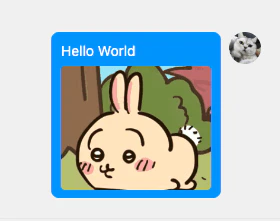 这就是一个消息链,包含 一个 Plain 组件(Hello World)和 一个 Image 组件(乌萨奇)
消息链和消息链组件的定义位于`langbot_plugin.api.entities.builtin.platform.message`中。
### 构造消息链
请先引入`langbot_plugin.api.entities.builtin.platform.message`包,才能使用其中的消息组件。
```python theme={null}
from langbot_plugin.api.entities.builtin.platform.message import *
# 构建一个包含文字 Hello LangBot 和图片(从URL获取)的消息
msg_chain = MessageChain([
Plain(text="Hello LangBot"),
Image(url='https://qchatgpt.rockchin.top/langbot-logo.png')
])
# 构建一个包含 @全体成员 和文字 Hello LangBot 的消息
msg_chain = MessageChain([
AtAll(),
Plain(text="Hello LangBot")
])
# 构建一个包含 @指定成员 和文字 Hello LangBot 的消息
msg_chain = MessageChain([
At(target=123456),
Plain(text="Hello LangBot")
])
```
目前支持的消息链组件:
* `Source` 源消息链信息,如果是从消息平台收到的消息,都会在消息链最前端包含此组件,记录消息信息
* `Plain` 纯文本消息
* `Quote` 引用消息
* `Image` 图片消息
* `AtAll` @全体成员消息
* `At` @指定成员消息
* `Voice` 语音消息
* 需要检查消息平台支持性
* `Forward` 转发消息
* 在很多平台不受支持,不建议使用
* `File` 文件消息
创建组件时,须使用具名参数传入。具体使用方式可以查看源码`langbot_plugin.api.entities.builtin.platform.message`中的定义。
## 其他实体
除了上述实体之外,还有`好友 Friend`和`群 Group`等实体,这些实体的定义位于`langbot_plugin.api.entities.platform.entities`中。
## 访问消息平台底层 API
4.x 暂不适用。
为了抹平各个平台的差异,LangBot 在消息平台API之上,提供了一个抽象层,即上方所述的内容,以及`pkg/platform/sources`目录下的各个平台适配器。\
但由于各个平台的差异较大,抽象层内的实体和 API 封装并不完整,如果您的插件需要访问特定平台的功能,可以按照以下说明访问底层 API。
```python theme={null}
# 例如在插件中
@handler(GroupMessageReceived)
async def _(self, ctx: EventContext):
# 取得适配器对象
adapter = ctx.query.adapter
```
| 平台 | 适配器 | 访问方式 | 说明 |
| ---------- | --------------- | ------------------- | ------------------------------------------------------------------------------------------------------------------------------------------------------------------ |
| OneBot v11 | aiocqhttp | adapter.bot | bot 对象对应 [aiocqhttp](https://github.com/nonebot/aiocqhttp) 的 CQHttp 对象,详细使用方式请参考 aiocqhttp 文档 |
| QQ 官方API | qqofficial | adapter.bot | bot 对象为 libs/qq\_official\_api 下的 SDK 对象,详细使用方式可以参考 libs/qq\_official\_api/api.py 中`QQOfficialClient`中的`send_group_text_msg`方法发起 HTTP 请求的方式,具体接口文档请查看 QQ 官方 API 文档 |
| 企业微信 | wecom | adapter.bot | 参考 libs/wecom\_api/api.py 中`WecomClient`中的`send_image`方法发起 HTTP 请求的方式,具体接口文档请查看企业微信 API 文档 |
| 微信公众号 | officialaccount | - | 请参考微信公众号的 API 文档中的接口文档信息,相关的凭据信息可以在 adapter.bot 中取得 |
| 飞书 | lark | adapter.api\_client | 飞书 SDK 的 API Client 对象,具体请参考[oapi-sdk-python](https://github.com/larksuite/oapi-sdk-python) |
| 钉钉 | dingtalk | - | 请参考钉钉 API 文档,相关的凭据信息可以在 adapter.bot 中取得 |
| Discord | discord | adapter.bot | bot 对象为 [Rapptz/discord.py](https://github.com/Rapptz/discord.py) 的 Discord 对象,详细使用方式请参考文档 |
| Telegram | telegram | adapter.bot | bot 对象为 [python-telegram-bot](https://github.com/python-telegram-bot/python-telegram-bot) 的 Telegram 对象,详细使用方式请参考文档 |
| Slack | slack | adapter.bot | bot 对象 libs/slack\_api/api.py 中的对象,详细使用方式请参考其代码以及 Slack SDK |
这就是一个消息链,包含 一个 Plain 组件(Hello World)和 一个 Image 组件(乌萨奇)
消息链和消息链组件的定义位于`langbot_plugin.api.entities.builtin.platform.message`中。
### 构造消息链
请先引入`langbot_plugin.api.entities.builtin.platform.message`包,才能使用其中的消息组件。
```python theme={null}
from langbot_plugin.api.entities.builtin.platform.message import *
# 构建一个包含文字 Hello LangBot 和图片(从URL获取)的消息
msg_chain = MessageChain([
Plain(text="Hello LangBot"),
Image(url='https://qchatgpt.rockchin.top/langbot-logo.png')
])
# 构建一个包含 @全体成员 和文字 Hello LangBot 的消息
msg_chain = MessageChain([
AtAll(),
Plain(text="Hello LangBot")
])
# 构建一个包含 @指定成员 和文字 Hello LangBot 的消息
msg_chain = MessageChain([
At(target=123456),
Plain(text="Hello LangBot")
])
```
目前支持的消息链组件:
* `Source` 源消息链信息,如果是从消息平台收到的消息,都会在消息链最前端包含此组件,记录消息信息
* `Plain` 纯文本消息
* `Quote` 引用消息
* `Image` 图片消息
* `AtAll` @全体成员消息
* `At` @指定成员消息
* `Voice` 语音消息
* 需要检查消息平台支持性
* `Forward` 转发消息
* 在很多平台不受支持,不建议使用
* `File` 文件消息
创建组件时,须使用具名参数传入。具体使用方式可以查看源码`langbot_plugin.api.entities.builtin.platform.message`中的定义。
## 其他实体
除了上述实体之外,还有`好友 Friend`和`群 Group`等实体,这些实体的定义位于`langbot_plugin.api.entities.platform.entities`中。
## 访问消息平台底层 API
4.x 暂不适用。
为了抹平各个平台的差异,LangBot 在消息平台API之上,提供了一个抽象层,即上方所述的内容,以及`pkg/platform/sources`目录下的各个平台适配器。\
但由于各个平台的差异较大,抽象层内的实体和 API 封装并不完整,如果您的插件需要访问特定平台的功能,可以按照以下说明访问底层 API。
```python theme={null}
# 例如在插件中
@handler(GroupMessageReceived)
async def _(self, ctx: EventContext):
# 取得适配器对象
adapter = ctx.query.adapter
```
| 平台 | 适配器 | 访问方式 | 说明 |
| ---------- | --------------- | ------------------- | ------------------------------------------------------------------------------------------------------------------------------------------------------------------ |
| OneBot v11 | aiocqhttp | adapter.bot | bot 对象对应 [aiocqhttp](https://github.com/nonebot/aiocqhttp) 的 CQHttp 对象,详细使用方式请参考 aiocqhttp 文档 |
| QQ 官方API | qqofficial | adapter.bot | bot 对象为 libs/qq\_official\_api 下的 SDK 对象,详细使用方式可以参考 libs/qq\_official\_api/api.py 中`QQOfficialClient`中的`send_group_text_msg`方法发起 HTTP 请求的方式,具体接口文档请查看 QQ 官方 API 文档 |
| 企业微信 | wecom | adapter.bot | 参考 libs/wecom\_api/api.py 中`WecomClient`中的`send_image`方法发起 HTTP 请求的方式,具体接口文档请查看企业微信 API 文档 |
| 微信公众号 | officialaccount | - | 请参考微信公众号的 API 文档中的接口文档信息,相关的凭据信息可以在 adapter.bot 中取得 |
| 飞书 | lark | adapter.api\_client | 飞书 SDK 的 API Client 对象,具体请参考[oapi-sdk-python](https://github.com/larksuite/oapi-sdk-python) |
| 钉钉 | dingtalk | - | 请参考钉钉 API 文档,相关的凭据信息可以在 adapter.bot 中取得 |
| Discord | discord | adapter.bot | bot 对象为 [Rapptz/discord.py](https://github.com/Rapptz/discord.py) 的 Discord 对象,详细使用方式请参考文档 |
| Telegram | telegram | adapter.bot | bot 对象为 [python-telegram-bot](https://github.com/python-telegram-bot/python-telegram-bot) 的 Telegram 对象,详细使用方式请参考文档 |
| Slack | slack | adapter.bot | bot 对象 libs/slack\_api/api.py 中的对象,详细使用方式请参考其代码以及 Slack SDK |