> ## Documentation Index
> Fetch the complete documentation index at: https://docs.langbot.app/llms.txt
> Use this file to discover all available pages before exploring further.
# LangTARS:开源 AI Agent 远程控制电脑 — 支持接入 Dify 和 n8n 工作流
> LangTARS 是 LangBot 原生插件,让你通过 Telegram、Discord、微信等聊天软件远程控制电脑,并支持接入 Dify、n8n 等 AI 工作流平台。
本文同步自 LangBot Blog。 [阅读 Blog 原文](https://langbot.app/zh/blog/langtars-remote-pc-control-dify-n8n).
发布于 2026-03-23 · 作者:LangBot Team
 **LangBot 原生插件 | 类 OpenClaw 体验 | 一键部署即可使用**
***
## ✨ 什么是 LangTARS?
**LangTARS** 是 **LangBot 原生的类 OpenClaw 插件**,灵感来自《星际穿越》中忠诚可靠的机器人 TARS。
它能让你通过 **Telegram、钉钉、微信** 等聊天软件,远程控制你的 **Mac / Windows / Linux** 电脑!
> 💡 **部署 LangBot,即可体验 LangTARS!** 无需额外安装,插件市场一键获取。
**LangBot 原生插件 | 类 OpenClaw 体验 | 一键部署即可使用**
***
## ✨ 什么是 LangTARS?
**LangTARS** 是 **LangBot 原生的类 OpenClaw 插件**,灵感来自《星际穿越》中忠诚可靠的机器人 TARS。
它能让你通过 **Telegram、钉钉、微信** 等聊天软件,远程控制你的 **Mac / Windows / Linux** 电脑!
> 💡 **部署 LangBot,即可体验 LangTARS!** 无需额外安装,插件市场一键获取。
 ***
## 🎯 能做什么?
只需发一条消息,AI 就能帮你完成各种任务:
| 你说 | AI 做 |
| ------------------------------------------------------- | --------------- |
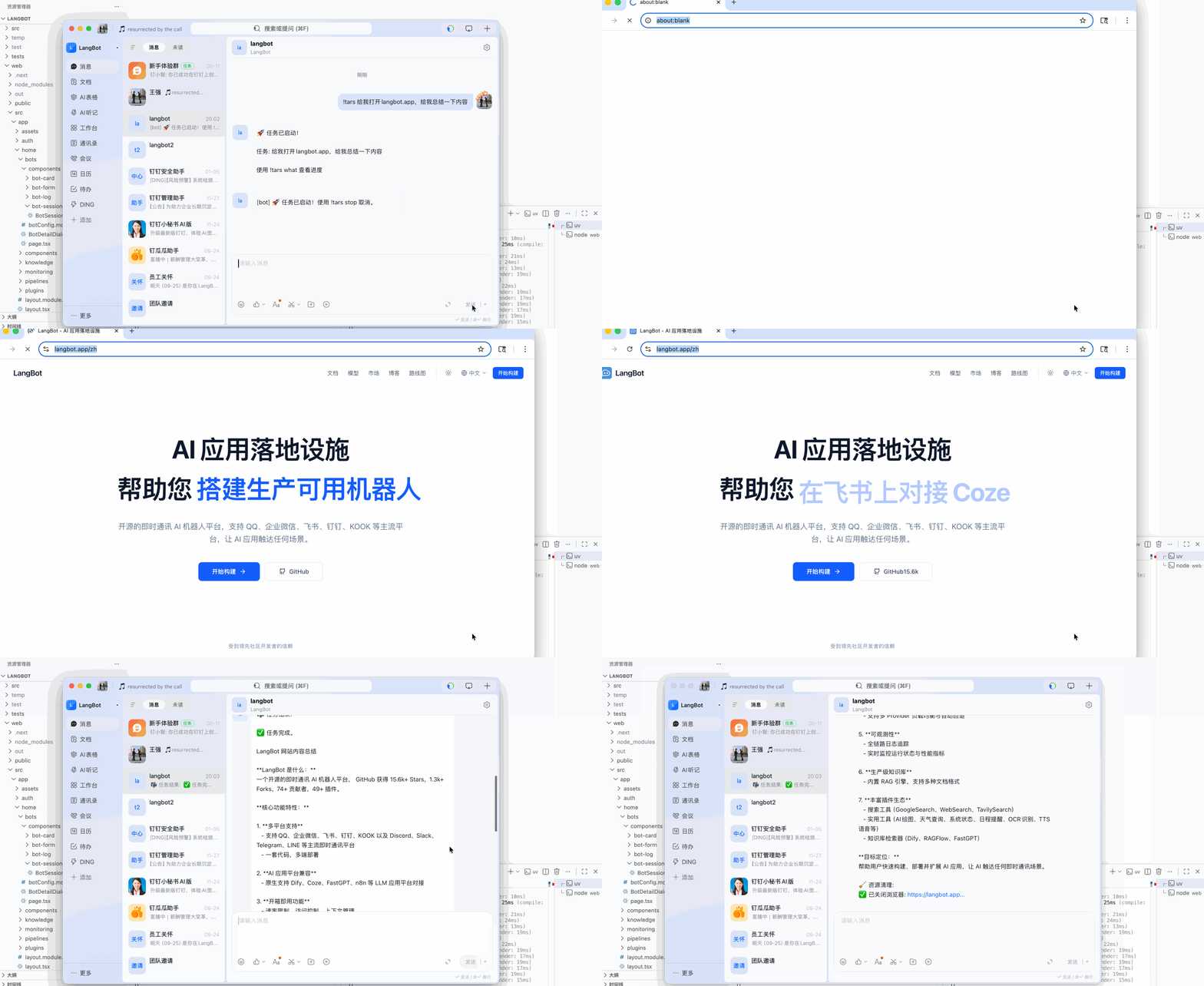
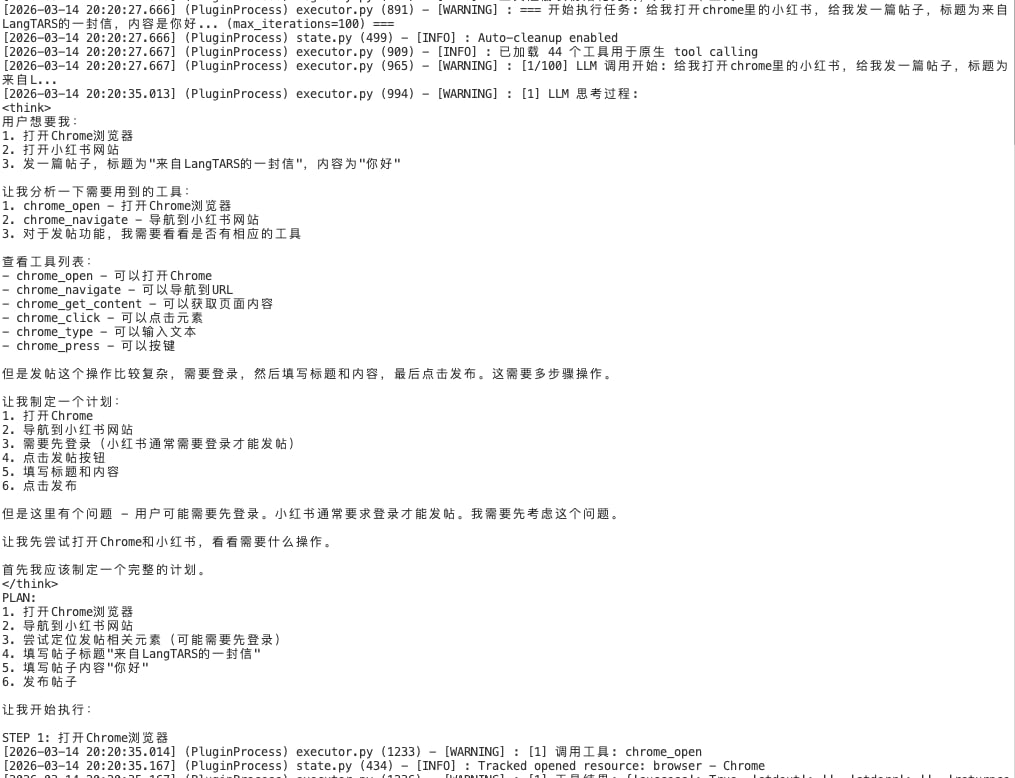
| `!tars 给我打开chrome里的小红书,给我发一篇帖子,标题为来自LangTARS的一封信,内容是你好` | 🌐 自动打开小红书并发布帖子 |
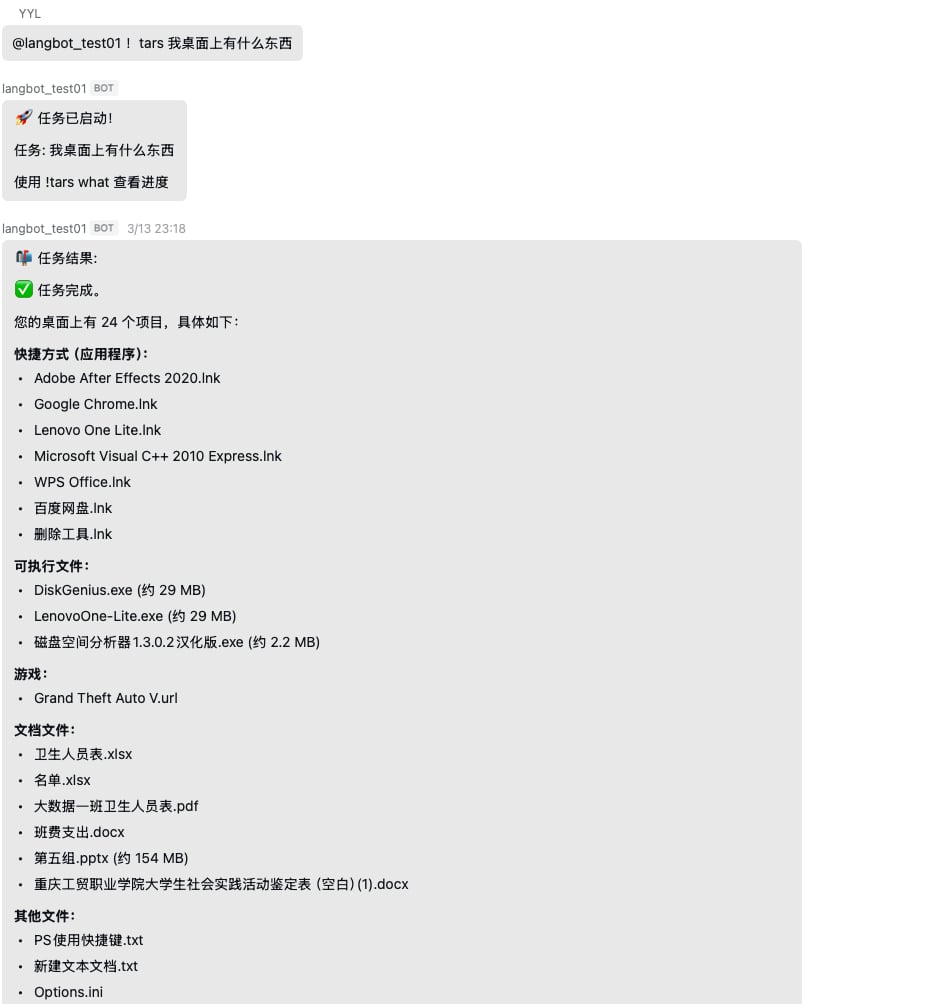
| `!tars 帮我整理桌面文件` | 📁 自动分类整理文件 |
| `!tars 打开浏览器搜索今天的新闻` | 🌐 打开浏览器并搜索 |
| `!tars 创建一个会议笔记` | 📝 自动创建笔记文件 |
| `!tars 查看系统信息` | 💻 获取电脑状态 |
***
## 🎯 能做什么?
只需发一条消息,AI 就能帮你完成各种任务:
| 你说 | AI 做 |
| ------------------------------------------------------- | --------------- |
| `!tars 给我打开chrome里的小红书,给我发一篇帖子,标题为来自LangTARS的一封信,内容是你好` | 🌐 自动打开小红书并发布帖子 |
| `!tars 帮我整理桌面文件` | 📁 自动分类整理文件 |
| `!tars 打开浏览器搜索今天的新闻` | 🌐 打开浏览器并搜索 |
| `!tars 创建一个会议笔记` | 📝 自动创建笔记文件 |
| `!tars 查看系统信息` | 💻 获取电脑状态 |
 ***
## 🚀 为什么选择 LangTARS?
### 1️⃣ LangBot 原生插件,开箱即用
```bash theme={null}
# 一行命令部署 LangBot
uvx langbot@latest
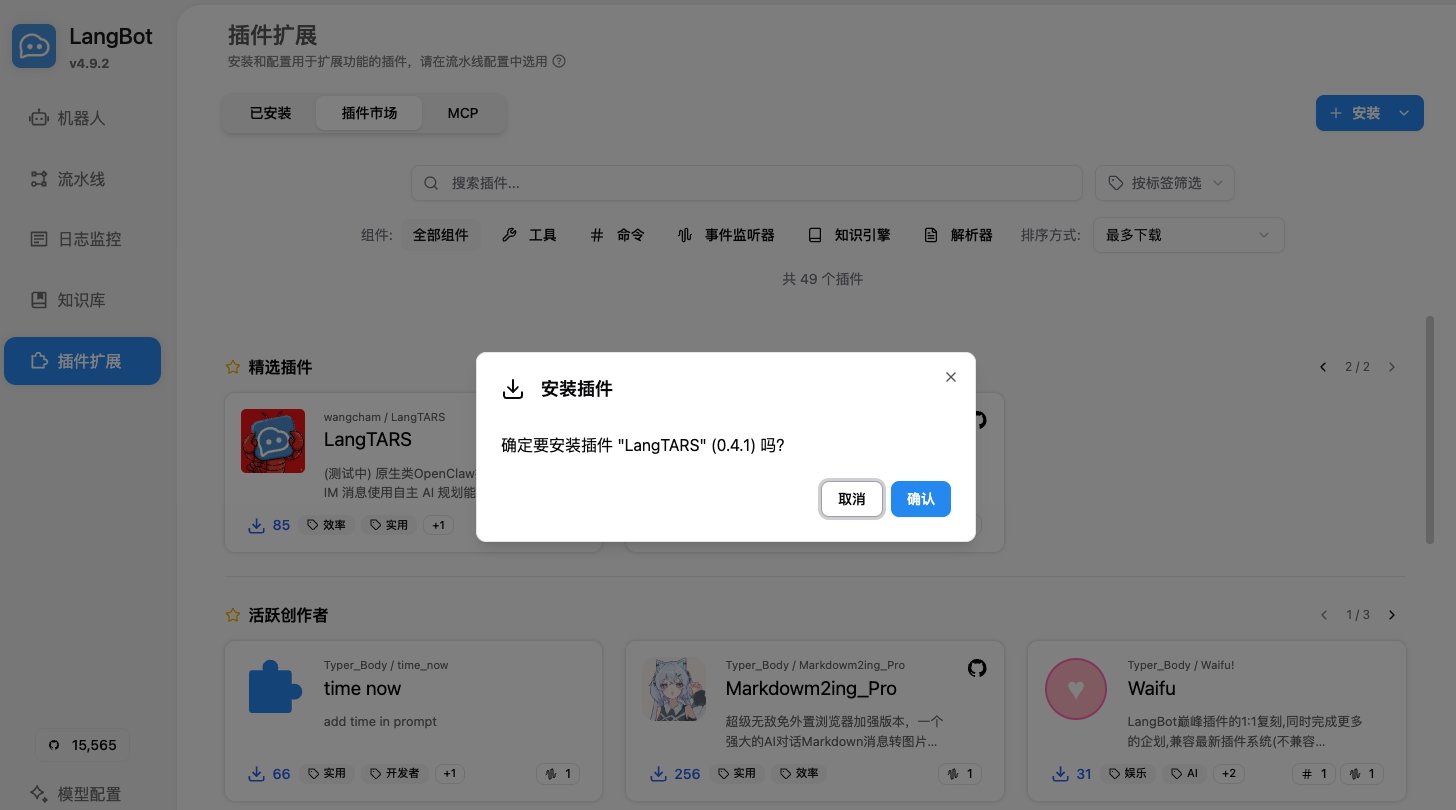
# 插件市场安装 LangTARS,配置模型,开始使用!
```
**无需复杂配置,无需额外部署,LangBot 用户直接体验!**
***
## 🚀 为什么选择 LangTARS?
### 1️⃣ LangBot 原生插件,开箱即用
```bash theme={null}
# 一行命令部署 LangBot
uvx langbot@latest
# 插件市场安装 LangTARS,配置模型,开始使用!
```
**无需复杂配置,无需额外部署,LangBot 用户直接体验!**
 ***
### 2️⃣ 智能任务规划,自主执行
基于 **ReAct 循环**的 AI 规划引擎:
```
你的指令 → 理解需求 → 制定计划 → 逐步执行 → 反馈结果
```
AI 会像人一样思考,自动拆解复杂任务!
***
### 3️⃣ 多浏览器支持
| 浏览器 | macOS | Windows | Linux |
| -------------- | ----- | ------- | ----- |
| Playwright(无头) | ✅ | ✅ | ✅ |
| Safari | ✅ | - | - |
| Chrome | ✅ | ✅ | ✅ |
| Edge | - | ✅ | - |
| Firefox | - | - | ✅ |
***
### 4️⃣ 安全优先设计
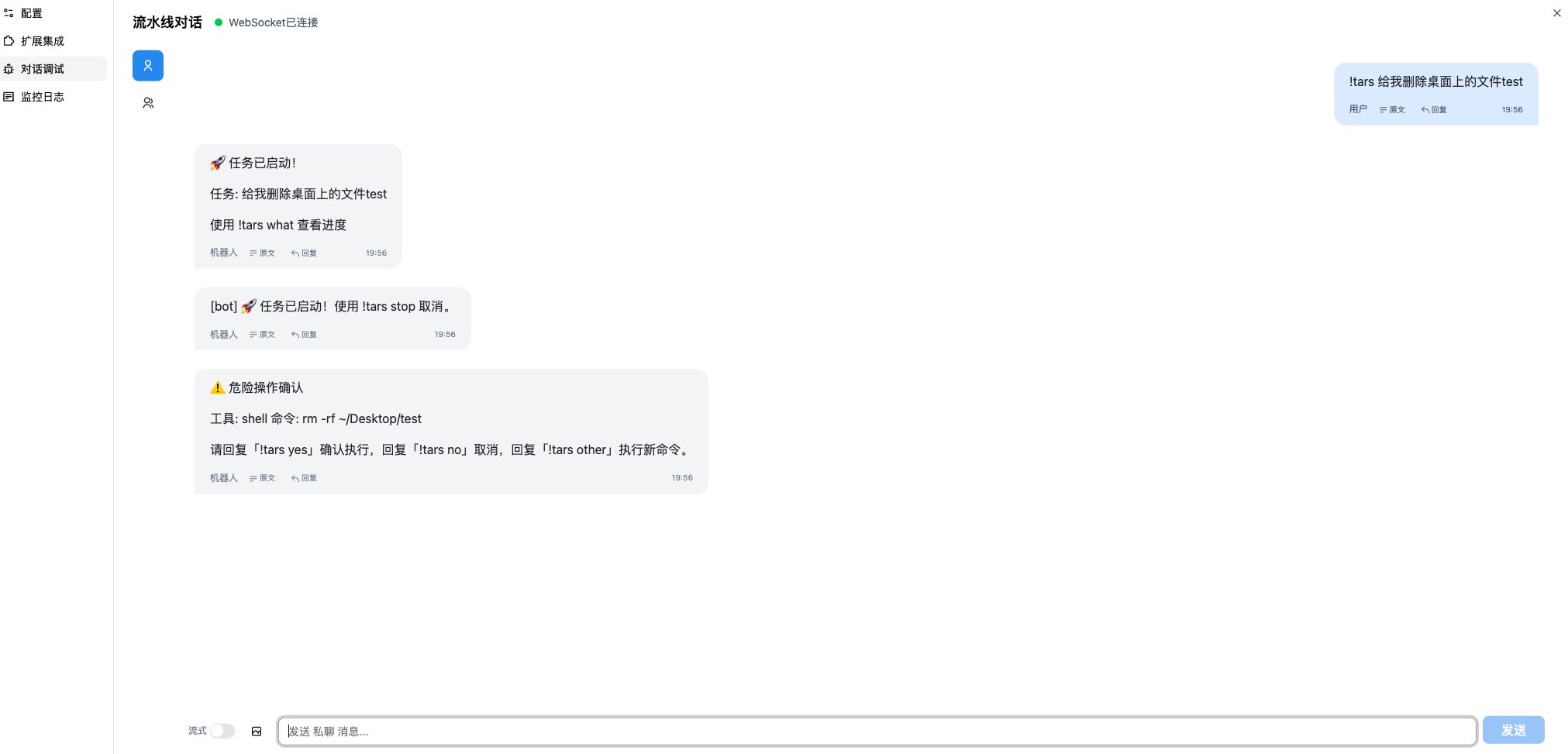
* 🚫 **危险命令拦截** — `rm -rf /` 等命令自动阻止
* 📂 **工作区隔离** — 文件操作限制在安全目录
* 📋 **命令白名单** — 可配置允许的命令
* 👤 **用户访问控制** — 限制特定用户使用
***
### 2️⃣ 智能任务规划,自主执行
基于 **ReAct 循环**的 AI 规划引擎:
```
你的指令 → 理解需求 → 制定计划 → 逐步执行 → 反馈结果
```
AI 会像人一样思考,自动拆解复杂任务!
***
### 3️⃣ 多浏览器支持
| 浏览器 | macOS | Windows | Linux |
| -------------- | ----- | ------- | ----- |
| Playwright(无头) | ✅ | ✅ | ✅ |
| Safari | ✅ | - | - |
| Chrome | ✅ | ✅ | ✅ |
| Edge | - | ✅ | - |
| Firefox | - | - | ✅ |
***
### 4️⃣ 安全优先设计
* 🚫 **危险命令拦截** — `rm -rf /` 等命令自动阻止
* 📂 **工作区隔离** — 文件操作限制在安全目录
* 📋 **命令白名单** — 可配置允许的命令
* 👤 **用户访问控制** — 限制特定用户使用
 ***
## 📱 快速开始
### Step 1: 部署 LangBot
```bash theme={null}
uvx langbot@latest
```
### Step 2: 配置聊天平台
按照文档配置 Telegram / 钉钉 / 微信机器人
### Step 3: 安装 LangTARS
在 LangBot 插件市场搜索 **LangTARS** 并安装
### Step 4: 开始对话
```
!tars 你好,告诉我你能做什么
```
> 📱 **推荐**:在 **Telegram** 或 **钉钉** 上使用,体验最佳!
***
## 🎮 常用命令
| 命令 | 功能 |
| -------------- | ------ |
| `!tars <任务描述>` | 执行任务 |
| `!tars stop` | 停止当前任务 |
| `!tars what` | 查看执行状态 |
| `!tars reset` | 重置对话 |
| `!tars help` | 显示帮助 |
***
## 🌟 项目信息
| 项目 | 信息 |
| ---------- | -------------------------------------------------------------------------- |
| **GitHub** | [github.com/langbot-app/LangTARS](https://github.com/langbot-app/LangTARS) |
| **语言** | Python 100% |
| **许可证** | CC BY-NC-ND 4.0 |
| **平台** | macOS / Windows / Linux |
***
## 🔗 相关链接
* 📖 **LangBot 文档**: [docs.langbot.app](https://docs.langbot.app)
* 💬 **问题反馈**: [GitHub Issues](https://github.com/langbot-app/LangTARS/issues)
* ⭐ **Star 支持**: [GitHub](https://github.com/langbot-app/LangTARS)
***
## 🎉 部署 LangBot,体验 LangTARS!
**让 AI 成为你忠诚的数字助手,就像 TARS 一样。**
```bash theme={null}
uvx langbot@latest
```
**#LangTARS #LangBot #AI助手 #效率工具 #开源**
***
## 🔗 搭配 Dify & n8n,释放更强大能力
LangTARS 搭配 AI 工作流平台使用效果更佳:
* **Dify 集成**:将 LangBot 作为 [Dify](https://dify.ai) 的消息前端,在 Dify 可视化编辑器中构建复杂 AI 工作流,然后通过 Telegram/Discord 触发。例如:自动生成报告 → 创建文件 → 发送邮件通知,全部通过一条聊天消息完成。
* **n8n 集成**:结合 [n8n](https://n8n.io) 工作流与 LangBot,将 LangTARS 的电脑控制能力与 n8n 的 400+ 集成组合,实现无限可能。
* **同时支持**:Langflow、Coze 以及任何 OpenAI 兼容 API。
> 💡 **示例**:"TARS,运行我的 Dify 工作流分析今天的销售数据,把报告保存到桌面" — LangTARS 处理整个链路。
***
## 📱 快速开始
### Step 1: 部署 LangBot
```bash theme={null}
uvx langbot@latest
```
### Step 2: 配置聊天平台
按照文档配置 Telegram / 钉钉 / 微信机器人
### Step 3: 安装 LangTARS
在 LangBot 插件市场搜索 **LangTARS** 并安装
### Step 4: 开始对话
```
!tars 你好,告诉我你能做什么
```
> 📱 **推荐**:在 **Telegram** 或 **钉钉** 上使用,体验最佳!
***
## 🎮 常用命令
| 命令 | 功能 |
| -------------- | ------ |
| `!tars <任务描述>` | 执行任务 |
| `!tars stop` | 停止当前任务 |
| `!tars what` | 查看执行状态 |
| `!tars reset` | 重置对话 |
| `!tars help` | 显示帮助 |
***
## 🌟 项目信息
| 项目 | 信息 |
| ---------- | -------------------------------------------------------------------------- |
| **GitHub** | [github.com/langbot-app/LangTARS](https://github.com/langbot-app/LangTARS) |
| **语言** | Python 100% |
| **许可证** | CC BY-NC-ND 4.0 |
| **平台** | macOS / Windows / Linux |
***
## 🔗 相关链接
* 📖 **LangBot 文档**: [docs.langbot.app](https://docs.langbot.app)
* 💬 **问题反馈**: [GitHub Issues](https://github.com/langbot-app/LangTARS/issues)
* ⭐ **Star 支持**: [GitHub](https://github.com/langbot-app/LangTARS)
***
## 🎉 部署 LangBot,体验 LangTARS!
**让 AI 成为你忠诚的数字助手,就像 TARS 一样。**
```bash theme={null}
uvx langbot@latest
```
**#LangTARS #LangBot #AI助手 #效率工具 #开源**
***
## 🔗 搭配 Dify & n8n,释放更强大能力
LangTARS 搭配 AI 工作流平台使用效果更佳:
* **Dify 集成**:将 LangBot 作为 [Dify](https://dify.ai) 的消息前端,在 Dify 可视化编辑器中构建复杂 AI 工作流,然后通过 Telegram/Discord 触发。例如:自动生成报告 → 创建文件 → 发送邮件通知,全部通过一条聊天消息完成。
* **n8n 集成**:结合 [n8n](https://n8n.io) 工作流与 LangBot,将 LangTARS 的电脑控制能力与 n8n 的 400+ 集成组合,实现无限可能。
* **同时支持**:Langflow、Coze 以及任何 OpenAI 兼容 API。
> 💡 **示例**:"TARS,运行我的 Dify 工作流分析今天的销售数据,把报告保存到桌面" — LangTARS 处理整个链路。