> ## Documentation Index
> Fetch the complete documentation index at: https://docs.langbot.app/llms.txt
> Use this file to discover all available pages before exploring further.
# Using DeerFlow with LangBot
> Use DeerFlow with LangBot to power your AI bot's conversation pipeline across messaging platforms.
[DeerFlow](https://github.com/bytedance/deer-flow) is an open-source AI Agent framework based on Large Language Models (LLMs), developed by ByteDance. It focuses on deep research, information retrieval, and multi-agent collaborative orchestration.\
The framework is built on LangGraph with a configurable workflow engine, supporting advanced features such as planning mode, sub-agent concurrency, and chain-of-thought reasoning. It is suitable for scenarios that require deep information gathering and structured analysis.
Current integration targets DeerFlow **2.0 `main` branch**. The DeerFlow official team has migrated the original Deep Research framework to the `main-1.x` branch for ongoing maintenance. Therefore, if you are using version 2.0, please refer to the official documentation and backend API of the `main` branch.
LangBot currently supports DeerFlow as an `AI Capabilities` runner, bringing deep research and agent orchestration capabilities to your conversation pipelines.
## Deploying DeerFlow
Please follow the [DeerFlow Official Documentation](https://github.com/bytedance/deer-flow) to install, configure, and start the service:
* [DeerFlow GitHub Repository](https://github.com/bytedance/deer-flow)
* [DeerFlow Website](https://deerflow.tech/)
* [DeerFlow Configuration Documentation](https://github.com/bytedance/deer-flow/blob/main/backend/docs/CONFIGURATION.md)
After deployment, please confirm that DeerFlow has started normally and note its gateway address. By default, the DeerFlow gateway address is `http://127.0.0.1:2026`.
* The `API Base URL` must start with `http://` or `https://`.
* If LangBot and DeerFlow are deployed on the same host and both use Docker deployment, you can refer to the article: [Network Configuration Details](/en/workshop/network-details.html#langbot-and-message-platform-both-running-in-docker-containers). Please add the DeerFlow container to `langbot-network` when starting, and set the `API Base URL` in LangBot configuration to the container interconnection address, for example `http://deerflow-app:2026`.
* If deployed on different hosts or containers, please replace `127.0.0.1` with the actual accessible intranet address, hostname, or domain of DeerFlow.
## Configuring LangBot
Open the LangBot WebUI page, add a new pipeline or switch to the `AI Capabilities` configuration page in an existing pipeline.
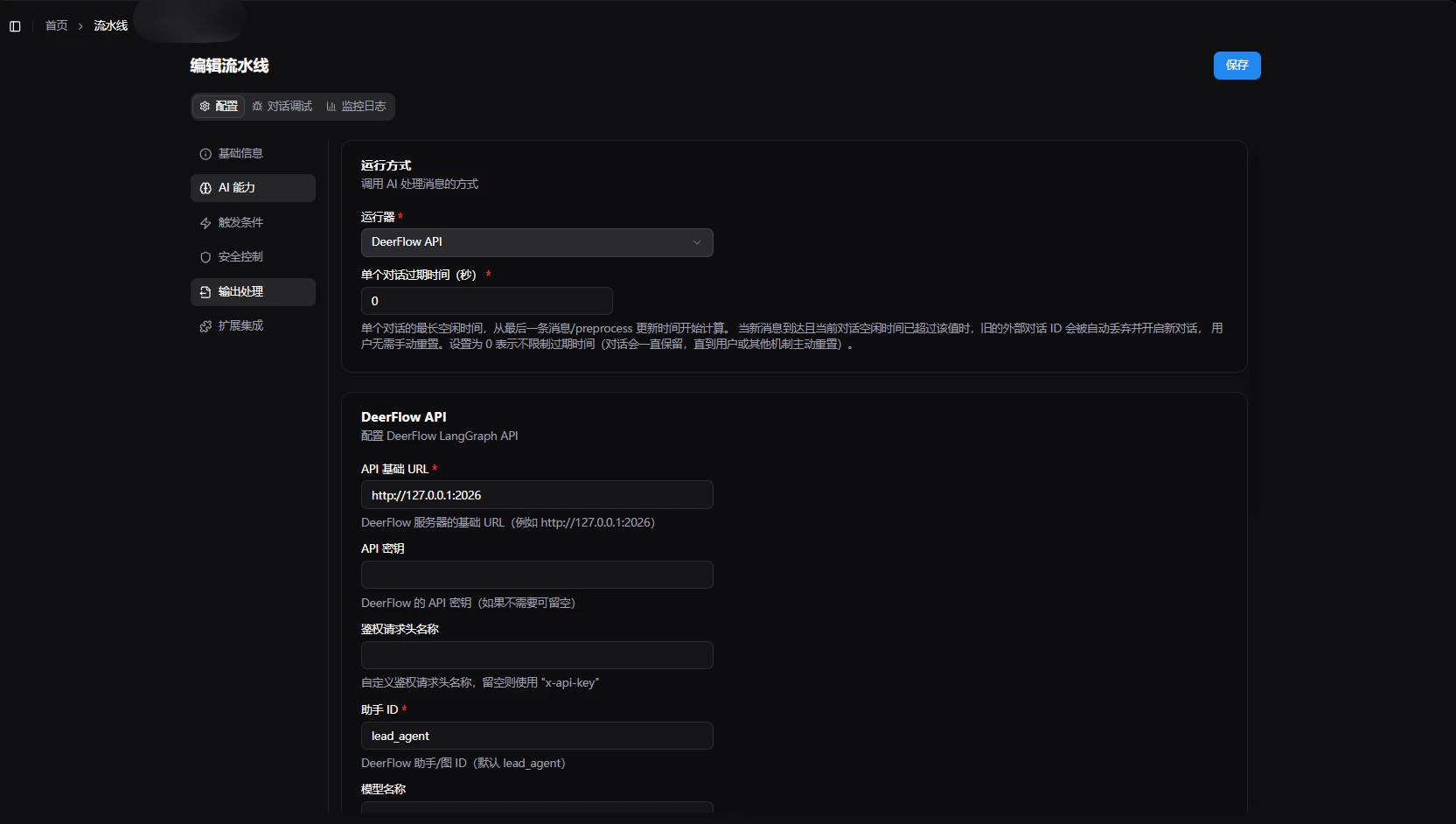 1. Select `DeerFlow API` in `Runner`.
2. In the runner configuration items, fill in:
* `API Base URL`: The API gateway address of the DeerFlow service, default `http://127.0.0.1:2026`.
* `API Key`: Optional. If your DeerFlow gateway uses Bearer Token authentication, you can enter the API Key here.
* `Assistant ID`: Corresponds to DeerFlow 2.0 LangGraph's `assistant_id`, default `lead_agent`.
* `Model Name Override`: Optional. Used to override the default model configured on the DeerFlow side. If DeerFlow has a model configured, this can be left empty.
* `Enable Thinking Mode`: When enabled, DeerFlow will return chain-of-thought content, which can be used to display the reasoning process.
* `Enable Planning Mode`: Corresponds to DeerFlow 2.0 runtime parameter `config.configurable.is_plan_mode`. When enabled, the Agent will formulate a research plan before execution.
* `Enable Sub-Agents`: Corresponds to DeerFlow 2.0 runtime parameter `config.configurable.subagent_enabled`. When enabled, allows the Agent to dispatch sub-agents to complete tasks in parallel.
* `Max Concurrent Sub-Agents`: Corresponds to DeerFlow 2.0 runtime parameter `config.configurable.max_concurrent_subagents`, only effective when sub-agents are enabled, default `3`.
* `Recursion Limit`: Corresponds to LangGraph's `recursion_limit`, controls the maximum recursion depth of the workflow, default `1000`.
3. Click `Save` to complete the configuration.
* It is only recommended to enable `Planning Mode` or `Sub-Agent` related options if the corresponding capabilities have been enabled on the DeerFlow side, otherwise the expected effects may not be achieved.
* LangBot will send both the `config.configurable` runtime parameters recommended by DeerFlow 2.0 and retain backward-compatible legacy fields for easier integration with upstream recent versions.
After completion, you can use DeerFlow in the pipeline to complete deep research and intelligent Q\&A.
## Frequently Asked Questions
* **Save failed or invocation error**: Please verify that the `API Key` and `API Base URL` are correct, and ensure the DeerFlow service has started normally.
* **No expected content returned**: Please verify that the `Assistant ID` matches the actual available assistant in DeerFlow.
* **Cannot select `DeerFlow API`**: Please verify that your current LangBot version supports this runner; if not supported, please upgrade to a version that includes the DeerFlow runner.
* **Meaning of DeerFlow configuration items**: Please refer to the DeerFlow official documentation regarding runtime parameters and capabilities, or consult the DeerFlow community for recommended configurations.
For more pipeline general configuration instructions, please refer to [Modifying Conversation Pipeline Configuration](/en/usage/pipelines/readme).
1. Select `DeerFlow API` in `Runner`.
2. In the runner configuration items, fill in:
* `API Base URL`: The API gateway address of the DeerFlow service, default `http://127.0.0.1:2026`.
* `API Key`: Optional. If your DeerFlow gateway uses Bearer Token authentication, you can enter the API Key here.
* `Assistant ID`: Corresponds to DeerFlow 2.0 LangGraph's `assistant_id`, default `lead_agent`.
* `Model Name Override`: Optional. Used to override the default model configured on the DeerFlow side. If DeerFlow has a model configured, this can be left empty.
* `Enable Thinking Mode`: When enabled, DeerFlow will return chain-of-thought content, which can be used to display the reasoning process.
* `Enable Planning Mode`: Corresponds to DeerFlow 2.0 runtime parameter `config.configurable.is_plan_mode`. When enabled, the Agent will formulate a research plan before execution.
* `Enable Sub-Agents`: Corresponds to DeerFlow 2.0 runtime parameter `config.configurable.subagent_enabled`. When enabled, allows the Agent to dispatch sub-agents to complete tasks in parallel.
* `Max Concurrent Sub-Agents`: Corresponds to DeerFlow 2.0 runtime parameter `config.configurable.max_concurrent_subagents`, only effective when sub-agents are enabled, default `3`.
* `Recursion Limit`: Corresponds to LangGraph's `recursion_limit`, controls the maximum recursion depth of the workflow, default `1000`.
3. Click `Save` to complete the configuration.
* It is only recommended to enable `Planning Mode` or `Sub-Agent` related options if the corresponding capabilities have been enabled on the DeerFlow side, otherwise the expected effects may not be achieved.
* LangBot will send both the `config.configurable` runtime parameters recommended by DeerFlow 2.0 and retain backward-compatible legacy fields for easier integration with upstream recent versions.
After completion, you can use DeerFlow in the pipeline to complete deep research and intelligent Q\&A.
## Frequently Asked Questions
* **Save failed or invocation error**: Please verify that the `API Key` and `API Base URL` are correct, and ensure the DeerFlow service has started normally.
* **No expected content returned**: Please verify that the `Assistant ID` matches the actual available assistant in DeerFlow.
* **Cannot select `DeerFlow API`**: Please verify that your current LangBot version supports this runner; if not supported, please upgrade to a version that includes the DeerFlow runner.
* **Meaning of DeerFlow configuration items**: Please refer to the DeerFlow official documentation regarding runtime parameters and capabilities, or consult the DeerFlow community for recommended configurations.
For more pipeline general configuration instructions, please refer to [Modifying Conversation Pipeline Configuration](/en/usage/pipelines/readme).