> ## Documentation Index
> Fetch the complete documentation index at: https://docs.langbot.app/llms.txt
> Use this file to discover all available pages before exploring further.
# MCP Server
LangBot can call tools from MCP servers. Once an MCP server is added, the built-in Agent — with tool use enabled on its model — can invoke those tools during a conversation.
Install from [LangBot Space](https://space.langbot.app) for the smoothest setup — listed MCPs are pre-configured and ready to use.
You can also fetch from [ModelScope](https://modelscope.cn/mcp), [mcp.so](https://mcp.so), or [composio.dev](https://composio.dev/toolkits), then add them manually as shown below.
## Three Transport Modes
| Mode | When to use | Notes |
| -------------------------------- | ---------------------------------------------- | ------------------------------------------- |
| Streamable HTTP (`mode: "http"`) | Remote MCP service that speaks Streamable HTTP | LangBot connects to the remote URL directly |
| SSE | Remote MCP service that speaks SSE | LangBot connects to the remote URL directly |
| stdio | MCP server launched by a local command | Only available when Box Runtime is up |
MCP tools require the pipeline to use the **built-in Agent**, with a model that has **tool use enabled** — see [Models](../models/readme). External runners (Dify, n8n, Langflow, Coze, etc.) use their own tool mechanisms.
## Installing an MCP Server
### From LangBot Space (Preferred)
[LangBot Space](https://space.langbot.app) is the official LangBot marketplace, with a curated list of ready-to-use MCP servers. In the WebUI, browse and install them with one click under `Plugin Management` → `MCP Management` — URL, command, and mode are filled in by the listing, so nothing has to be configured by hand.
This covers most cases. For services that aren't listed, use the manual flow below.
### Adding Manually
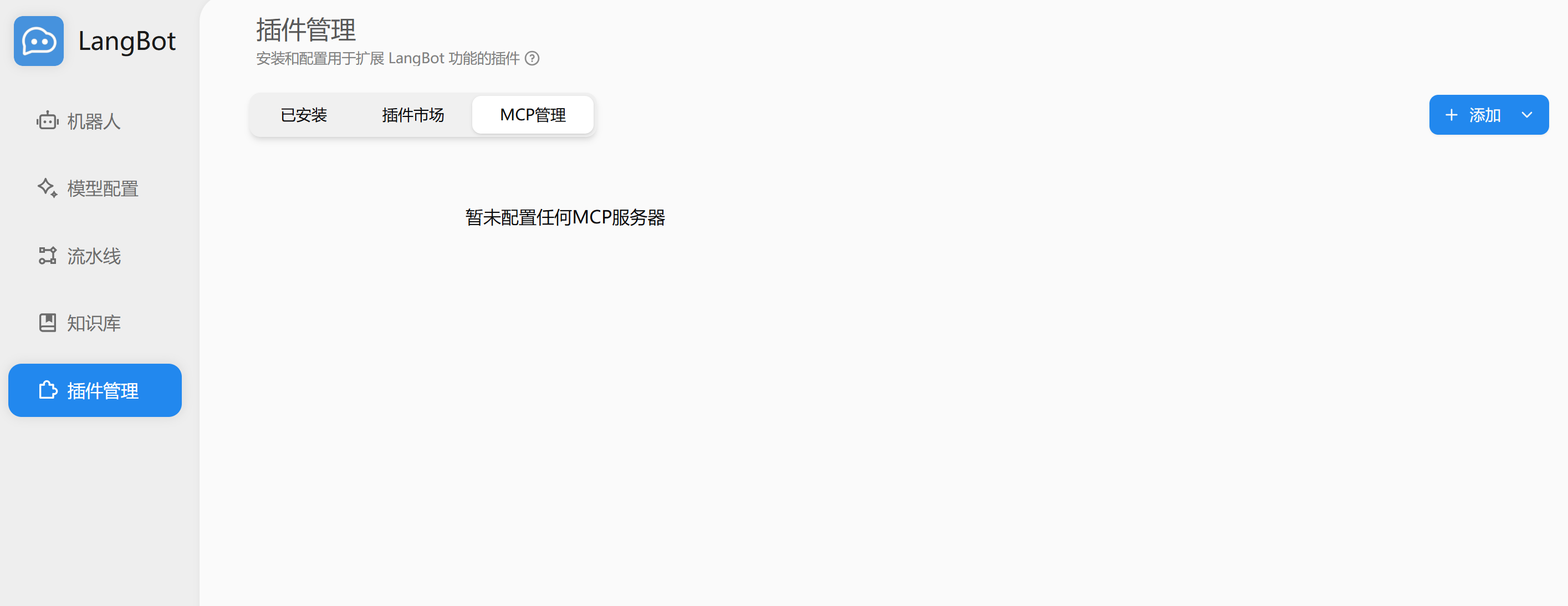
Open `Plugin Management` → `MCP Management`:
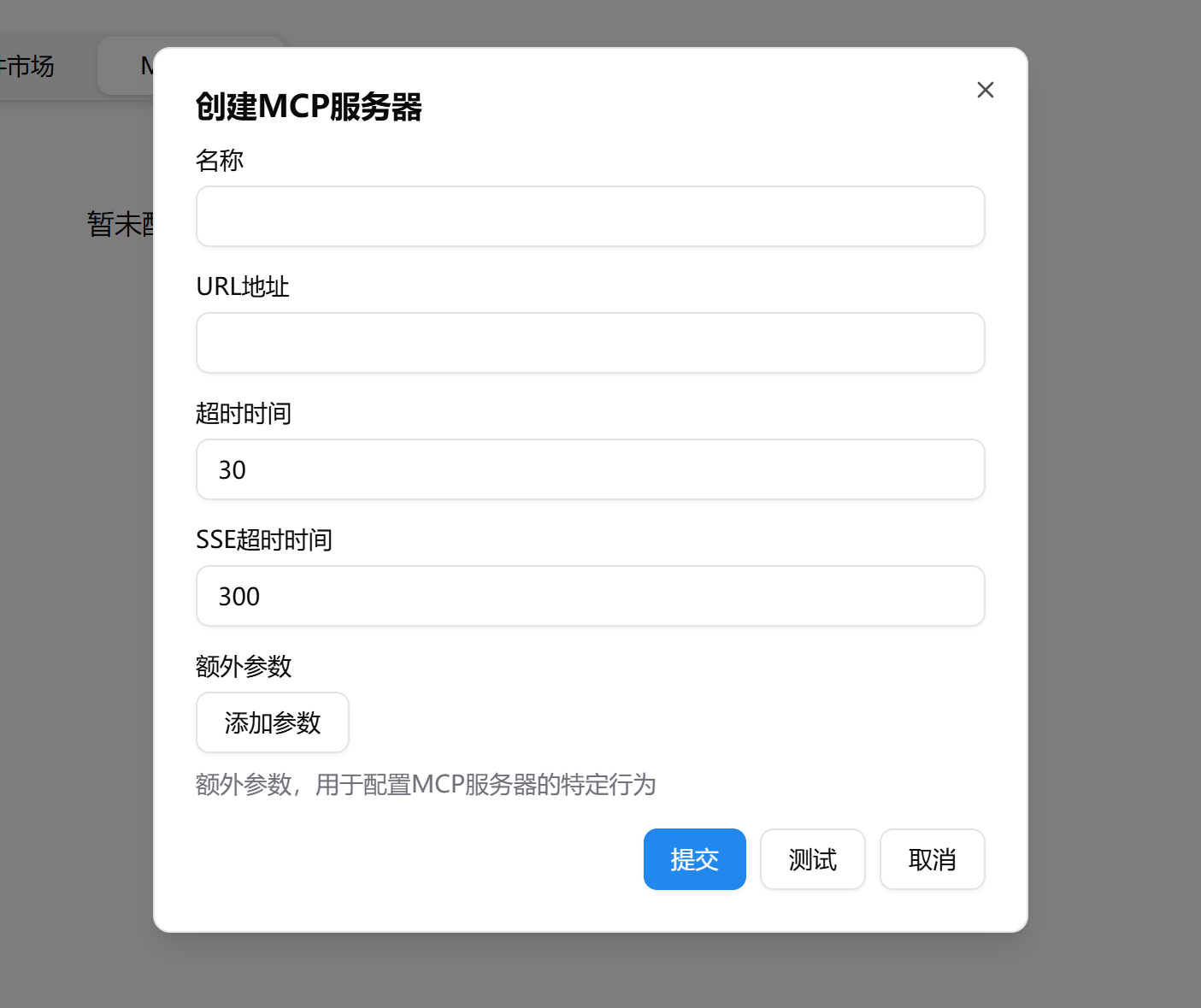
 Click `Add` in the top right, choose `Add MCP Server`, fill in the URL (HTTP/SSE) or command (stdio), click `Test` to verify connectivity, then `Submit`:
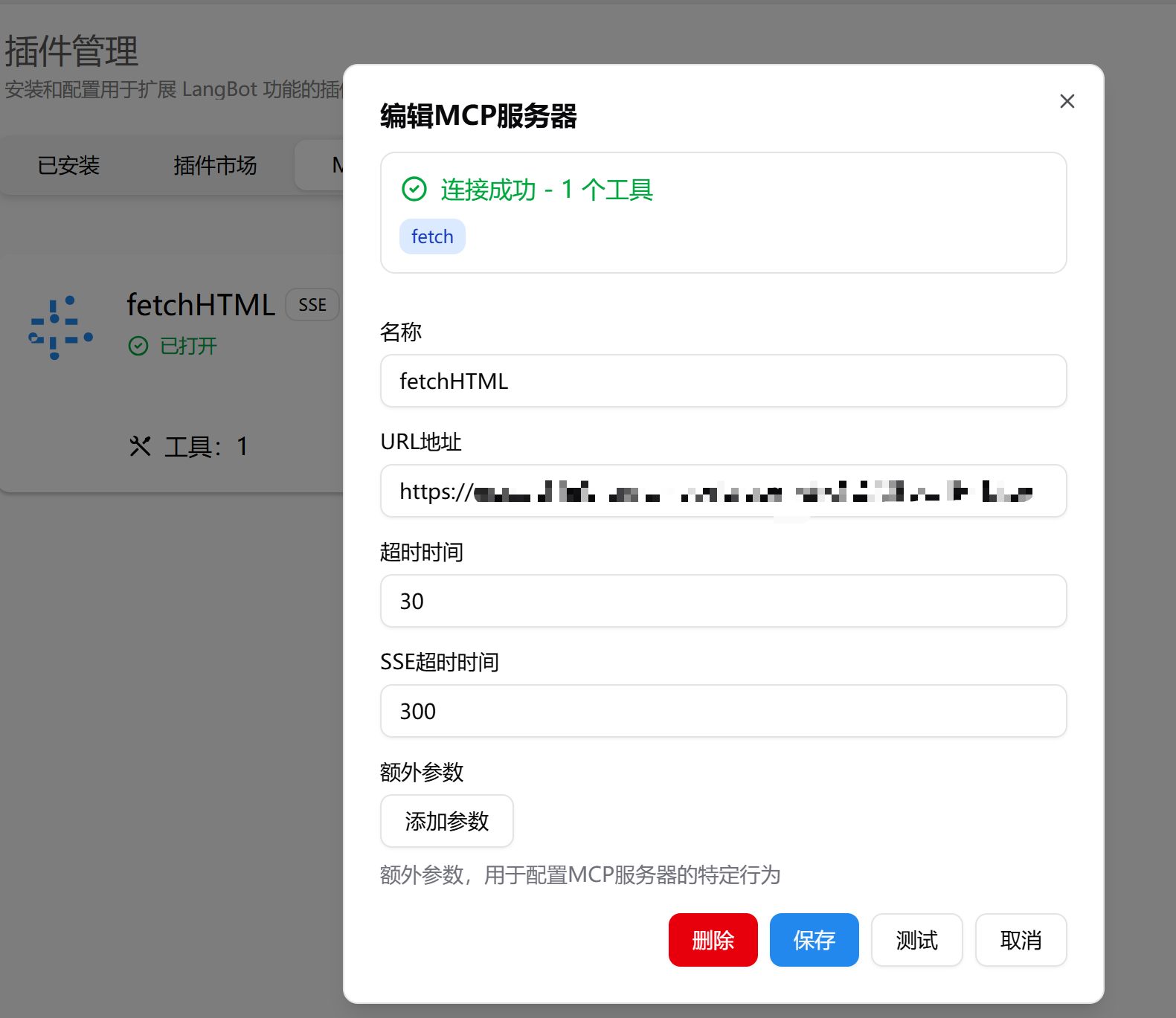
 After saving, toggle the switch on the card to connect. Click the card to see details:
 ## Enabling in a Pipeline
Once an MCP server is added, the pipeline extension config decides which servers the Agent can see:
* Enable "all MCP servers", or
* Bind only specific MCP servers
Tools from unbound servers won't appear in that pipeline's tool list.
## Advanced: stdio MCP
stdio MCP is hosted by Box Runtime. Before the connection is ready, LangBot:
1. Creates or reuses a shared MCP Box session
2. If a local project path can be inferred from the command, stages the project into the workspace
3. Installs dependencies if the project has `requirements.txt`, `pyproject.toml`, `setup.py`, or `setup.cfg`
4. Connects the MCP process's stdin/stdout through a WebSocket relay
To fine-tune mount, network, or timeout behavior, add a `box` override under the MCP `extra_args`:
```json theme={null}
{
"mode": "stdio",
"extra_args": {
"command": "python",
"args": ["server.py"],
"env": {},
"box": {
"host_path": "/path/to/mcp-project",
"network": "on",
"host_path_mode": "ro",
"startup_timeout_sec": 120,
"image": "python:3.11-slim"
}
}
}
```
Common fields:
| Field | Notes |
| --------------------- | --------------------------------------------------------------------------------------------------- |
| `host_path` | MCP project directory on the host. Must be within `box.local.allowed_mount_roots` |
| `network` | Whether network is allowed (typically for dependency install) |
| `host_path_mode` | Access mode when staging `host_path`; defaults to `ro`. stdio MCP usually stages into the workspace |
| `startup_timeout_sec` | Box prep + dependency install timeout, default 120s. Connection wait gets about 30s extra |
| `image` | Runtime image when the Docker backend is used |
stdio MCP runs inside Box. Dependency install and process startup are subject to the sandbox profile, network permission, resource limits, and the mount allowlist.
## Common Issues
| Symptom | What to check |
| --------------------------- | -------------------------------------------------------------------------------------- |
| MCP connection fails | URL, command, arguments, env vars are correct |
| stdio MCP stuck connecting | Box Runtime status; `startup_timeout_sec` may be too short |
| Dependency install fails | Sandbox network permission; dependency files are correct |
| Local files inaccessible | `host_path` exists; it's inside `allowed_mount_roots` |
| Agent doesn't see MCP tools | Pipeline uses built-in Agent; model has tool use enabled; MCP is bound on the pipeline |
## Enabling in a Pipeline
Once an MCP server is added, the pipeline extension config decides which servers the Agent can see:
* Enable "all MCP servers", or
* Bind only specific MCP servers
Tools from unbound servers won't appear in that pipeline's tool list.
## Advanced: stdio MCP
stdio MCP is hosted by Box Runtime. Before the connection is ready, LangBot:
1. Creates or reuses a shared MCP Box session
2. If a local project path can be inferred from the command, stages the project into the workspace
3. Installs dependencies if the project has `requirements.txt`, `pyproject.toml`, `setup.py`, or `setup.cfg`
4. Connects the MCP process's stdin/stdout through a WebSocket relay
To fine-tune mount, network, or timeout behavior, add a `box` override under the MCP `extra_args`:
```json theme={null}
{
"mode": "stdio",
"extra_args": {
"command": "python",
"args": ["server.py"],
"env": {},
"box": {
"host_path": "/path/to/mcp-project",
"network": "on",
"host_path_mode": "ro",
"startup_timeout_sec": 120,
"image": "python:3.11-slim"
}
}
}
```
Common fields:
| Field | Notes |
| --------------------- | --------------------------------------------------------------------------------------------------- |
| `host_path` | MCP project directory on the host. Must be within `box.local.allowed_mount_roots` |
| `network` | Whether network is allowed (typically for dependency install) |
| `host_path_mode` | Access mode when staging `host_path`; defaults to `ro`. stdio MCP usually stages into the workspace |
| `startup_timeout_sec` | Box prep + dependency install timeout, default 120s. Connection wait gets about 30s extra |
| `image` | Runtime image when the Docker backend is used |
stdio MCP runs inside Box. Dependency install and process startup are subject to the sandbox profile, network permission, resource limits, and the mount allowlist.
## Common Issues
| Symptom | What to check |
| --------------------------- | -------------------------------------------------------------------------------------- |
| MCP connection fails | URL, command, arguments, env vars are correct |
| stdio MCP stuck connecting | Box Runtime status; `startup_timeout_sec` may be too short |
| Dependency install fails | Sandbox network permission; dependency files are correct |
| Local files inaccessible | `host_path` exists; it's inside `allowed_mount_roots` |
| Agent doesn't see MCP tools | Pipeline uses built-in Agent; model has tool use enabled; MCP is bound on the pipeline |