> ## Documentation Index
> Fetch the complete documentation index at: https://docs.langbot.app/llms.txt
> Use this file to discover all available pages before exploring further.
# Component: Knowledge Retriever
The Knowledge Retriever component allows plugins to provide external knowledge base retrieval capabilities for LangBot. When users create an external knowledge base in LangBot, they can choose a knowledge retriever provided by a plugin to retrieve knowledge.
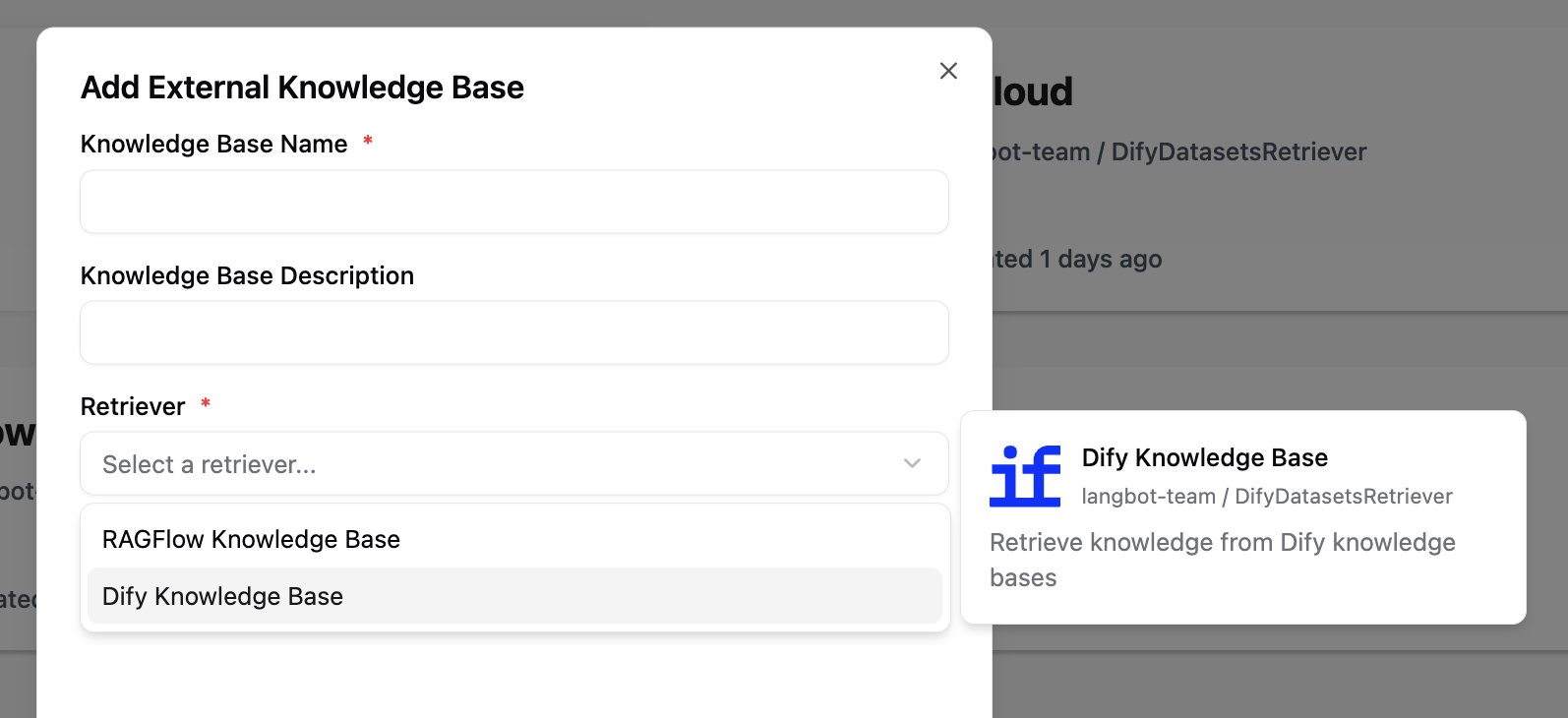 ## Adding a Knowledge Retriever Component
A single plugin can add any number of knowledge retrievers. Execute the command `lbp comp KnowledgeRetriever` in the plugin directory and follow the prompts to enter the knowledge retriever configuration.
```bash theme={null}
➜ FastGPTRetriever > lbp comp KnowledgeRetriever
Generating component KnowledgeRetriever...
KnowledgeRetriever name: fastgpt
KnowledgeRetriever description: Retrieve knowledge from FastGPT knowledge bases
Component KnowledgeRetriever generated successfully.
```
This will generate `fastgpt.yaml` and `fastgpt.py` files in the `components/knowledge_retriever/` directory. The `.yaml` file defines the basic information and configuration parameters of the knowledge retriever, and the `.py` file is the handler for this retriever:
```bash theme={null}
➜ FastGPTRetriever > tree
...
├── components
│ ├── __init__.py
│ └── knowledge_retriever
│ ├── __init__.py
│ ├── fastgpt.py
│ └── fastgpt.yaml
...
```
## Manifest File: Knowledge Retriever
```yaml theme={null}
apiVersion: v1 # Do not modify
kind: KnowledgeRetriever # Do not modify
metadata:
name: fastgpt # Knowledge retriever name, used to identify this retriever
label:
en_US: FastGPT Knowledge Base # Retriever display name, shown in LangBot's UI, supports multiple languages
zh_Hans: FastGPT 知识库
ja_JP: FastGPT ナレッジベース
description:
en_US: 'Retrieve knowledge from FastGPT knowledge bases' # Retriever description, shown in LangBot's UI, supports multiple languages. Optional
zh_Hans: '从 FastGPT 知识库中检索知识'
ja_JP: 'FastGPT ナレッジベースから知識を取得'
icon: assets/icon.svg # Retriever icon, displayed on the external knowledge base configuration page
spec:
config: # Retriever configuration parameters, users need to fill in these parameters when creating an external knowledge base
- name: api_base_url # Parameter name
type: string # Parameter type: string, number, boolean, select
label:
en_US: API Base URL
zh_Hans: API 基础地址
ja_JP: API ベース URL
description:
en_US: 'Base URL for FastGPT API'
zh_Hans: 'FastGPT API 基础地址'
ja_JP: 'FastGPT API ベース URL'
default: 'http://localhost:3000' # Default parameter value
required: true # Whether required
- name: api_key
type: string
label:
en_US: FastGPT API Key
zh_Hans: FastGPT API Key
ja_JP: FastGPT API キー
description:
en_US: 'API key from your FastGPT instance'
zh_Hans: '从您的 FastGPT 实例获取的 API Key'
ja_JP: 'FastGPT インスタンスから取得した API Key'
default: ''
required: true
- name: search_mode # Example of select type parameter
type: select
label:
en_US: Search Mode
zh_Hans: 搜索模式
ja_JP: 検索モード
description:
en_US: 'The search method to use'
zh_Hans: '使用的搜索方法'
ja_JP: '使用する検索方法'
default: 'embedding'
options: # Select type parameters need to define an option list
- name: 'embedding'
label:
en_US: 'Embedding Search'
zh_Hans: '向量搜索'
ja_JP: '埋め込み検索'
- name: 'fullTextRecall'
label:
en_US: 'Full-Text Recall'
zh_Hans: '全文检索'
ja_JP: '全文検索'
- name: using_rerank # Example of boolean type parameter
type: boolean
label:
en_US: Use Re-ranking
zh_Hans: 使用重排序
ja_JP: リランキングを使用
description:
en_US: 'Whether to use re-ranking'
zh_Hans: '是否使用重排序'
ja_JP: 'リランキングを使用するかどうか'
default: false
required: false
execution:
python:
path: fastgpt.py # Retriever handler, do not modify
attr: FastGPT # Class name of the retriever handler, consistent with the class name in fastgpt.py
```
For configuration item format reference, see: [Plugin Manifest Configuration Format](/en/plugin/dev/basic-info)
## Plugin Handler
The following code will be generated by default (`components/knowledge_retriever/.py`). You need to implement the knowledge retrieval logic in the `retrieve` method of the `FastGPT` class. Complete code can be found in [langbot-plugin-demo](https://github.com/langbot-app/langbot-plugin-demo).
```python theme={null}
# Auto generated by LangBot Plugin SDK.
# Please refer to https://docs.langbot.app/en/plugin/dev/tutor.html for more details.
...
class FastGPT(KnowledgeRetriever):
async def retrieve(self, context: RetrievalContext) -> list[RetrievalResultEntry]:
"""Retrieve knowledge from FastGPT knowledge base"""
# 1. Get configuration parameters
api_base_url = self.config.get('api_base_url', 'http://localhost:3000')
api_key = self.config.get('api_key')
dataset_id = self.config.get('dataset_id')
search_mode = self.config.get('search_mode', 'embedding')
using_rerank = self.config.get('using_rerank', False)
# 2. Parameter validation
if not api_key or not dataset_id:
logger.error("Missing required configuration: api_key or dataset_id")
return []
# 3. Build API request
url = f"{api_base_url.rstrip('/')}/api/core/dataset/searchTest"
headers = {
"Authorization": f"Bearer {api_key}",
"Content-Type": "application/json"
}
payload = {
"datasetId": dataset_id,
"text": context.query, # Get query text from RetrievalContext
"searchMode": search_mode,
"usingReRank": using_rerank,
}
try:
# 4. Call external API
async with httpx.AsyncClient() as client:
response = await client.post(url, json=payload, headers=headers, timeout=30.0)
response.raise_for_status()
result = response.json()
# 5. Parse response and convert to RetrievalResultEntry
results = []
for record in result.get('data', []):
# Combine main data and auxiliary data as content
content_text = '\n'.join([
record.get('q', ''),
record.get('a', '')
]).strip()
# Create retrieval result entry
entry = RetrievalResultEntry(
id=record.get('id', ''),
content=[ContentElement.from_text(content_text)],
metadata={
'dataset_id': record.get('datasetId', ''),
'source_name': record.get('sourceName', ''),
'score': record.get('score', 0.0),
},
# Convert similarity score to distance (higher score = smaller distance)
distance=1.0 - float(record.get('score', 0.0)),
)
results.append(entry)
logger.info(f"Retrieved {len(results)} chunks from FastGPT dataset {dataset_id}")
return results
except httpx.HTTPStatusError as e:
logger.error(f"HTTP error from FastGPT API: {e.response.status_code} - {e.response.text}")
return []
except httpx.RequestError as e:
logger.error(f"Request error when calling FastGPT API: {str(e)}")
return []
except Exception as e:
traceback.print_exc()
logger.error(f"Unexpected error during retrieval: {str(e)}")
return []
```
### Retrieval Context
`RetrievalContext` contains context information for this retrieval:
```python theme={null}
class RetrievalContext(pydantic.BaseModel):
"""Knowledge retrieval context"""
query: str
"""Query text, the user's retrieval question"""
```
### Retrieval Results
Retrieval results need to be converted to a list of `RetrievalResultEntry` objects, each representing a retrieved knowledge chunk:
```python theme={null}
class RetrievalResultEntry(pydantic.BaseModel):
"""Single retrieval result entry"""
id: str
"""Result ID, uniquely identifies this entry"""
content: list[ContentElement]
"""Result content, create text content using ContentElement.from_text()"""
metadata: dict[str, Any]
"""Result metadata, can contain any key-value pairs, such as source, score, etc."""
distance: float
"""Distance score, indicates relevance to the query (smaller is more relevant)
Usually calculated as 1.0 - similarity_score"""
```
### Getting Configuration Parameters
Get user-configured parameter values using `self.config.get(parameter_name, default_value)`:
```python theme={null}
# Get string parameter
api_base_url = self.config.get('api_base_url', 'http://localhost:3000')
# Get number parameters
limit = self.config.get('limit', 5000)
similarity = self.config.get('similarity', 0.0)
# Get boolean parameter
using_rerank = self.config.get('using_rerank', False)
# Get select parameter
search_mode = self.config.get('search_mode', 'embedding')
```
## Testing the Retriever
After creation, execute the command `lbp run` in the plugin directory to start debugging. Then in LangBot:
1. Go to the "Knowledge Base" page
2. Add an external knowledge base
3. Select the knowledge retriever provided by your plugin and fill in the configuration
## Adding a Knowledge Retriever Component
A single plugin can add any number of knowledge retrievers. Execute the command `lbp comp KnowledgeRetriever` in the plugin directory and follow the prompts to enter the knowledge retriever configuration.
```bash theme={null}
➜ FastGPTRetriever > lbp comp KnowledgeRetriever
Generating component KnowledgeRetriever...
KnowledgeRetriever name: fastgpt
KnowledgeRetriever description: Retrieve knowledge from FastGPT knowledge bases
Component KnowledgeRetriever generated successfully.
```
This will generate `fastgpt.yaml` and `fastgpt.py` files in the `components/knowledge_retriever/` directory. The `.yaml` file defines the basic information and configuration parameters of the knowledge retriever, and the `.py` file is the handler for this retriever:
```bash theme={null}
➜ FastGPTRetriever > tree
...
├── components
│ ├── __init__.py
│ └── knowledge_retriever
│ ├── __init__.py
│ ├── fastgpt.py
│ └── fastgpt.yaml
...
```
## Manifest File: Knowledge Retriever
```yaml theme={null}
apiVersion: v1 # Do not modify
kind: KnowledgeRetriever # Do not modify
metadata:
name: fastgpt # Knowledge retriever name, used to identify this retriever
label:
en_US: FastGPT Knowledge Base # Retriever display name, shown in LangBot's UI, supports multiple languages
zh_Hans: FastGPT 知识库
ja_JP: FastGPT ナレッジベース
description:
en_US: 'Retrieve knowledge from FastGPT knowledge bases' # Retriever description, shown in LangBot's UI, supports multiple languages. Optional
zh_Hans: '从 FastGPT 知识库中检索知识'
ja_JP: 'FastGPT ナレッジベースから知識を取得'
icon: assets/icon.svg # Retriever icon, displayed on the external knowledge base configuration page
spec:
config: # Retriever configuration parameters, users need to fill in these parameters when creating an external knowledge base
- name: api_base_url # Parameter name
type: string # Parameter type: string, number, boolean, select
label:
en_US: API Base URL
zh_Hans: API 基础地址
ja_JP: API ベース URL
description:
en_US: 'Base URL for FastGPT API'
zh_Hans: 'FastGPT API 基础地址'
ja_JP: 'FastGPT API ベース URL'
default: 'http://localhost:3000' # Default parameter value
required: true # Whether required
- name: api_key
type: string
label:
en_US: FastGPT API Key
zh_Hans: FastGPT API Key
ja_JP: FastGPT API キー
description:
en_US: 'API key from your FastGPT instance'
zh_Hans: '从您的 FastGPT 实例获取的 API Key'
ja_JP: 'FastGPT インスタンスから取得した API Key'
default: ''
required: true
- name: search_mode # Example of select type parameter
type: select
label:
en_US: Search Mode
zh_Hans: 搜索模式
ja_JP: 検索モード
description:
en_US: 'The search method to use'
zh_Hans: '使用的搜索方法'
ja_JP: '使用する検索方法'
default: 'embedding'
options: # Select type parameters need to define an option list
- name: 'embedding'
label:
en_US: 'Embedding Search'
zh_Hans: '向量搜索'
ja_JP: '埋め込み検索'
- name: 'fullTextRecall'
label:
en_US: 'Full-Text Recall'
zh_Hans: '全文检索'
ja_JP: '全文検索'
- name: using_rerank # Example of boolean type parameter
type: boolean
label:
en_US: Use Re-ranking
zh_Hans: 使用重排序
ja_JP: リランキングを使用
description:
en_US: 'Whether to use re-ranking'
zh_Hans: '是否使用重排序'
ja_JP: 'リランキングを使用するかどうか'
default: false
required: false
execution:
python:
path: fastgpt.py # Retriever handler, do not modify
attr: FastGPT # Class name of the retriever handler, consistent with the class name in fastgpt.py
```
For configuration item format reference, see: [Plugin Manifest Configuration Format](/en/plugin/dev/basic-info)
## Plugin Handler
The following code will be generated by default (`components/knowledge_retriever/.py`). You need to implement the knowledge retrieval logic in the `retrieve` method of the `FastGPT` class. Complete code can be found in [langbot-plugin-demo](https://github.com/langbot-app/langbot-plugin-demo).
```python theme={null}
# Auto generated by LangBot Plugin SDK.
# Please refer to https://docs.langbot.app/en/plugin/dev/tutor.html for more details.
...
class FastGPT(KnowledgeRetriever):
async def retrieve(self, context: RetrievalContext) -> list[RetrievalResultEntry]:
"""Retrieve knowledge from FastGPT knowledge base"""
# 1. Get configuration parameters
api_base_url = self.config.get('api_base_url', 'http://localhost:3000')
api_key = self.config.get('api_key')
dataset_id = self.config.get('dataset_id')
search_mode = self.config.get('search_mode', 'embedding')
using_rerank = self.config.get('using_rerank', False)
# 2. Parameter validation
if not api_key or not dataset_id:
logger.error("Missing required configuration: api_key or dataset_id")
return []
# 3. Build API request
url = f"{api_base_url.rstrip('/')}/api/core/dataset/searchTest"
headers = {
"Authorization": f"Bearer {api_key}",
"Content-Type": "application/json"
}
payload = {
"datasetId": dataset_id,
"text": context.query, # Get query text from RetrievalContext
"searchMode": search_mode,
"usingReRank": using_rerank,
}
try:
# 4. Call external API
async with httpx.AsyncClient() as client:
response = await client.post(url, json=payload, headers=headers, timeout=30.0)
response.raise_for_status()
result = response.json()
# 5. Parse response and convert to RetrievalResultEntry
results = []
for record in result.get('data', []):
# Combine main data and auxiliary data as content
content_text = '\n'.join([
record.get('q', ''),
record.get('a', '')
]).strip()
# Create retrieval result entry
entry = RetrievalResultEntry(
id=record.get('id', ''),
content=[ContentElement.from_text(content_text)],
metadata={
'dataset_id': record.get('datasetId', ''),
'source_name': record.get('sourceName', ''),
'score': record.get('score', 0.0),
},
# Convert similarity score to distance (higher score = smaller distance)
distance=1.0 - float(record.get('score', 0.0)),
)
results.append(entry)
logger.info(f"Retrieved {len(results)} chunks from FastGPT dataset {dataset_id}")
return results
except httpx.HTTPStatusError as e:
logger.error(f"HTTP error from FastGPT API: {e.response.status_code} - {e.response.text}")
return []
except httpx.RequestError as e:
logger.error(f"Request error when calling FastGPT API: {str(e)}")
return []
except Exception as e:
traceback.print_exc()
logger.error(f"Unexpected error during retrieval: {str(e)}")
return []
```
### Retrieval Context
`RetrievalContext` contains context information for this retrieval:
```python theme={null}
class RetrievalContext(pydantic.BaseModel):
"""Knowledge retrieval context"""
query: str
"""Query text, the user's retrieval question"""
```
### Retrieval Results
Retrieval results need to be converted to a list of `RetrievalResultEntry` objects, each representing a retrieved knowledge chunk:
```python theme={null}
class RetrievalResultEntry(pydantic.BaseModel):
"""Single retrieval result entry"""
id: str
"""Result ID, uniquely identifies this entry"""
content: list[ContentElement]
"""Result content, create text content using ContentElement.from_text()"""
metadata: dict[str, Any]
"""Result metadata, can contain any key-value pairs, such as source, score, etc."""
distance: float
"""Distance score, indicates relevance to the query (smaller is more relevant)
Usually calculated as 1.0 - similarity_score"""
```
### Getting Configuration Parameters
Get user-configured parameter values using `self.config.get(parameter_name, default_value)`:
```python theme={null}
# Get string parameter
api_base_url = self.config.get('api_base_url', 'http://localhost:3000')
# Get number parameters
limit = self.config.get('limit', 5000)
similarity = self.config.get('similarity', 0.0)
# Get boolean parameter
using_rerank = self.config.get('using_rerank', False)
# Get select parameter
search_mode = self.config.get('search_mode', 'embedding')
```
## Testing the Retriever
After creation, execute the command `lbp run` in the plugin directory to start debugging. Then in LangBot:
1. Go to the "Knowledge Base" page
2. Add an external knowledge base
3. Select the knowledge retriever provided by your plugin and fill in the configuration
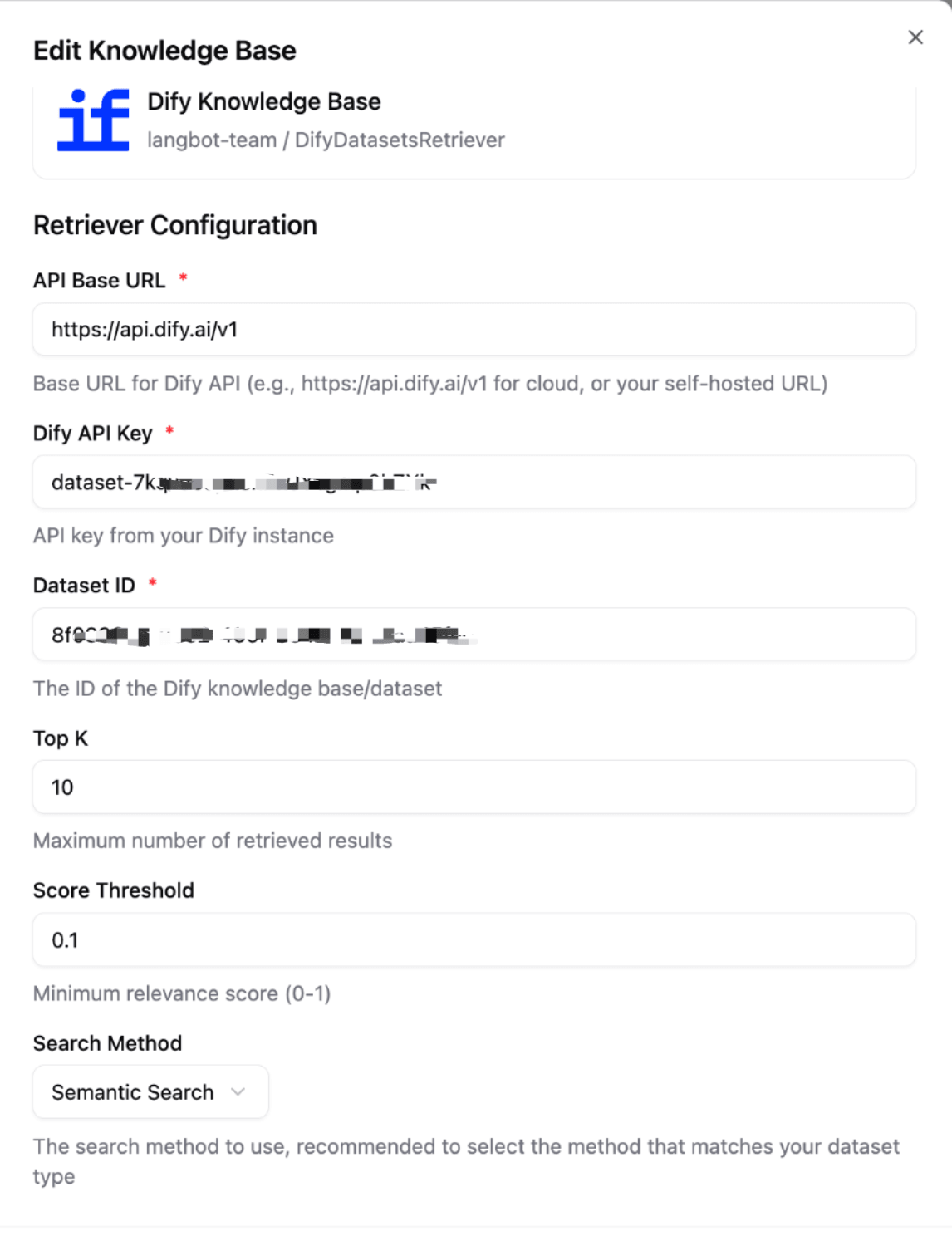 After saving, you can select this knowledge base in the LangBot pipeline.