> ## Documentation Index
> Fetch the complete documentation index at: https://docs.langbot.app/llms.txt
> Use this file to discover all available pages before exploring further.
# Message Platform Entities
LangBot supports multiple messaging platforms, and each platform has different `message entity` formats. To abstract away these differences, we have implemented a unified standard. Plugin developers only need to master and use the message entities described on this page in plugins, and LangBot's internal message processing logic can automatically handle message parsing and conversion.
## Message Chain
`Messages` on messaging platforms are different from messages used for AI interaction. Messages on messaging platforms are described in the form of `message chains`. Each independent message displayed on QQ is a message chain, which can contain various `message chain components` such as `text`, `images`, `@mentions`, etc. For example:
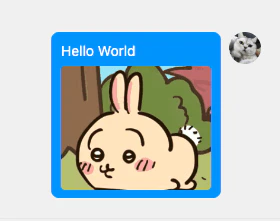 This is a message chain containing one Plain component (Hello World) and one Image component (Usagi).
The definitions of message chains and message chain components are located in `langbot_plugin.api.entities.builtin.platform.message`.
### Constructing Message Chains
Please first import the `langbot_plugin.api.entities.builtin.platform.message` package to use the message components within it.
```python theme={null}
from langbot_plugin.api.entities.builtin.platform.message import *
# Build a message containing text "Hello LangBot" and an image (from URL)
msg_chain = MessageChain([
Plain(text="Hello LangBot"),
Image(url='https://qchatgpt.rockchin.top/langbot-logo.png')
])
# Build a message containing @everyone and text "Hello LangBot"
msg_chain = MessageChain([
AtAll(),
Plain(text="Hello LangBot")
])
# Build a message containing @specific member and text "Hello LangBot"
msg_chain = MessageChain([
At(target=123456),
Plain(text="Hello LangBot")
])
```
Currently supported message chain components:
* `Source` - Source message chain information. Messages received from messaging platforms will include this component at the front of the message chain to record message information
* `Plain` - Plain text message
* `Quote` - Quote message
* `Image` - Image message
* `AtAll` - @everyone message
* `At` - @specific member message
* `Voice` - Voice message
* Need to check messaging platform support
* `Forward` - Forward message
* Not supported on many platforms, not recommended
* `File` - File message
When creating components, named parameters must be used. For specific usage, you can check the definitions in the source code `langbot_plugin.api.entities.builtin.platform.message`.
## Other Entities
In addition to the above entities, there are also entities like `Friend` and `Group`. These entities are defined in `langbot_plugin.api.entities.platform.entities`.
## Accessing Underlying Platform APIs
Not applicable for 4.x.
To abstract away platform differences, LangBot provides an abstraction layer above messaging platform APIs, which includes the content described above and various platform adapters in the `pkg/platform/sources` directory. However, due to significant platform differences, the entity and API encapsulation in the abstraction layer is not complete. If your plugin needs to access platform-specific functionality, you can access underlying APIs according to the following instructions.
```python theme={null}
# For example in a plugin
@handler(GroupMessageReceived)
async def _(self, ctx: EventContext):
# Get adapter object
adapter = ctx.query.adapter
```
| Platform | Adapter | Access Method | Description |
| ------------------------- | --------------- | ------------------- | -------------------------------------------------------------------------------------------------------------------------------------------------------------------------------------------------------------------------------------------------------------------------------------------------- |
| OneBot v11 | aiocqhttp | adapter.bot | bot object corresponds to [aiocqhttp](https://github.com/nonebot/aiocqhttp) CQHttp object, please refer to aiocqhttp documentation for detailed usage |
| QQ Official API | qqofficial | adapter.bot | bot object is the SDK object under libs/qq\_official\_api, for detailed usage please refer to the `send_group_text_msg` method in `QQOfficialClient` in libs/qq\_official\_api/api.py for HTTP request methods, please refer to QQ Official API documentation for specific interface documentation |
| WeCom (Enterprise WeChat) | wecom | adapter.bot | Refer to the `send_image` method in `WecomClient` in libs/wecom\_api/api.py for HTTP request methods, please refer to WeCom API documentation for specific interface documentation |
| WeChat Official Account | officialaccount | - | Please refer to WeChat Official Account API documentation for interface documentation, credential information can be obtained from adapter.bot |
| Lark | lark | adapter.api\_client | Lark SDK's API Client object, please refer to [oapi-sdk-python](https://github.com/larksuite/oapi-sdk-python) for details |
| DingTalk | dingtalk | - | Please refer to DingTalk API documentation, credential information can be obtained from adapter.bot |
| Discord | discord | adapter.bot | bot object is [Rapptz/discord.py](https://github.com/Rapptz/discord.py) Discord object, please refer to documentation for detailed usage |
| Telegram | telegram | adapter.bot | bot object is [python-telegram-bot](https://github.com/python-telegram-bot/python-telegram-bot) Telegram object, please refer to documentation for detailed usage |
| Slack | slack | adapter.bot | bot object in libs/slack\_api/api.py, please refer to its code and Slack SDK for detailed usage |
This is a message chain containing one Plain component (Hello World) and one Image component (Usagi).
The definitions of message chains and message chain components are located in `langbot_plugin.api.entities.builtin.platform.message`.
### Constructing Message Chains
Please first import the `langbot_plugin.api.entities.builtin.platform.message` package to use the message components within it.
```python theme={null}
from langbot_plugin.api.entities.builtin.platform.message import *
# Build a message containing text "Hello LangBot" and an image (from URL)
msg_chain = MessageChain([
Plain(text="Hello LangBot"),
Image(url='https://qchatgpt.rockchin.top/langbot-logo.png')
])
# Build a message containing @everyone and text "Hello LangBot"
msg_chain = MessageChain([
AtAll(),
Plain(text="Hello LangBot")
])
# Build a message containing @specific member and text "Hello LangBot"
msg_chain = MessageChain([
At(target=123456),
Plain(text="Hello LangBot")
])
```
Currently supported message chain components:
* `Source` - Source message chain information. Messages received from messaging platforms will include this component at the front of the message chain to record message information
* `Plain` - Plain text message
* `Quote` - Quote message
* `Image` - Image message
* `AtAll` - @everyone message
* `At` - @specific member message
* `Voice` - Voice message
* Need to check messaging platform support
* `Forward` - Forward message
* Not supported on many platforms, not recommended
* `File` - File message
When creating components, named parameters must be used. For specific usage, you can check the definitions in the source code `langbot_plugin.api.entities.builtin.platform.message`.
## Other Entities
In addition to the above entities, there are also entities like `Friend` and `Group`. These entities are defined in `langbot_plugin.api.entities.platform.entities`.
## Accessing Underlying Platform APIs
Not applicable for 4.x.
To abstract away platform differences, LangBot provides an abstraction layer above messaging platform APIs, which includes the content described above and various platform adapters in the `pkg/platform/sources` directory. However, due to significant platform differences, the entity and API encapsulation in the abstraction layer is not complete. If your plugin needs to access platform-specific functionality, you can access underlying APIs according to the following instructions.
```python theme={null}
# For example in a plugin
@handler(GroupMessageReceived)
async def _(self, ctx: EventContext):
# Get adapter object
adapter = ctx.query.adapter
```
| Platform | Adapter | Access Method | Description |
| ------------------------- | --------------- | ------------------- | -------------------------------------------------------------------------------------------------------------------------------------------------------------------------------------------------------------------------------------------------------------------------------------------------- |
| OneBot v11 | aiocqhttp | adapter.bot | bot object corresponds to [aiocqhttp](https://github.com/nonebot/aiocqhttp) CQHttp object, please refer to aiocqhttp documentation for detailed usage |
| QQ Official API | qqofficial | adapter.bot | bot object is the SDK object under libs/qq\_official\_api, for detailed usage please refer to the `send_group_text_msg` method in `QQOfficialClient` in libs/qq\_official\_api/api.py for HTTP request methods, please refer to QQ Official API documentation for specific interface documentation |
| WeCom (Enterprise WeChat) | wecom | adapter.bot | Refer to the `send_image` method in `WecomClient` in libs/wecom\_api/api.py for HTTP request methods, please refer to WeCom API documentation for specific interface documentation |
| WeChat Official Account | officialaccount | - | Please refer to WeChat Official Account API documentation for interface documentation, credential information can be obtained from adapter.bot |
| Lark | lark | adapter.api\_client | Lark SDK's API Client object, please refer to [oapi-sdk-python](https://github.com/larksuite/oapi-sdk-python) for details |
| DingTalk | dingtalk | - | Please refer to DingTalk API documentation, credential information can be obtained from adapter.bot |
| Discord | discord | adapter.bot | bot object is [Rapptz/discord.py](https://github.com/Rapptz/discord.py) Discord object, please refer to documentation for detailed usage |
| Telegram | telegram | adapter.bot | bot object is [python-telegram-bot](https://github.com/python-telegram-bot/python-telegram-bot) Telegram object, please refer to documentation for detailed usage |
| Slack | slack | adapter.bot | bot object in libs/slack\_api/api.py, please refer to its code and Slack SDK for detailed usage |