> ## Documentation Index
> Fetch the complete documentation index at: https://docs.langbot.app/llms.txt
> Use this file to discover all available pages before exploring further.
# LangBot v4.9.0: Full RAG Plugin Architecture — Knowledge Without Borders
> LangBot v4.9.0 refactors the entire knowledge base system from a built-in implementation to a plugin-driven architecture, introducing KnowledgeEngine and Parser component types for boundless extensibility.
This article is synchronized from the LangBot Blog. [Read the canonical version](https://langbot.app/en/blog/langbot-v490-rag-plugin-architecture).
Published 2026-03-10 · Author: LangBot Team
 LangBot v4.9.0, codenamed **"Knowledge Without Borders,"** does exactly what the name says: **the entire knowledge base capability has been refactored from a built-in implementation to a plugin-driven architecture.**
This isn't a minor tweak — it redefines what "knowledge" means in LangBot.
## The Problem with the Old Approach
Before v4.9.0, LangBot's knowledge base was split into two separate systems:
* **Built-in Knowledge Base**: Used Chroma as the vector database, with embedding models managed by LangBot directly. Document parsing, chunking, and indexing were all hardcoded.
* **External Knowledge Base**: Bridged services like Dify, RAGFlow, and FastGPT through the `KnowledgeRetriever` plugin component — retrieval only, no document ingestion.
These two systems lived behind separate UI tabs, with completely different data models and management flows.
**Why this was painful:**
1. **Poor extensibility**: Want a different vector database? A custom chunking strategy? Sorry, that's hardcoded.
2. **High maintenance cost**: Every RAG improvement required changes to LangBot's core code and a new release.
3. **Fragmented UX**: Two completely different knowledge base management flows meant a steep learning curve.
v4.9.0 solves this decisively: **extract RAG capabilities from LangBot's core and hand them to plugins.**
## What Changed
### 1. Unified Knowledge Base Model
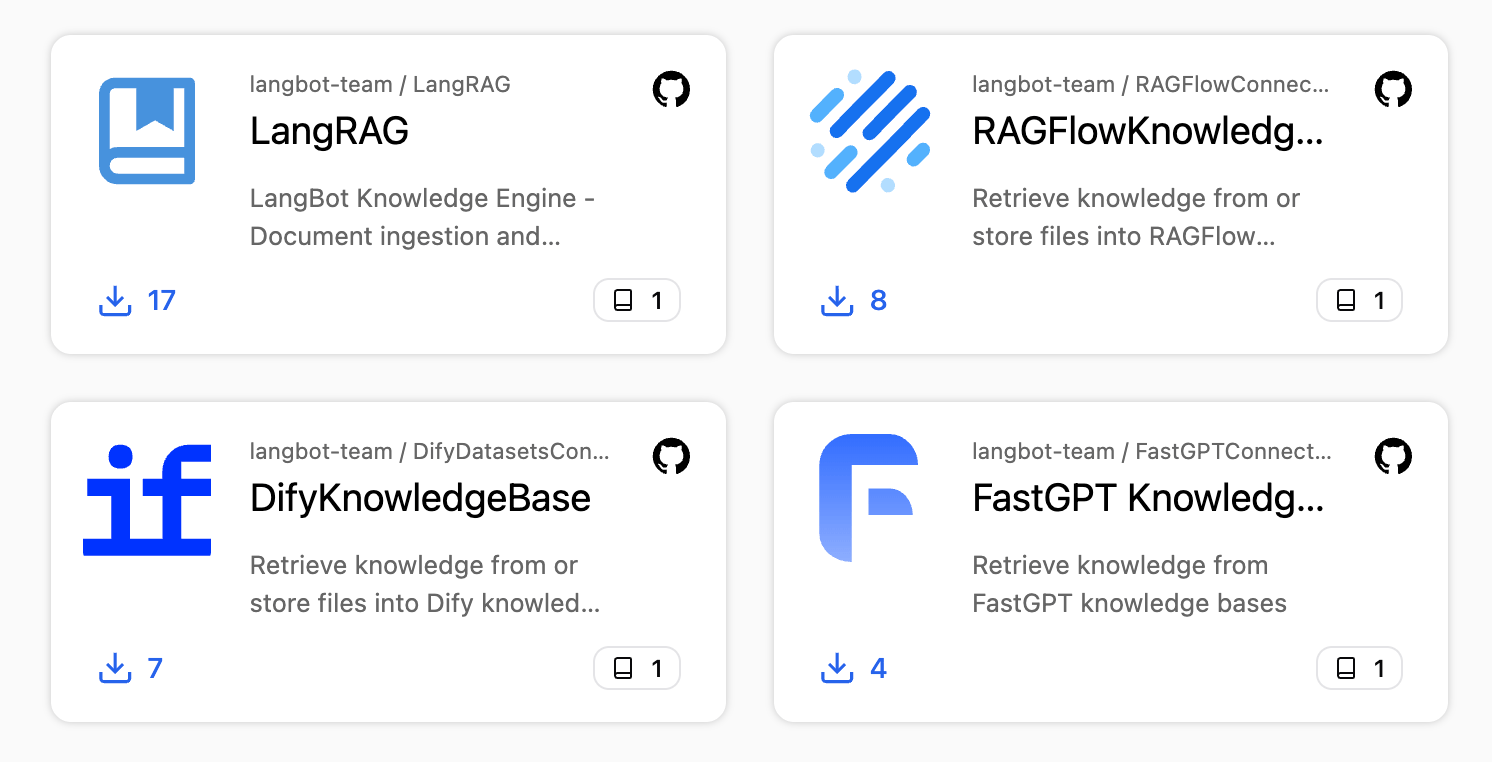
The `internal` / `external` distinction is gone. All knowledge bases are managed through a single interface, differentiated only by their `rag_engine_plugin_id`. One list, one creation flow — just pick your engine.
### 2. KnowledgeEngine Component
This is the headline addition. `KnowledgeEngine` replaces the old `KnowledgeRetriever` and takes ownership of the full knowledge base lifecycle:
* **Document Ingestion**: The complete pipeline from file parsing to vector indexing
* **Knowledge Retrieval**: Returning relevant chunks at query time
* **Document Deletion**: Cleaning up documents and their associated vector data
* **Lifecycle Hooks**: Callbacks when knowledge bases are created or deleted
A KnowledgeEngine plugin has full control over indexing and retrieval strategies — not just retrieval.
LangBot v4.9.0, codenamed **"Knowledge Without Borders,"** does exactly what the name says: **the entire knowledge base capability has been refactored from a built-in implementation to a plugin-driven architecture.**
This isn't a minor tweak — it redefines what "knowledge" means in LangBot.
## The Problem with the Old Approach
Before v4.9.0, LangBot's knowledge base was split into two separate systems:
* **Built-in Knowledge Base**: Used Chroma as the vector database, with embedding models managed by LangBot directly. Document parsing, chunking, and indexing were all hardcoded.
* **External Knowledge Base**: Bridged services like Dify, RAGFlow, and FastGPT through the `KnowledgeRetriever` plugin component — retrieval only, no document ingestion.
These two systems lived behind separate UI tabs, with completely different data models and management flows.
**Why this was painful:**
1. **Poor extensibility**: Want a different vector database? A custom chunking strategy? Sorry, that's hardcoded.
2. **High maintenance cost**: Every RAG improvement required changes to LangBot's core code and a new release.
3. **Fragmented UX**: Two completely different knowledge base management flows meant a steep learning curve.
v4.9.0 solves this decisively: **extract RAG capabilities from LangBot's core and hand them to plugins.**
## What Changed
### 1. Unified Knowledge Base Model
The `internal` / `external` distinction is gone. All knowledge bases are managed through a single interface, differentiated only by their `rag_engine_plugin_id`. One list, one creation flow — just pick your engine.
### 2. KnowledgeEngine Component
This is the headline addition. `KnowledgeEngine` replaces the old `KnowledgeRetriever` and takes ownership of the full knowledge base lifecycle:
* **Document Ingestion**: The complete pipeline from file parsing to vector indexing
* **Knowledge Retrieval**: Returning relevant chunks at query time
* **Document Deletion**: Cleaning up documents and their associated vector data
* **Lifecycle Hooks**: Callbacks when knowledge bases are created or deleted
A KnowledgeEngine plugin has full control over indexing and retrieval strategies — not just retrieval.
 ### 3. Parser Component
Document parsing has been extracted into its own plugin component type. A Parser converts binary files (PDF, Word, Markdown, etc.) into structured text, which is then handed to the RAG engine for chunking and indexing.
**The data flow:**
### 3. Parser Component
Document parsing has been extracted into its own plugin component type. A Parser converts binary files (PDF, Word, Markdown, etc.) into structured text, which is then handed to the RAG engine for chunking and indexing.
**The data flow:**
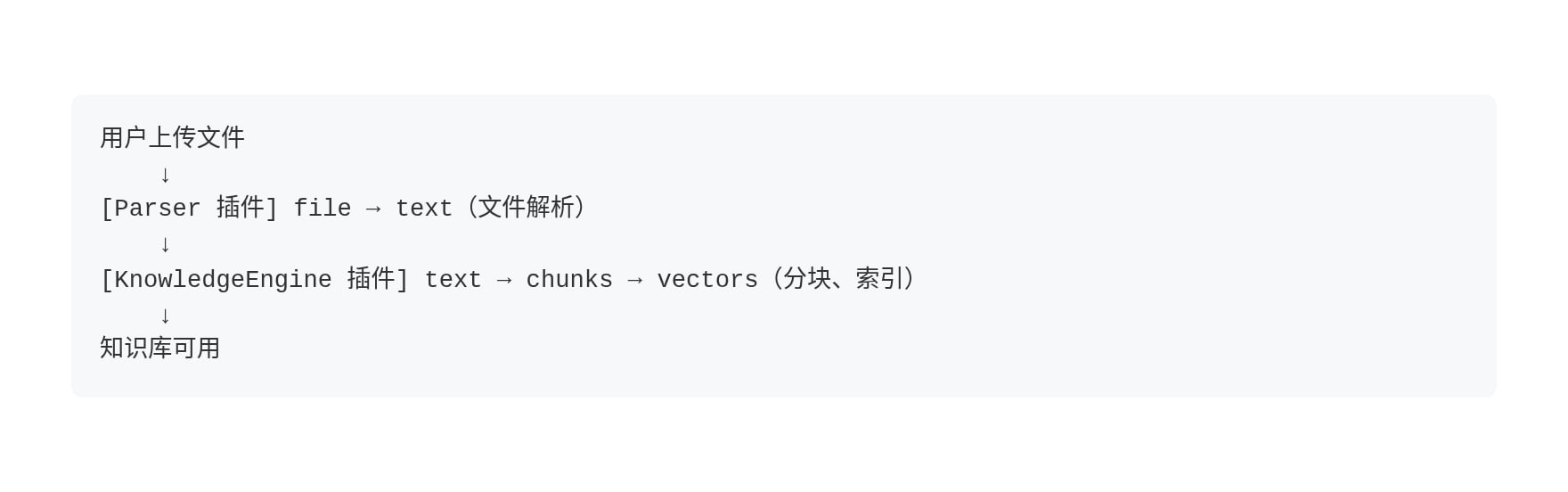 If a RAG engine declares `DOC_PARSING` capability, it can handle parsing internally and skip the external Parser.
### 4. Host RAG API
LangBot's core no longer executes RAG operations directly, but it still provides essential infrastructure through `RAGRuntimeService`, accessible to plugins via RPC:
* **Embedding invocation**: `invoke_embedding()` — plugins don't need to manage model connections
* **Vector database operations**: `vector_upsert()` / `vector_search()` / `vector_delete()`
* **File access**: `get_knowledge_file_stream()` — read raw files from storage
This means plugins can focus on RAG strategy (chunking algorithms, retrieval logic, re-ranking) while the host handles the "heavy" operations like vector storage and embedding models.
### 5. KnowledgeRetriever Deprecated
The old `KnowledgeRetriever` component has been removed. If you had external knowledge base plugins, they'll need to migrate to `KnowledgeEngine`. The good news: the new API is cleaner and migration is straightforward.
## Building a RAG Engine Plugin
### Scaffold the Component
```bash theme={null}
lbp comp KnowledgeEngine
```
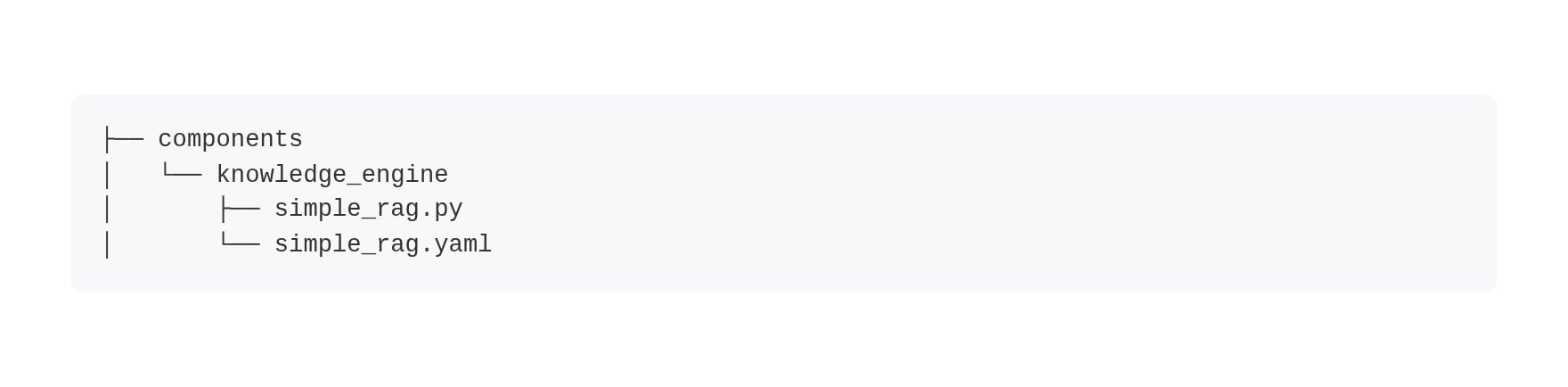
This generates the directory structure:
If a RAG engine declares `DOC_PARSING` capability, it can handle parsing internally and skip the external Parser.
### 4. Host RAG API
LangBot's core no longer executes RAG operations directly, but it still provides essential infrastructure through `RAGRuntimeService`, accessible to plugins via RPC:
* **Embedding invocation**: `invoke_embedding()` — plugins don't need to manage model connections
* **Vector database operations**: `vector_upsert()` / `vector_search()` / `vector_delete()`
* **File access**: `get_knowledge_file_stream()` — read raw files from storage
This means plugins can focus on RAG strategy (chunking algorithms, retrieval logic, re-ranking) while the host handles the "heavy" operations like vector storage and embedding models.
### 5. KnowledgeRetriever Deprecated
The old `KnowledgeRetriever` component has been removed. If you had external knowledge base plugins, they'll need to migrate to `KnowledgeEngine`. The good news: the new API is cleaner and migration is straightforward.
## Building a RAG Engine Plugin
### Scaffold the Component
```bash theme={null}
lbp comp KnowledgeEngine
```
This generates the directory structure:
 ### Define Configuration Schemas
The YAML manifest defines two configuration schemas:
* **`creation_schema`**: Parameters filled when creating a knowledge base (e.g., chunk size, embedding model)
* **`retrieval_schema`**: Parameters adjustable at retrieval time (e.g., score threshold, top-K)
```yaml theme={null}
spec:
creation_schema:
- name: chunk_size
label:
en_US: Chunk Size
type: integer
default: 500
- name: chunk_overlap
label:
en_US: Chunk Overlap
type: integer
default: 50
retrieval_schema:
- name: score_threshold
label:
en_US: Score Threshold
type: float
default: 0.5
```
LangBot **dynamically renders** creation and retrieval forms based on these schemas — different engines show different configuration fields.
### Declare Capabilities
```python theme={null}
class SimpleRag(KnowledgeEngine):
@classmethod
def get_capabilities(cls) -> list[str]:
return [
KnowledgeEngineCapability.DOC_INGESTION, # Supports document upload
# KnowledgeEngineCapability.DOC_PARSING, # Optional: built-in parsing
]
```
| Capability | Description |
| --------------- | --------------------------------------------------------------------------------------- |
| `DOC_INGESTION` | Supports document upload and processing. UI shows "Documents" tab |
| `DOC_PARSING` | Supports built-in document parsing. Without this, an external Parser plugin is required |
### Implement Core Methods
The three essential methods:
**Document Ingestion:**
```python theme={null}
async def ingest(self, context: IngestionContext) -> IngestionResult:
# 1. Get file content (or use Parser's pre-parsed result)
if context.parsed_content:
text = context.parsed_content.text
else:
file_bytes = await self.plugin.get_knowledge_file_stream(
context.file_object.storage_path
)
text = file_bytes.decode('utf-8')
# 2. Chunk the text
chunks = self._split_text(text, chunk_size=500)
# 3. Call host embedding model
vectors = await self.plugin.invoke_embedding(
embedding_model_uuid, chunks
)
# 4. Write to host vector database
await self.plugin.vector_upsert(
collection_id, vectors, ids, metadata
)
return IngestionResult(
document_id=context.file_object.metadata.document_id,
status=DocumentStatus.COMPLETED,
chunks_created=len(chunks),
)
```
**Knowledge Retrieval:**
```python theme={null}
async def retrieve(self, context: RetrievalContext) -> RetrievalResponse:
# 1. Generate query vector
query_vectors = await self.plugin.invoke_embedding(
embedding_model_uuid, [context.query]
)
# 2. Vector search
results = await self.plugin.vector_search(
collection_id, query_vectors[0], top_k=5
)
# 3. Convert and return
return RetrievalResponse(results=entries, total_found=len(entries))
```
**Document Deletion:**
```python theme={null}
async def delete_document(self, kb_id: str, document_id: str) -> bool:
deleted = await self.plugin.vector_delete(
collection_id=kb_id, file_ids=[document_id]
)
return deleted > 0
```
### Bridging External Services
If your goal is to bridge Dify, RAGFlow, FastGPT, or other external services rather than building a custom RAG pipeline, the implementation is even simpler — **don't declare `DOC_INGESTION` capability** and only implement `retrieve`:
```python theme={null}
class DifyRAGEngine(KnowledgeEngine):
@classmethod
def get_capabilities(cls) -> list[str]:
return [] # No document upload — managed externally
async def retrieve(self, context: RetrievalContext) -> RetrievalResponse:
# Call Dify/RAGFlow/FastGPT retrieval API
...
```
The knowledge base won't show a "Documents" tab — all content management happens in the external service.
## Building a Parser Plugin
Parser development is even more concise:
```bash theme={null}
lbp comp Parser
```
Declare supported MIME types in the manifest:
```yaml theme={null}
spec:
supported_mime_types:
- application/pdf
- application/vnd.openxmlformats-officedocument.wordprocessingml.document
```
Implement the `parse` method:
```python theme={null}
class PdfParser(Parser):
async def parse(self, context: ParseContext) -> ParseResult:
# context.file_content: raw file bytes
# context.mime_type: detected MIME type
# context.filename: original filename
text = extract_text_from_pdf(context.file_content)
return ParseResult(
text=text,
sections=[
TextSection(content=page_text, heading=f"Page {i}", page=i)
for i, page_text in enumerate(pages)
],
)
```
Parsers also support **cross-plugin invocation** — a RAG engine plugin can call another plugin's Parser:
```python theme={null}
result = await self.plugin.invoke_parser(
plugin_author="author_name",
plugin_name="plugin_name",
storage_path=context.file_object.storage_path,
mime_type=context.file_object.metadata.mime_type,
filename=context.file_object.metadata.filename,
)
```
## Upgrade Notes
* Knowledge bases created in previous versions are **automatically migrated**. After updating, visit the Knowledge Base page to verify.
* The `KnowledgeRetriever` component is deprecated. Existing plugins need to migrate to `KnowledgeEngine`.
* Browse the [Plugin Marketplace](https://space.langbot.app/market?category=KnowledgeEngine) for available RAG engine plugins.
## The Bigger Picture
v4.9.0's knowledge base refactoring is the latest step in LangBot's plugin-first evolution. From event handlers and tools in v4.0, to knowledge retrievers, to now full RAG engines and parsers — LangBot's core capabilities are progressively moving from "built-in" to "pluggable."
The endgame: **LangBot's core provides pipeline orchestration and infrastructure; all business capabilities are plugin-driven.**
Custom chunking strategy? Write a KnowledgeEngine plugin. PDF parsing? Write a Parser plugin. Bridge your company's internal knowledge service? Also a plugin.
Knowledge, without borders.
***
**Links:**
* [v4.9.0 Release Notes](https://github.com/langbot-app/LangBot/releases/tag/v4.9.0)
* [KnowledgeEngine Development Guide](https://docs.langbot.app/en/plugin/dev/components/knowledge-engine)
* [Parser Development Guide](https://docs.langbot.app/en/plugin/dev/components/parser)
* [Plugin Marketplace](https://space.langbot.app/market)
* [LangBot Cloud](https://space.langbot.app/cloud)
### Define Configuration Schemas
The YAML manifest defines two configuration schemas:
* **`creation_schema`**: Parameters filled when creating a knowledge base (e.g., chunk size, embedding model)
* **`retrieval_schema`**: Parameters adjustable at retrieval time (e.g., score threshold, top-K)
```yaml theme={null}
spec:
creation_schema:
- name: chunk_size
label:
en_US: Chunk Size
type: integer
default: 500
- name: chunk_overlap
label:
en_US: Chunk Overlap
type: integer
default: 50
retrieval_schema:
- name: score_threshold
label:
en_US: Score Threshold
type: float
default: 0.5
```
LangBot **dynamically renders** creation and retrieval forms based on these schemas — different engines show different configuration fields.
### Declare Capabilities
```python theme={null}
class SimpleRag(KnowledgeEngine):
@classmethod
def get_capabilities(cls) -> list[str]:
return [
KnowledgeEngineCapability.DOC_INGESTION, # Supports document upload
# KnowledgeEngineCapability.DOC_PARSING, # Optional: built-in parsing
]
```
| Capability | Description |
| --------------- | --------------------------------------------------------------------------------------- |
| `DOC_INGESTION` | Supports document upload and processing. UI shows "Documents" tab |
| `DOC_PARSING` | Supports built-in document parsing. Without this, an external Parser plugin is required |
### Implement Core Methods
The three essential methods:
**Document Ingestion:**
```python theme={null}
async def ingest(self, context: IngestionContext) -> IngestionResult:
# 1. Get file content (or use Parser's pre-parsed result)
if context.parsed_content:
text = context.parsed_content.text
else:
file_bytes = await self.plugin.get_knowledge_file_stream(
context.file_object.storage_path
)
text = file_bytes.decode('utf-8')
# 2. Chunk the text
chunks = self._split_text(text, chunk_size=500)
# 3. Call host embedding model
vectors = await self.plugin.invoke_embedding(
embedding_model_uuid, chunks
)
# 4. Write to host vector database
await self.plugin.vector_upsert(
collection_id, vectors, ids, metadata
)
return IngestionResult(
document_id=context.file_object.metadata.document_id,
status=DocumentStatus.COMPLETED,
chunks_created=len(chunks),
)
```
**Knowledge Retrieval:**
```python theme={null}
async def retrieve(self, context: RetrievalContext) -> RetrievalResponse:
# 1. Generate query vector
query_vectors = await self.plugin.invoke_embedding(
embedding_model_uuid, [context.query]
)
# 2. Vector search
results = await self.plugin.vector_search(
collection_id, query_vectors[0], top_k=5
)
# 3. Convert and return
return RetrievalResponse(results=entries, total_found=len(entries))
```
**Document Deletion:**
```python theme={null}
async def delete_document(self, kb_id: str, document_id: str) -> bool:
deleted = await self.plugin.vector_delete(
collection_id=kb_id, file_ids=[document_id]
)
return deleted > 0
```
### Bridging External Services
If your goal is to bridge Dify, RAGFlow, FastGPT, or other external services rather than building a custom RAG pipeline, the implementation is even simpler — **don't declare `DOC_INGESTION` capability** and only implement `retrieve`:
```python theme={null}
class DifyRAGEngine(KnowledgeEngine):
@classmethod
def get_capabilities(cls) -> list[str]:
return [] # No document upload — managed externally
async def retrieve(self, context: RetrievalContext) -> RetrievalResponse:
# Call Dify/RAGFlow/FastGPT retrieval API
...
```
The knowledge base won't show a "Documents" tab — all content management happens in the external service.
## Building a Parser Plugin
Parser development is even more concise:
```bash theme={null}
lbp comp Parser
```
Declare supported MIME types in the manifest:
```yaml theme={null}
spec:
supported_mime_types:
- application/pdf
- application/vnd.openxmlformats-officedocument.wordprocessingml.document
```
Implement the `parse` method:
```python theme={null}
class PdfParser(Parser):
async def parse(self, context: ParseContext) -> ParseResult:
# context.file_content: raw file bytes
# context.mime_type: detected MIME type
# context.filename: original filename
text = extract_text_from_pdf(context.file_content)
return ParseResult(
text=text,
sections=[
TextSection(content=page_text, heading=f"Page {i}", page=i)
for i, page_text in enumerate(pages)
],
)
```
Parsers also support **cross-plugin invocation** — a RAG engine plugin can call another plugin's Parser:
```python theme={null}
result = await self.plugin.invoke_parser(
plugin_author="author_name",
plugin_name="plugin_name",
storage_path=context.file_object.storage_path,
mime_type=context.file_object.metadata.mime_type,
filename=context.file_object.metadata.filename,
)
```
## Upgrade Notes
* Knowledge bases created in previous versions are **automatically migrated**. After updating, visit the Knowledge Base page to verify.
* The `KnowledgeRetriever` component is deprecated. Existing plugins need to migrate to `KnowledgeEngine`.
* Browse the [Plugin Marketplace](https://space.langbot.app/market?category=KnowledgeEngine) for available RAG engine plugins.
## The Bigger Picture
v4.9.0's knowledge base refactoring is the latest step in LangBot's plugin-first evolution. From event handlers and tools in v4.0, to knowledge retrievers, to now full RAG engines and parsers — LangBot's core capabilities are progressively moving from "built-in" to "pluggable."
The endgame: **LangBot's core provides pipeline orchestration and infrastructure; all business capabilities are plugin-driven.**
Custom chunking strategy? Write a KnowledgeEngine plugin. PDF parsing? Write a Parser plugin. Bridge your company's internal knowledge service? Also a plugin.
Knowledge, without borders.
***
**Links:**
* [v4.9.0 Release Notes](https://github.com/langbot-app/LangBot/releases/tag/v4.9.0)
* [KnowledgeEngine Development Guide](https://docs.langbot.app/en/plugin/dev/components/knowledge-engine)
* [Parser Development Guide](https://docs.langbot.app/en/plugin/dev/components/parser)
* [Plugin Marketplace](https://space.langbot.app/market)
* [LangBot Cloud](https://space.langbot.app/cloud)