> ## Documentation Index
> Fetch the complete documentation index at: https://docs.langbot.app/llms.txt
> Use this file to discover all available pages before exploring further.
# Deep Dive into the LangBot Plugin System: Process Isolation, Event-Driven Hooks, and Component Architecture
> A source-level deep dive into LangBot 4.0's plugin architecture — process-isolated communication, event-driven hooks, a component-based extension model, and comparisons with Dify and MCP.
This article is synchronized from the LangBot Blog. [Read the canonical version](https://langbot.app/en/blog/langbot-plugin-system-deep-dive).
Published 2026-02-23 · Author: LangBot Team
 Most chatbot frameworks call their "plugin system" a glorified dynamic import of Python modules. LangBot 4.0 takes a harder but more principled approach — **every plugin runs in its own process**, communicating with the host through a structured JSON-RPC-style protocol.
This article dissects the system from source code, end to end.
## Overall Architecture: A Three-Layer Process Model
LangBot's plugin system consists of three cooperating process layers:
Most chatbot frameworks call their "plugin system" a glorified dynamic import of Python modules. LangBot 4.0 takes a harder but more principled approach — **every plugin runs in its own process**, communicating with the host through a structured JSON-RPC-style protocol.
This article dissects the system from source code, end to end.
## Overall Architecture: A Three-Layer Process Model
LangBot's plugin system consists of three cooperating process layers:
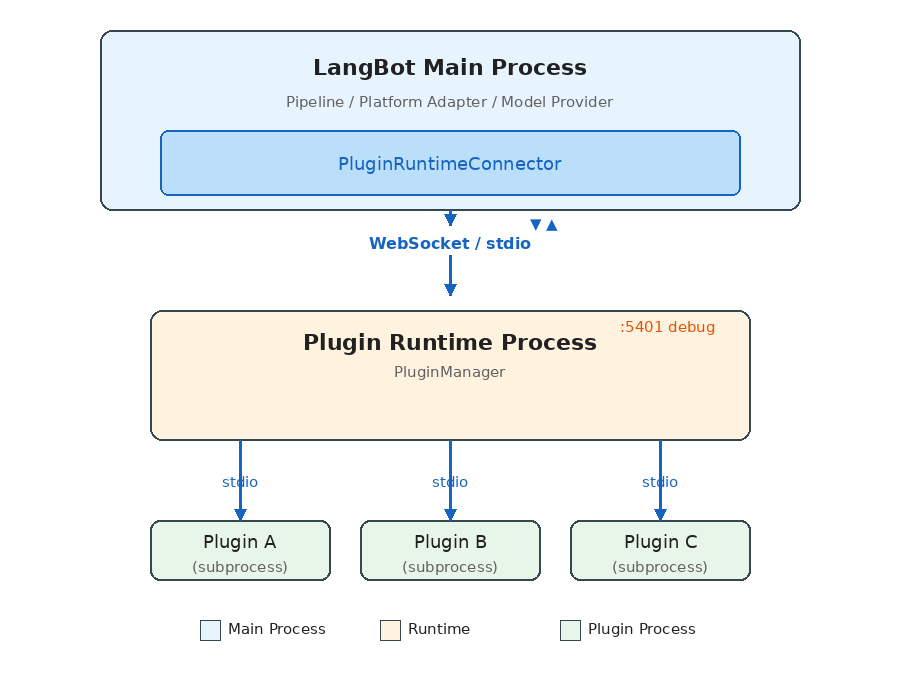 **Each layer has a distinct responsibility:**
1. **LangBot Main Process**: Runs business logic (message pipelines, platform adapters, model invocations), connects to Runtime via `PluginRuntimeConnector`.
2. **Plugin Runtime**: The orchestration layer — discovers, launches, and manages all plugin subprocesses, routes requests from the main process to the appropriate plugin.
3. **Plugin Subprocesses**: Each plugin runs in its own Python process, communicating with Runtime via stdio pipes.
### Why Three Layers Instead of Two?
The intuitive design would have the main process manage plugin processes directly. LangBot adds the Runtime layer for **deployment flexibility**:
* **Local development**: Main process spawns Runtime as a child via stdio (zero config)
* **Docker production**: Runtime runs as a separate container, connected via WebSocket
* **Windows compatibility**: Since Windows asyncio has incomplete stdio subprocess support, it automatically falls back to WebSocket
The same codebase — no config changes — adapts from development to production.
## Communication Protocol: JSON-RPC-Style Request/Response
All cross-process communication runs on a unified protocol layer. The core data structures are minimal:
```python theme={null}
# Request
class ActionRequest(pydantic.BaseModel):
seq_id: int # Sequence number for matching request/response
action: str # Action name
data: dict # Payload
# Response
class ActionResponse(pydantic.BaseModel):
seq_id: int
code: int # 0 = success
message: str
data: dict
chunk_status: str # "continue" | "end" (streaming support)
```
The `Handler` class is the system's core abstraction, acting as both RPC client and server:
```python theme={null}
class Handler:
async def call_action(self, action, data, timeout=15.0) -> dict:
"""Actively call an action provided by the peer, wait for response"""
self.seq_id_index += 1
request = ActionRequest.make_request(self.seq_id_index, action.value, data)
future = asyncio.Future()
self.resp_waiters[self.seq_id_index] = future
await self.conn.send(json.dumps(request.model_dump()))
response = await asyncio.wait_for(future, timeout)
return response.data
@action(SomeAction.DO_SOMETHING)
async def handle_something(data: dict) -> ActionResponse:
"""Register an action for the peer to call"""
return ActionResponse.success({"result": "ok"})
```
**Key design points:**
* `seq_id`-based request/response matching enables full-duplex concurrent calls
* Streaming responses via `chunk_status` for long-running operations like command execution
* Large messages auto-chunk (stdio: 16KB / WebSocket: 64KB per chunk)
* File transfer uses a separate base64 chunking mechanism
### Action Enums: Clear API Contracts
The system defines all cross-process calls through four enum groups:
```python theme={null}
# Plugin → Runtime (plugin-initiated requests)
class PluginToRuntimeAction:
REGISTER_PLUGIN = "register_plugin"
SEND_MESSAGE = "send_message" # Send message to a platform
INVOKE_LLM = "invoke_llm" # Call an LLM
SET_PLUGIN_STORAGE = "set_plugin_storage" # Persistent storage
# ...
# Runtime → Plugin (runtime-dispatched commands)
class RuntimeToPluginAction:
INITIALIZE_PLUGIN = "initialize_plugin"
EMIT_EVENT = "emit_event"
CALL_TOOL = "call_tool"
EXECUTE_COMMAND = "execute_command"
SHUTDOWN = "shutdown"
# ...
# LangBot Main → Runtime
class LangBotToRuntimeAction:
INSTALL_PLUGIN = "install_plugin"
EMIT_EVENT = "emit_event"
LIST_TOOLS = "list_tools"
# ...
# Runtime → LangBot Main
class RuntimeToLangBotAction:
GET_PLUGIN_SETTINGS = "get_plugin_settings"
SET_BINARY_STORAGE = "set_binary_storage"
# ...
```
This makes API boundaries crystal clear — what a plugin can and cannot do is defined entirely by these enums.
## Plugin Lifecycle
A plugin goes through these stages from installation to execution:
### 1. Discovery
On startup, Runtime scans the `data/plugins/` directory:
```python theme={null}
async def launch_all_plugins(self):
for plugin_path in glob.glob("data/plugins/*"):
if not os.path.isdir(plugin_path):
continue
task = self.launch_plugin(plugin_path)
self.plugin_run_tasks.append(task)
```
Directory names follow the `{author}__{name}` convention, each containing a `manifest.yaml` and plugin code.
### 2. Launch
Runtime spawns an independent subprocess for each plugin:
```python theme={null}
async def launch_plugin(self, plugin_path: str):
python_path = sys.executable
args = ["-m", "langbot_plugin.cli.__init__", "run", "-s", "--prod"]
ctrl = StdioClientController(
command=python_path,
args=args,
working_dir=plugin_path, # Each plugin runs in its own directory
)
await ctrl.run(new_plugin_connection_callback)
```
**Key detail**: The subprocess working directory is set to the plugin's own directory — natural filesystem isolation.
### 3. Registration
After starting, the plugin process actively registers itself with Runtime:
```python theme={null}
# Runtime-side registration handler
async def register_plugin(self, handler, container_data, debug_plugin=False):
plugin_container = PluginContainer.from_dict(container_data)
# Fetch plugin settings from the main process
plugin_settings = await self.context.control_handler.call_action(
RuntimeToLangBotAction.GET_PLUGIN_SETTINGS, {...}
)
# Initialize the plugin (send config)
await handler.initialize_plugin(plugin_settings)
# Store the plugin container
self.plugins.append(plugin_container)
```
### 4. Running
Once in `INITIALIZED` state, the plugin can receive events, tool calls, and command executions.
### 5. Shutdown
```python theme={null}
async def shutdown_plugin(self, plugin_container):
# 1. Notify the plugin to shut down gracefully
await plugin_container._runtime_plugin_handler.shutdown_plugin()
# 2. Close the communication connection
await plugin_container._runtime_plugin_handler.conn.close()
# 3. Kill the subprocess
if handler.stdio_process is not None:
handler.stdio_process.kill()
await asyncio.wait_for(handler.stdio_process.wait(), timeout=2)
```
## Component System: Four Extension Types
A LangBot plugin isn't a single hook function — it's a **component container**. A single plugin can provide multiple component types simultaneously:
### EventListener
The most fundamental extension — listen for events in the message pipeline:
```python theme={null}
from langbot_plugin.api.definition.components.common.event_listener import EventListener
from langbot_plugin.api.entities.events import PersonNormalMessageReceived
from langbot_plugin.api.entities.context import EventContext
class MyListener(EventListener):
@EventListener.handler(PersonNormalMessageReceived)
async def on_person_message(self, ctx: EventContext):
event = ctx.event
# Modify the user message before it reaches the LLM
event.user_message_alter = "Answer in poetry: " + event.text_message
# Or block further processing
# ctx.prevent_default()
# ctx.prevent_postorder()
```
Supported events cover the full message lifecycle:
| Event | Trigger |
| ----------------------------- | ---------------------------------- |
| `PersonMessageReceived` | Any private message received |
| `GroupMessageReceived` | Any group message received |
| `PersonNormalMessageReceived` | Private message deemed processable |
| `GroupNormalMessageReceived` | Group message deemed processable |
| `NormalMessageResponded` | LLM response completed |
| `PromptPreProcessing` | Prompt preprocessing stage |
Event propagation supports two interruption modes:
* `prevent_default()`: Skip default behavior (e.g., skip the LLM call)
* `prevent_postorder()`: Stop subsequent plugins from running
### Tool
Tools for LLM Function Calling:
```python theme={null}
from langbot_plugin.api.definition.components.tool.tool import Tool
class WeatherTool(Tool):
async def call(self, params: dict, session, query_id: int) -> str:
city = params.get("city", "Beijing")
# Call weather API...
return f"{city}: Sunny, 25°C"
```
Tool metadata (name, description, parameter schema) is defined in a companion YAML manifest file. LangBot automatically converts this into the Function definition that LLMs understand.
### Command
User-triggered commands via `!command`, with subcommand support:
```python theme={null}
from langbot_plugin.api.definition.components.command.command import Command
class MyCommand(Command):
def __init__(self):
super().__init__()
@self.subcommand("hello", help="Say hello")
async def hello(self, ctx):
yield CommandReturn(text="Hello from plugin!")
@self.subcommand("status", help="Show status")
async def status(self, ctx):
yield CommandReturn(text="All systems operational.")
```
Command results are returned via `AsyncGenerator`, providing natural streaming output.
### KnowledgeRetriever
A multi-instance component for connecting external knowledge bases:
```python theme={null}
from langbot_plugin.api.definition.components.knowledge_retriever.retriever import KnowledgeRetriever
class MyRetriever(KnowledgeRetriever):
async def retrieve(self, context) -> list:
results = await self.search_external_db(context.query)
return [RetrievalResultEntry(content=r) for r in results]
```
KnowledgeRetriever is a **polymorphic component** — a single retriever class can spawn multiple instances, each with independent configuration. This allows users to connect multiple different external knowledge bases.
## SDK API: What Plugins Can Do
Plugins gain rich capabilities through the `LangBotAPIProxy` inherited by `BasePlugin`:
```python theme={null}
class LangBotAPIProxy:
# Message operations
async def send_message(self, bot_uuid, target_type, target_id, message_chain)
# Model invocation
async def get_llm_models(self) -> list[str]
async def invoke_llm(self, model_uuid, messages, funcs=[], extra_args={})
# Persistent storage (plugin-level isolation)
async def set_plugin_storage(self, key, value: bytes)
async def get_plugin_storage(self, key) -> bytes
# Workspace storage (cross-plugin shared)
async def set_workspace_storage(self, key, value: bytes)
async def get_workspace_storage(self, key) -> bytes
# System info
async def get_langbot_version(self) -> str
async def get_bots(self) -> list[str]
async def list_plugins_manifest(self) -> list
```
**The storage API design is worth noting**: Two levels of KV storage — `plugin_storage` (plugin-private) and `workspace_storage` (globally shared), storing data as bytes (base64-serialized in transit). Simple but flexible enough.
## Event Dispatch Mechanism
The complete path from main process to plugin:
**Each layer has a distinct responsibility:**
1. **LangBot Main Process**: Runs business logic (message pipelines, platform adapters, model invocations), connects to Runtime via `PluginRuntimeConnector`.
2. **Plugin Runtime**: The orchestration layer — discovers, launches, and manages all plugin subprocesses, routes requests from the main process to the appropriate plugin.
3. **Plugin Subprocesses**: Each plugin runs in its own Python process, communicating with Runtime via stdio pipes.
### Why Three Layers Instead of Two?
The intuitive design would have the main process manage plugin processes directly. LangBot adds the Runtime layer for **deployment flexibility**:
* **Local development**: Main process spawns Runtime as a child via stdio (zero config)
* **Docker production**: Runtime runs as a separate container, connected via WebSocket
* **Windows compatibility**: Since Windows asyncio has incomplete stdio subprocess support, it automatically falls back to WebSocket
The same codebase — no config changes — adapts from development to production.
## Communication Protocol: JSON-RPC-Style Request/Response
All cross-process communication runs on a unified protocol layer. The core data structures are minimal:
```python theme={null}
# Request
class ActionRequest(pydantic.BaseModel):
seq_id: int # Sequence number for matching request/response
action: str # Action name
data: dict # Payload
# Response
class ActionResponse(pydantic.BaseModel):
seq_id: int
code: int # 0 = success
message: str
data: dict
chunk_status: str # "continue" | "end" (streaming support)
```
The `Handler` class is the system's core abstraction, acting as both RPC client and server:
```python theme={null}
class Handler:
async def call_action(self, action, data, timeout=15.0) -> dict:
"""Actively call an action provided by the peer, wait for response"""
self.seq_id_index += 1
request = ActionRequest.make_request(self.seq_id_index, action.value, data)
future = asyncio.Future()
self.resp_waiters[self.seq_id_index] = future
await self.conn.send(json.dumps(request.model_dump()))
response = await asyncio.wait_for(future, timeout)
return response.data
@action(SomeAction.DO_SOMETHING)
async def handle_something(data: dict) -> ActionResponse:
"""Register an action for the peer to call"""
return ActionResponse.success({"result": "ok"})
```
**Key design points:**
* `seq_id`-based request/response matching enables full-duplex concurrent calls
* Streaming responses via `chunk_status` for long-running operations like command execution
* Large messages auto-chunk (stdio: 16KB / WebSocket: 64KB per chunk)
* File transfer uses a separate base64 chunking mechanism
### Action Enums: Clear API Contracts
The system defines all cross-process calls through four enum groups:
```python theme={null}
# Plugin → Runtime (plugin-initiated requests)
class PluginToRuntimeAction:
REGISTER_PLUGIN = "register_plugin"
SEND_MESSAGE = "send_message" # Send message to a platform
INVOKE_LLM = "invoke_llm" # Call an LLM
SET_PLUGIN_STORAGE = "set_plugin_storage" # Persistent storage
# ...
# Runtime → Plugin (runtime-dispatched commands)
class RuntimeToPluginAction:
INITIALIZE_PLUGIN = "initialize_plugin"
EMIT_EVENT = "emit_event"
CALL_TOOL = "call_tool"
EXECUTE_COMMAND = "execute_command"
SHUTDOWN = "shutdown"
# ...
# LangBot Main → Runtime
class LangBotToRuntimeAction:
INSTALL_PLUGIN = "install_plugin"
EMIT_EVENT = "emit_event"
LIST_TOOLS = "list_tools"
# ...
# Runtime → LangBot Main
class RuntimeToLangBotAction:
GET_PLUGIN_SETTINGS = "get_plugin_settings"
SET_BINARY_STORAGE = "set_binary_storage"
# ...
```
This makes API boundaries crystal clear — what a plugin can and cannot do is defined entirely by these enums.
## Plugin Lifecycle
A plugin goes through these stages from installation to execution:
### 1. Discovery
On startup, Runtime scans the `data/plugins/` directory:
```python theme={null}
async def launch_all_plugins(self):
for plugin_path in glob.glob("data/plugins/*"):
if not os.path.isdir(plugin_path):
continue
task = self.launch_plugin(plugin_path)
self.plugin_run_tasks.append(task)
```
Directory names follow the `{author}__{name}` convention, each containing a `manifest.yaml` and plugin code.
### 2. Launch
Runtime spawns an independent subprocess for each plugin:
```python theme={null}
async def launch_plugin(self, plugin_path: str):
python_path = sys.executable
args = ["-m", "langbot_plugin.cli.__init__", "run", "-s", "--prod"]
ctrl = StdioClientController(
command=python_path,
args=args,
working_dir=plugin_path, # Each plugin runs in its own directory
)
await ctrl.run(new_plugin_connection_callback)
```
**Key detail**: The subprocess working directory is set to the plugin's own directory — natural filesystem isolation.
### 3. Registration
After starting, the plugin process actively registers itself with Runtime:
```python theme={null}
# Runtime-side registration handler
async def register_plugin(self, handler, container_data, debug_plugin=False):
plugin_container = PluginContainer.from_dict(container_data)
# Fetch plugin settings from the main process
plugin_settings = await self.context.control_handler.call_action(
RuntimeToLangBotAction.GET_PLUGIN_SETTINGS, {...}
)
# Initialize the plugin (send config)
await handler.initialize_plugin(plugin_settings)
# Store the plugin container
self.plugins.append(plugin_container)
```
### 4. Running
Once in `INITIALIZED` state, the plugin can receive events, tool calls, and command executions.
### 5. Shutdown
```python theme={null}
async def shutdown_plugin(self, plugin_container):
# 1. Notify the plugin to shut down gracefully
await plugin_container._runtime_plugin_handler.shutdown_plugin()
# 2. Close the communication connection
await plugin_container._runtime_plugin_handler.conn.close()
# 3. Kill the subprocess
if handler.stdio_process is not None:
handler.stdio_process.kill()
await asyncio.wait_for(handler.stdio_process.wait(), timeout=2)
```
## Component System: Four Extension Types
A LangBot plugin isn't a single hook function — it's a **component container**. A single plugin can provide multiple component types simultaneously:
### EventListener
The most fundamental extension — listen for events in the message pipeline:
```python theme={null}
from langbot_plugin.api.definition.components.common.event_listener import EventListener
from langbot_plugin.api.entities.events import PersonNormalMessageReceived
from langbot_plugin.api.entities.context import EventContext
class MyListener(EventListener):
@EventListener.handler(PersonNormalMessageReceived)
async def on_person_message(self, ctx: EventContext):
event = ctx.event
# Modify the user message before it reaches the LLM
event.user_message_alter = "Answer in poetry: " + event.text_message
# Or block further processing
# ctx.prevent_default()
# ctx.prevent_postorder()
```
Supported events cover the full message lifecycle:
| Event | Trigger |
| ----------------------------- | ---------------------------------- |
| `PersonMessageReceived` | Any private message received |
| `GroupMessageReceived` | Any group message received |
| `PersonNormalMessageReceived` | Private message deemed processable |
| `GroupNormalMessageReceived` | Group message deemed processable |
| `NormalMessageResponded` | LLM response completed |
| `PromptPreProcessing` | Prompt preprocessing stage |
Event propagation supports two interruption modes:
* `prevent_default()`: Skip default behavior (e.g., skip the LLM call)
* `prevent_postorder()`: Stop subsequent plugins from running
### Tool
Tools for LLM Function Calling:
```python theme={null}
from langbot_plugin.api.definition.components.tool.tool import Tool
class WeatherTool(Tool):
async def call(self, params: dict, session, query_id: int) -> str:
city = params.get("city", "Beijing")
# Call weather API...
return f"{city}: Sunny, 25°C"
```
Tool metadata (name, description, parameter schema) is defined in a companion YAML manifest file. LangBot automatically converts this into the Function definition that LLMs understand.
### Command
User-triggered commands via `!command`, with subcommand support:
```python theme={null}
from langbot_plugin.api.definition.components.command.command import Command
class MyCommand(Command):
def __init__(self):
super().__init__()
@self.subcommand("hello", help="Say hello")
async def hello(self, ctx):
yield CommandReturn(text="Hello from plugin!")
@self.subcommand("status", help="Show status")
async def status(self, ctx):
yield CommandReturn(text="All systems operational.")
```
Command results are returned via `AsyncGenerator`, providing natural streaming output.
### KnowledgeRetriever
A multi-instance component for connecting external knowledge bases:
```python theme={null}
from langbot_plugin.api.definition.components.knowledge_retriever.retriever import KnowledgeRetriever
class MyRetriever(KnowledgeRetriever):
async def retrieve(self, context) -> list:
results = await self.search_external_db(context.query)
return [RetrievalResultEntry(content=r) for r in results]
```
KnowledgeRetriever is a **polymorphic component** — a single retriever class can spawn multiple instances, each with independent configuration. This allows users to connect multiple different external knowledge bases.
## SDK API: What Plugins Can Do
Plugins gain rich capabilities through the `LangBotAPIProxy` inherited by `BasePlugin`:
```python theme={null}
class LangBotAPIProxy:
# Message operations
async def send_message(self, bot_uuid, target_type, target_id, message_chain)
# Model invocation
async def get_llm_models(self) -> list[str]
async def invoke_llm(self, model_uuid, messages, funcs=[], extra_args={})
# Persistent storage (plugin-level isolation)
async def set_plugin_storage(self, key, value: bytes)
async def get_plugin_storage(self, key) -> bytes
# Workspace storage (cross-plugin shared)
async def set_workspace_storage(self, key, value: bytes)
async def get_workspace_storage(self, key) -> bytes
# System info
async def get_langbot_version(self) -> str
async def get_bots(self) -> list[str]
async def list_plugins_manifest(self) -> list
```
**The storage API design is worth noting**: Two levels of KV storage — `plugin_storage` (plugin-private) and `workspace_storage` (globally shared), storing data as bytes (base64-serialized in transit). Simple but flexible enough.
## Event Dispatch Mechanism
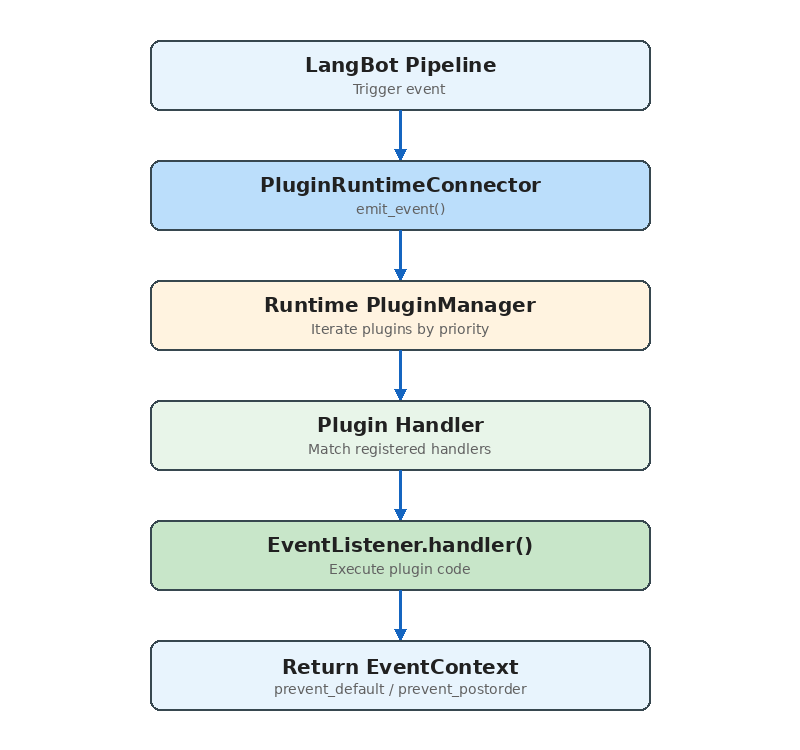
The complete path from main process to plugin:
 Key source code:
```python theme={null}
async def emit_event(self, event_context, include_plugins=None):
for plugin in self.plugins:
if plugin.status != RuntimeContainerStatus.INITIALIZED:
continue
if not plugin.enabled:
continue
# Pipeline-level plugin filtering
if include_plugins is not None:
plugin_id = f"{plugin.manifest.metadata.author}/{plugin.manifest.metadata.name}"
if plugin_id not in include_plugins:
continue
resp = await plugin._runtime_plugin_handler.emit_event(
event_context.model_dump()
)
event_context = EventContext.model_validate(resp["event_context"])
# Plugin requested propagation stop
if event_context.is_prevented_postorder():
break
return emitted_plugins, event_context
```
The `include_plugins` parameter enables **pipeline-level plugin binding** — different message processing pipelines can use different subsets of plugins.
## Installation & Distribution
Plugins support three installation sources:
1. **Local upload**: `.lbpkg` files (actually zip archives containing manifest.yaml and code)
2. **Marketplace**: Install from LangBot Space online
3. **GitHub Release**: Download from a GitHub repository's Release assets
The installation flow:
```python theme={null}
async def install_plugin(self, source, install_info):
yield {"current_action": "downloading plugin package"}
# 1. Fetch and extract the plugin package (unzip)
plugin_path, author, name, version = await self.install_plugin_from_file(plugin_file)
yield {"current_action": "installing dependencies"}
# 2. Install dependencies (pip install -r requirements.txt)
pkgmgr_helper.install_requirements(requirements_file)
yield {"current_action": "initializing plugin settings"}
# 3. Initialize configuration
await self.context.control_handler.call_action(
RuntimeToLangBotAction.INITIALIZE_PLUGIN_SETTINGS, {...}
)
yield {"current_action": "launching plugin"}
# 4. Launch the plugin process
task = self.launch_plugin(plugin_path)
```
The entire process reports progress via `AsyncGenerator`, enabling real-time installation status in the frontend.
## Developer Experience
The SDK provides a complete developer toolchain:
```bash theme={null}
# Initialize a new plugin
lbp init
# Add a component
lbp component add
# Run locally for debugging
lbp run
# Package for publication
lbp publish
```
**Debug mode** has a particularly clever design: the developer's plugin connects to the running Runtime via WebSocket (instead of stdio), meaning you can hot-reload plugin code without restarting LangBot. Debug plugins are specially marked in the UI and protected from accidental deletion.
## Comparisons with Other Systems
### vs Dify Plugins
Dify's plugin system (`dify-plugin-daemon`) shares the process isolation philosophy with LangBot, but the focus differs:
* **Dify**: Plugins extend workflow node types (Tool, Model, Extension) — designed for AI application orchestration
* **LangBot**: Plugins extend the message processing pipeline (Event, Tool, Command, KnowledgeRetriever) — designed for instant messaging scenarios
LangBot's `EventListener` component provides a capability Dify lacks — injecting logic at any stage of message processing.
### vs MCP (Model Context Protocol)
MCP is a standardized protocol for AI tool invocation. LangBot's Tool component and MCP services overlap functionally, but serve different purposes:
* **MCP**: A universal "AI calls external capabilities" protocol, usable by any LLM application
* **LangBot Tool**: Deeply integrated with message processing context, with access to session info, user identity, etc.
In practice, LangBot natively supports MCP — users can configure MCP servers directly in LangBot without writing plugins. LangBot's Tool component is for scenarios requiring access to LangBot's internal context.
## Design Decisions Explained
**Why process isolation instead of threads/coroutines?**
* Plugin code quality is unpredictable; a segfault shouldn't crash the entire service
* Dependency isolation: different plugins may depend on different versions of the same library
* Resource control: you can set per-plugin process resource limits
**Why JSON instead of Protobuf/MessagePack?**
* Debug-friendly: developers can directly read communication logs
* Natively supported in Python, no extra dependencies
* The performance bottleneck isn't serialization (plugin call frequency is far below database queries)
**Why stdio over WebSocket by default?**
* stdio requires no network stack — lower latency
* Simpler process lifecycle management (child processes auto-cleanup when parent exits)
* WebSocket is only used where stdio isn't supported (Docker, Windows)
## Conclusion
LangBot's plugin system is a **production-grade, process-isolated, event-driven component framework for extensibility**.
Its core design principles:
1. **Safety first**: Process isolation ensures plugins can't destabilize the main service
2. **Deployment flexibility**: Dual stdio/WebSocket modes adapt to all environments
3. **Developer-friendly**: Complete SDK, CLI, and debug support
4. **Component-based**: Four component types cover the major extension needs
If you're interested in developing LangBot plugins, start with the [plugin development docs](https://docs.langbot.app/en/plugin/dev/tutor), or browse existing plugins on the [marketplace](https://space.langbot.app/market) for inspiration.
Key source code:
```python theme={null}
async def emit_event(self, event_context, include_plugins=None):
for plugin in self.plugins:
if plugin.status != RuntimeContainerStatus.INITIALIZED:
continue
if not plugin.enabled:
continue
# Pipeline-level plugin filtering
if include_plugins is not None:
plugin_id = f"{plugin.manifest.metadata.author}/{plugin.manifest.metadata.name}"
if plugin_id not in include_plugins:
continue
resp = await plugin._runtime_plugin_handler.emit_event(
event_context.model_dump()
)
event_context = EventContext.model_validate(resp["event_context"])
# Plugin requested propagation stop
if event_context.is_prevented_postorder():
break
return emitted_plugins, event_context
```
The `include_plugins` parameter enables **pipeline-level plugin binding** — different message processing pipelines can use different subsets of plugins.
## Installation & Distribution
Plugins support three installation sources:
1. **Local upload**: `.lbpkg` files (actually zip archives containing manifest.yaml and code)
2. **Marketplace**: Install from LangBot Space online
3. **GitHub Release**: Download from a GitHub repository's Release assets
The installation flow:
```python theme={null}
async def install_plugin(self, source, install_info):
yield {"current_action": "downloading plugin package"}
# 1. Fetch and extract the plugin package (unzip)
plugin_path, author, name, version = await self.install_plugin_from_file(plugin_file)
yield {"current_action": "installing dependencies"}
# 2. Install dependencies (pip install -r requirements.txt)
pkgmgr_helper.install_requirements(requirements_file)
yield {"current_action": "initializing plugin settings"}
# 3. Initialize configuration
await self.context.control_handler.call_action(
RuntimeToLangBotAction.INITIALIZE_PLUGIN_SETTINGS, {...}
)
yield {"current_action": "launching plugin"}
# 4. Launch the plugin process
task = self.launch_plugin(plugin_path)
```
The entire process reports progress via `AsyncGenerator`, enabling real-time installation status in the frontend.
## Developer Experience
The SDK provides a complete developer toolchain:
```bash theme={null}
# Initialize a new plugin
lbp init
# Add a component
lbp component add
# Run locally for debugging
lbp run
# Package for publication
lbp publish
```
**Debug mode** has a particularly clever design: the developer's plugin connects to the running Runtime via WebSocket (instead of stdio), meaning you can hot-reload plugin code without restarting LangBot. Debug plugins are specially marked in the UI and protected from accidental deletion.
## Comparisons with Other Systems
### vs Dify Plugins
Dify's plugin system (`dify-plugin-daemon`) shares the process isolation philosophy with LangBot, but the focus differs:
* **Dify**: Plugins extend workflow node types (Tool, Model, Extension) — designed for AI application orchestration
* **LangBot**: Plugins extend the message processing pipeline (Event, Tool, Command, KnowledgeRetriever) — designed for instant messaging scenarios
LangBot's `EventListener` component provides a capability Dify lacks — injecting logic at any stage of message processing.
### vs MCP (Model Context Protocol)
MCP is a standardized protocol for AI tool invocation. LangBot's Tool component and MCP services overlap functionally, but serve different purposes:
* **MCP**: A universal "AI calls external capabilities" protocol, usable by any LLM application
* **LangBot Tool**: Deeply integrated with message processing context, with access to session info, user identity, etc.
In practice, LangBot natively supports MCP — users can configure MCP servers directly in LangBot without writing plugins. LangBot's Tool component is for scenarios requiring access to LangBot's internal context.
## Design Decisions Explained
**Why process isolation instead of threads/coroutines?**
* Plugin code quality is unpredictable; a segfault shouldn't crash the entire service
* Dependency isolation: different plugins may depend on different versions of the same library
* Resource control: you can set per-plugin process resource limits
**Why JSON instead of Protobuf/MessagePack?**
* Debug-friendly: developers can directly read communication logs
* Natively supported in Python, no extra dependencies
* The performance bottleneck isn't serialization (plugin call frequency is far below database queries)
**Why stdio over WebSocket by default?**
* stdio requires no network stack — lower latency
* Simpler process lifecycle management (child processes auto-cleanup when parent exits)
* WebSocket is only used where stdio isn't supported (Docker, Windows)
## Conclusion
LangBot's plugin system is a **production-grade, process-isolated, event-driven component framework for extensibility**.
Its core design principles:
1. **Safety first**: Process isolation ensures plugins can't destabilize the main service
2. **Deployment flexibility**: Dual stdio/WebSocket modes adapt to all environments
3. **Developer-friendly**: Complete SDK, CLI, and debug support
4. **Component-based**: Four component types cover the major extension needs
If you're interested in developing LangBot plugins, start with the [plugin development docs](https://docs.langbot.app/en/plugin/dev/tutor), or browse existing plugins on the [marketplace](https://space.langbot.app/market) for inspiration.